Passer la navigation

[Résolu] How to change number to currency within a table using view blocks

This support ticket is created Il y a 4 years, 11 months. There's a good chance that you are reading advice that it now obsolete.

This is the technical support forum for Toolset - a suite of plugins for developing WordPress sites without writing PHP.

Everyone can read this forum, but only Toolset clients can post in it. Toolset support works 6 days per week, 19 hours per day.

Sun Mon Tue Wed Thu Fri Sat
- 9:00 – 12:00 9:00 – 12:00 9:00 – 12:00 9:00 – 12:00 9:00 – 12:00 -
- 13:00 – 18:00 13:00 – 18:00 13:00 – 18:00 14:00 – 18:00 13:00 – 18:00 -

Fuseau horaire du supporter : America/Jamaica (GMT-05:00)

Marqué : 

Ce sujet contient 3 réponses, a 2 voix.

Dernière mise à jour par Shane Il y a 4 years, 11 months.

Assisté par: Shane.

Auteur
Publications
#1914667

I'm using the new Blocks interface to create a Views table. Each cell has a numeric value.

How can I make it so that all the numbers show as currency?

Here's a screenshot: lien caché

Thanks,
Amin

#1914807

Shane
Supporter

Les langues: Anglais (English )

Fuseau horaire: America/Jamaica (GMT-05:00)

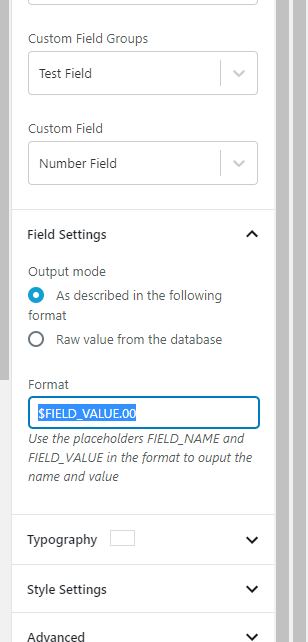
number field.PNG

Hi Amin,

Thank you for getting in touch.

I'm assuming here that this is a number field. When you click on the block that is displaying this field, there should be a format option. See Screenshot

Using the format option you can then add your currency symbol to the field.

Please let me know if this helps.
Thanks,
Shane

#1914909

Thanks for the quick response, Shane.

Is there a way to make it so that there's a comma after the thousands number? eg, $18,123.00

#1915237

Shane
Supporter

Les langues: Anglais (English )

Fuseau horaire: America/Jamaica (GMT-05:00)

Hi Amin,

Unfortunately the only way to do this is to use a custom shortcode to parse the values and convert it to currency. This can't be done using the single field block.

You will need to retrieve the value manually and then wrap it with the custom shortcode to convert the value.

Please let me know if this helps.
Thanks,
Shane