Passer la navigation

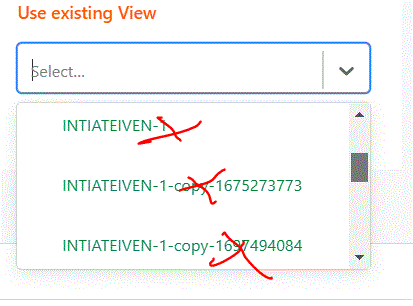
[Résolu] How can I clean up the post views I don't use any longer ?

This support ticket is created Il y a 2 years, 8 months. There's a good chance that you are reading advice that it now obsolete.

This is the technical support forum for Toolset - a suite of plugins for developing WordPress sites without writing PHP.

Everyone can read this forum, but only Toolset clients can post in it. Toolset support works 6 days per week, 19 hours per day.

Sun Mon Tue Wed Thu Fri Sat
- 9:00 – 12:00 9:00 – 12:00 9:00 – 12:00 9:00 – 12:00 9:00 – 12:00 -
- 13:00 – 18:00 13:00 – 18:00 13:00 – 18:00 13:00 – 18:00 13:00 – 18:00 -

Fuseau horaire du supporter : America/Sao_Paulo (GMT-03:00)

Marqué : 

Ce sujet contient 1 reply, a 2 voix.

Dernière mise à jour par Mateus Getulio Il y a 2 years, 8 months.

Assisté par: Mateus Getulio.

Auteur
Publications
#2653681
Knipsel.GIF

Tell us what you are trying to do?

Is there any documentation that you are following?

Is there a similar example that we can see?

What is the link to your site? lien caché

#2654083

Mateus Getulio
Supporter

Les langues: Anglais (English )

Fuseau horaire: America/Sao_Paulo (GMT-03:00)

Hey there.

Thank you for contacting our support.

To remove unused views, you can complete the following steps:

Begin by navigating to:
Toolset -> Settings -> General, and within the "Editing experience" section, opt for "Display both the legacy and Blocks interface, allowing me to choose for each item I create."
(Refer to the screenshot here: lien caché )

Following this setting, after refreshing the page, you'll notice the "Views" menu option becomes accessible under the Toolset menu.
(See the screenshot here: lien caché )

From this management screen, you'll have the ability to remove any unused views. Just hover your mouse, and a "Trash" link will appear, enabling you to delete the view.

Thank you,

Mateus