I am trying to display a link to a pdf document for a school yearbook after the site visitor has submitted a gravity form providing their details and selecting the yearbook they require from a dropdown.
I am able to get the Gravity form working e.g submitted URL is lien caché
The field I am trying to filter is the gradyear field so only the correct yearbook should be displayed on the target page based upon the year in the URL parameter.
I am not sure whether I should be populating a search in my view with the URL parameter or using a filter within the view which filters based on the URL parameter.
Also I am not sure how to format the search or filter either.
At present I only have one yearbook in there (for 1977) and the link to it it displays no matter which year I select in my form.
My form is located on lien caché
I am using WP5.8, Toolset Blocks 1.5.3, Toolset Types Version 3.4.10
Les langues: Anglais (English )Espagnol (Español )
Fuseau horaire: Europe/London (GMT+01:00)
Hi Kirk
As a long-time user, I'm guessing you are using the legacy Views editor?
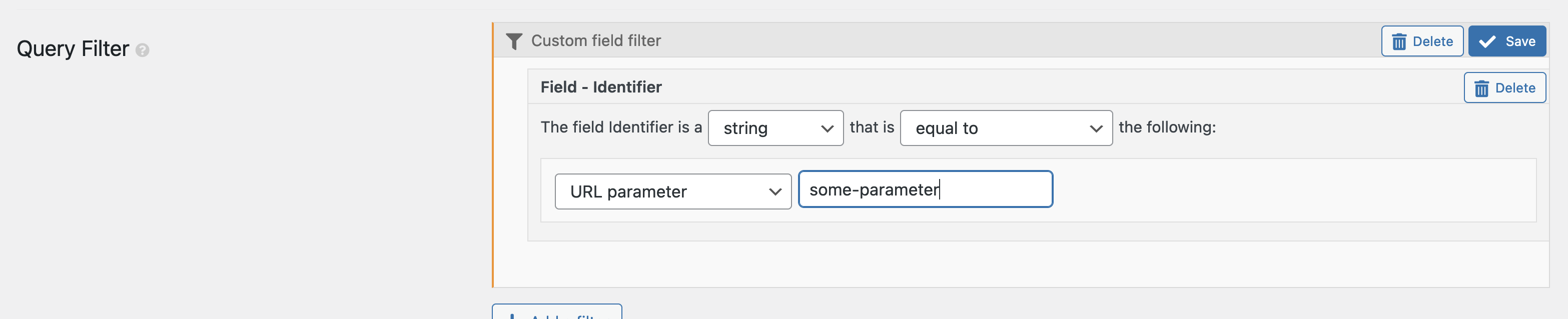
If the page containing your View loads with a URL parameter, you can add a Query Filter for some field where the value to filter by comes from a URL parameter (see screenshot example).
You specify the name of the URL parameter, and the field which is filtered.