Hello. Thank you for contacting the Toolset support.
As you can see with our server requirement Doc:
- https://toolset.com/toolset-requirements/
Important notes:
We tested Toolset plugins up to PHP version 8.1. Issues may arise with PHP 8.2 and we deal with them as they are reported.
So, this seems to be one of the case.
However - do you know how to reproduce the issue with brand new WordPress installation with only Toolset plugins active?
Could you please try to resolve your issue by deactivating all third-party plugins as well as the default theme to check for any possible conflicts with any of the plugins or themes?
- Do you see any difference?
Do you have any information how to reproduce the issue? If no:
*** Please make a FULL BACKUP of your database and website.***
I will require duplicator package and steps in order to see the issue.
I checked and I see the same thing what you noticed.
It seems to be theme issue with WordPress Version. I do not have any input on this as its working as expected with default twentytwentytwo theme. If I downgrade the WordPress version to 5.x.x I can see the page working as expected.
There is nothing much I can do here as you will have to play with this and update the theme code as required that should work with current latest WordPress version.
I checked and I see the same thing what you noticed.
It seems to be theme issue with WordPress Version. I do not have any input on this as its working as expected with default twentytwentytwo theme. If I downgrade the WordPress version to 5.x.x I can see the page working as expected.
There is nothing much I can do here as you will have to play with this and update the theme code as required that should work with current latest WordPress version.
I checked and I see the same thing what you noticed.
It seems to be theme issue with WordPress Version. I do not have any input on this as its working as expected with default twentytwentytwo theme. If I downgrade the WordPress version to 5.x.x I can see the page working as expected.
There is nothing much I can do here as you will have to play with this and update the theme code as required that should work with current latest WordPress version.
I checked and I see the same thing what you noticed.
It seems to be theme issue with WordPress Version. I do not have any input on this as its working as expected with default twentytwentytwo theme. If I downgrade the WordPress version to 5.x.x I can see the page working as expected.
There is nothing much I can do here as you will have to play with this and update the theme code as required that should work with current latest WordPress version.
I checked and I see the same thing what you noticed.
It seems to be theme issue with WordPress Version. I do not have any input on this as its working as expected with default twentytwentytwo theme. If I downgrade the WordPress version to 5.x.x I can see the page working as expected.
There is nothing much I can do here as you will have to play with this and update the theme code as required that should work with current latest WordPress version.
I checked and I see the same thing what you noticed.
It seems to be theme issue with WordPress Version. I do not have any input on this as its working as expected with default twentytwentytwo theme. If I downgrade the WordPress version to 5.x.x I can see the page working as expected.
There is nothing much I can do here as you will have to play with this and update the theme code as required that should work with current latest WordPress version.
As the theme used for this site is Minimax, which was provided by Toolset, I was hoping you could help me solving this issue. Could you perhaps point me in the direction where I should update the theme code?
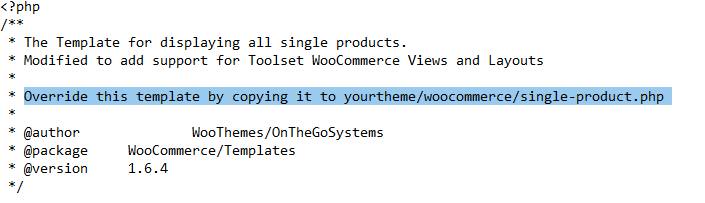
By the way, I found out that the template single-product.php located in plugins/woocomerce-views/library/toolset/woocommerce-views/templates/single-product.php when copied to the themefolder themes/minimax/woocommerce/single-product.php is not overridden by the copy, as it should be according to the template header (see screenshot).
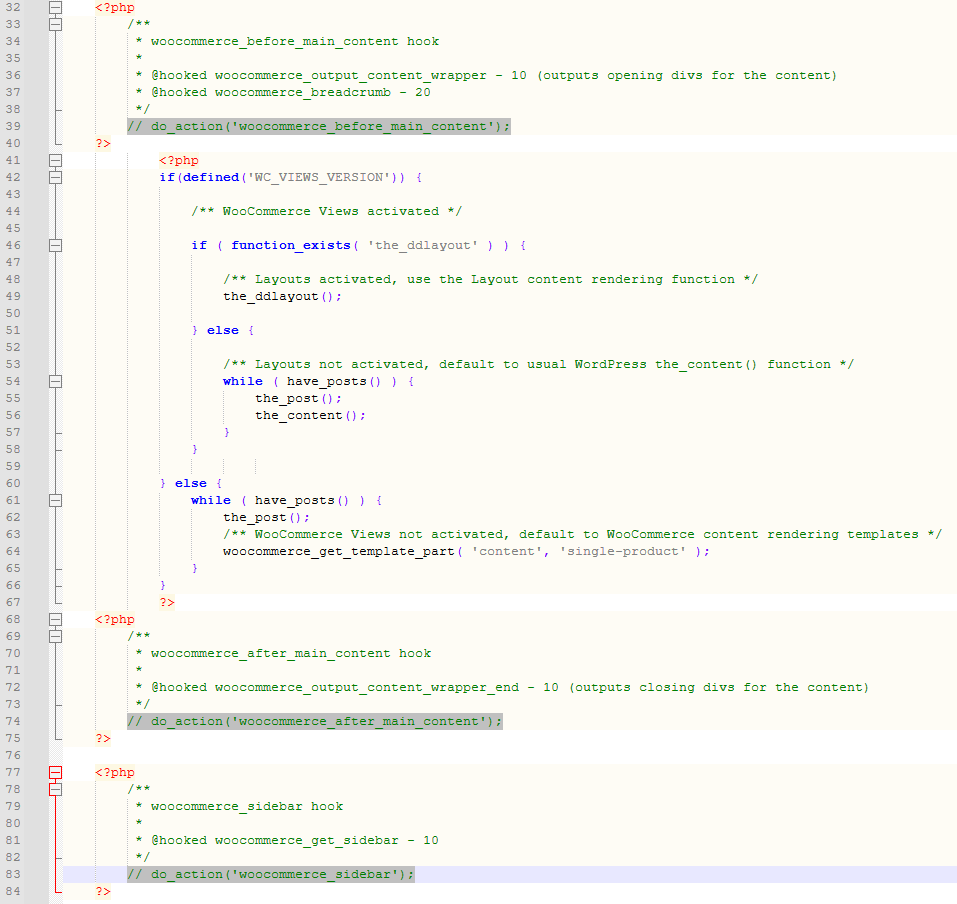
I did comment the 3 lines with do_action() calls in the Template copy in my theme Minimax/woocommerce/single-product.php (see screenshot)but the fatal error persisted and mentioned in the stack trace that the template was still loaded from the original loocation plugins/woocomerce-views/library/toolset/woocommerce-views/templates/single-product.php.
After I changed the filename of the template in this original location plugins/woocomerce-views/library/toolset/woocommerce-views/templates/single-product.php~ AND with the outcommented 3 do_action() calls applied in the template copy in minimax/woocommerce/single-product.php the error is gone and the product displays correctly at the front side.
So I have 2 additional questions:
1. Why doesn't the override work?
2. Why do the do_action() calls cause the fatal error?
So I have 2 additional questions:
1. Why doesn't the override work?
2. Why do the do_action() calls cause the fatal error?
=====>
I'm not sure but it happens due to the latest WordPress version.
Because WordPress is moving in the direction of Gutenberg block editor, we are supporting that shift by making it possible to design Content Templates using Gutenberg blocks, which might be a good substitute for Layouts.
In current situation - I would like to inform you that Toolset Layouts plugin is on maintenance mode, that means we are not going to add any new features to it and hence I suggest you should go with Toolset content template instead of using Toolset Layouts.
Sooner or later you will have to take this decision so may be it would be good if you take now and use the Content template instead of Layouts. You may acknowledge that the fix may take longer time then expected due to pre-defined priorities.
I am not at all satisfied with this answer. This means backwards compatibility has been abandoned by Toolset, while I have built many client sites with Layouts, sites that are still running. It would be an enormous amount of work to rebuild all those sites in blocks.
And then: what guarantee would I have that a company that abandoned it's backwards compatibility promises of the past won't do the same again in the future?
Ok - in that case I will take this to next steps and check what we can do. We are bound to offer hotfixes for Toolset Layouts so there is no worries. It was just to inform you that there is new way to build the site using content templates instead of using Layouts plugin that is put into maintenance mode. Maintenance mode does not mean that we will not support it.
Please hold on for further updates as I will have to troubleshoot in depth and escalate it in front of our next level support.
I will get in touch with you as soon as I've update on this.
The problem only occurs with the MiniMax1 theme, not with the Toolset Starter Theme, for example.
On the test site Minesh prepared I don't know if the copy of the MiniMax1 theme is the original theme or an edited version, but, in any case, the problem arises because of some poor coding in the functions.php file.
Edit the theme's functions.php file and locate these lines:
	/*
	 * Then hook in our own functions to display the wrappers our theme requires:
	 */
	add_action('woocommerce_before_main_content', '<div class="container">', 10);
	add_action('woocommerce_after_main_content', '</div><!-- #container -->', 10);
Deleting those will solve the errors, though you may want to edit them so that you add a callback function to each line instead of HTML markup.