Hello,
I'm editing a custom post that is related to another custom post. I click Quick Edit on a post relationship to edit the fields of that relationship. When I click the Update button of the relationship, it does not update and instead I get a message "Invalid related post title". The relationship has 2 wysiwyg and 1 number field. It does not matter which field I edit.
I had this problem on WordPress 5.9 and the previous Toolset plugins too. I hoped it would be solved after upgrading WordPress and the plugins but that's not the case.
What does that error mean?
Hi Arno,
Would you mind allowing me to have admin access to the website so that I can have a more detailed look at this for you ?
Please where applicable please provide me with a link to an example page where I can see the issue.
I've enabled the private fields for your next response.
Thanks,
Shane
Hi Arno,
Thank you for the login.
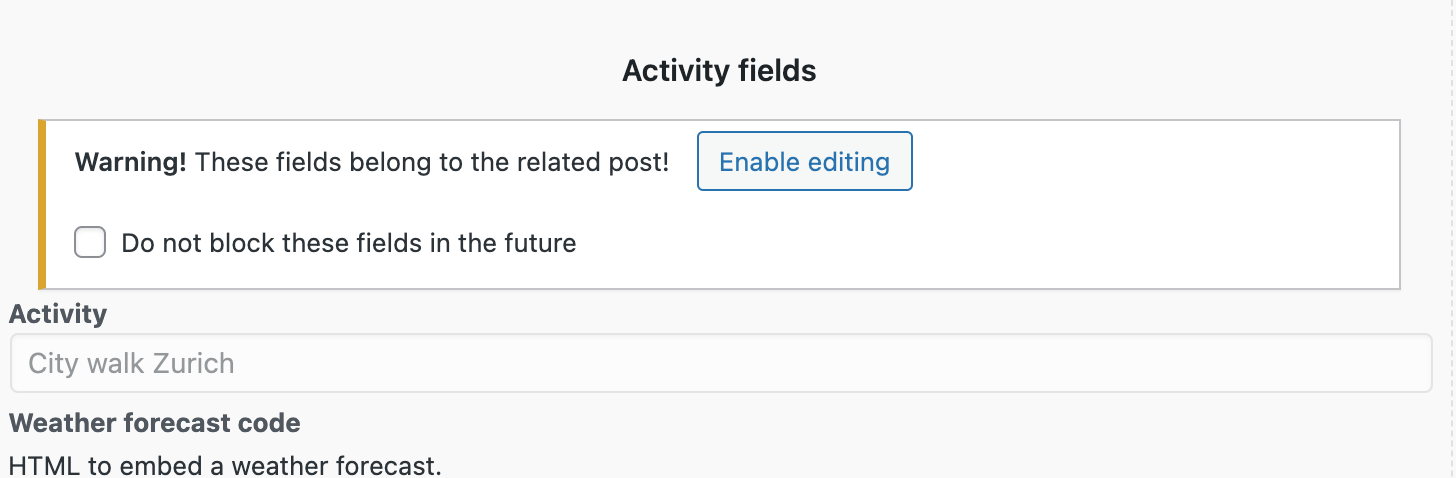
I was able to see the issue and the problem is that you've not enabled editing on the other fields. This i'm assuming is blocking the form from being saved. See Screenshot
Once I clicked enable editing I was able to successfully edit the relationship information.
Thanks,
Shane
Hi Shane,
I'm very happy that it's as simple as that! Indeed it works fine now.
Perhaps this is something for your UI designers to take a look at though.
1) The error message is not very helpful.
2) Initially, the fields of the RELATED POST are disabled and the button seems to refer to those only. The fields of the RELATION itself are enabled if not clicking that button, and one can enter content there just fine, it's only the update that fails. So it's not very intuitive.
But it works now and that's what matters 🙂
Thanks!
Hi Arno,
I understand the concern as the form isn't being saved without the post title being passed. The post title is a required field in wordpress itself so when this isn't passed with the rest of the post data then the form will fail to submit.
However happy I was able to assist your with overcoming this issue.
Thanks,
Shane
My issue is resolved now. Thank you!