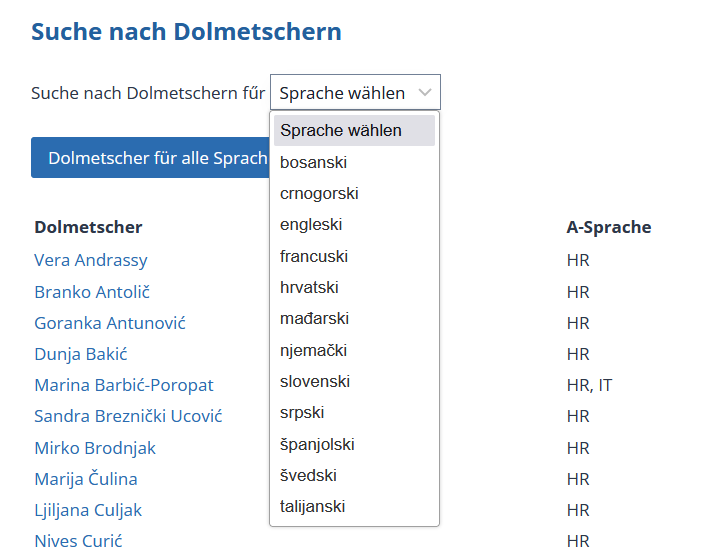
I have created 3 views, each one with their own set of custom fields in three languages, and one of the fields is dropdown selection of languages (that you use to filter translators from the list shown), shown on the links below (Toolset debug is ON). Values are entered through checkboxes. Image 1 shows that although I have set up custom field values and labels in their respective languages, when I try to enter it, checkboxes on the backend are in Croatian.
Link to pages:
CROATIAN: lien caché
ENGLISH: lien caché
GERMAN: lien caché
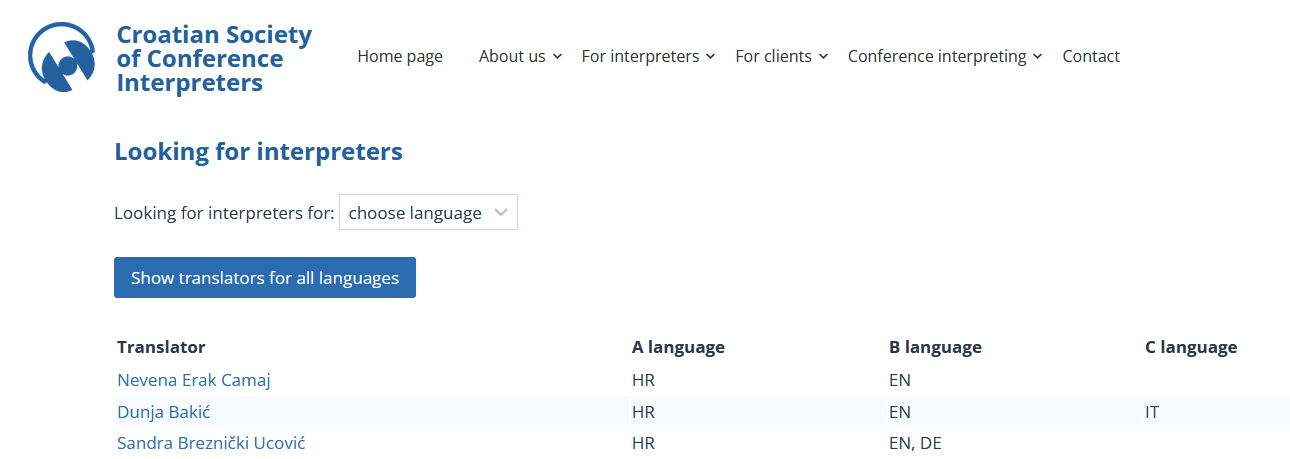
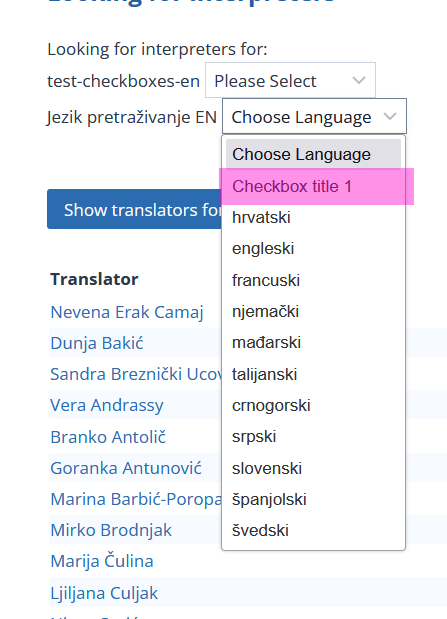
On English and German dropdown on the search pages, there are Croatian labels / values. I have looked everywhere to change them (first in the custom fields, then views, and so on, but nothing works). Custom field in question has these values for each language/option on the checkbox (image 2). Everything else on those pages is in English or German, so it is not Polylang issue (multilang plugin similar to WPML), shown on Image 3.
Example of view filter for german search is here:
----
[wpv-filter-start hide="false"]
[wpv-filter-controls]
<div class="form-group">
<label for="wpv-wpcf-jezik-pretrazivanje-de">[wpml-string context="wpv-views"]Suche nach Dolmetschern fűr [/wpml-string]</label>
[wpv-control-postmeta type="select" field="wpcf-jezik-pretrazivanje-de" default_label="Sprache wählen" url_param="wpv-wpcf-jezik-pretrazivanje-de"]
<br/> <br/>
[wpv-filter-reset reset_label="Dolmetscher für alle Sprachen anzeigen" output="bootstrap"]
</div>
[/wpv-filter-controls]
[wpv-filter-end]
----
I have tried to clear Views cahce, to no avail.
Custom post type related to that view works just fine in all three languages:
lien caché
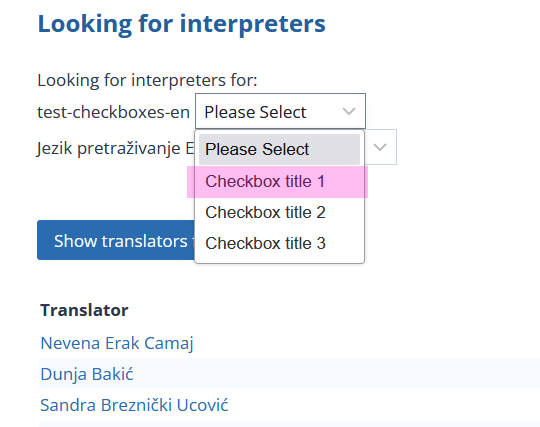
Image 4 shows what dropdown on German page looks like (labels are in Croatian).
I can provide you with credentials for login if necessary.
Thank you in advance.
Hello. Thank you for contacting the Toolset support.
Yes - can you please share admin access details and let me dive there and review the structure you set first.
*** Please make a FULL BACKUP of your database and website.***
I would also eventually need to request temporary access (WP-Admin) to your site. Preferably to a test site where the problem has been replicated if possible in order to be of better help and check if some configurations might need to be changed.
I have set the next reply to private which means only you and I have access to it.
I'm not sure whats going wrong as I do not know site history and how those checkboxes field is created and added which is not displaying currently even on Edit post page of English posts as well but I've created new checkboxes field "test-checkboxes-en" to your Eng custom field group and added few options.
- lien caché
When I edit the post I can see those options and I selected all options and saved the post.
- lien caché
I've added the custom search filter for the same field "test-checkboxes-en" to the view:
- lien caché
I can see the field on the frontend with all options:
- lien caché
Hi, I have renamed first checkbox option to "Bosnian" - IMAGE 1.
But when I reload this page: lien caché
It STILL shows the label "Checkbox title 1" - IMAGE 2.
AND now the label in the OTHER dropdown also shows "Checkbox title 1" although in the settings it clearly remained "Bosnian" because I haven't changed it or anything - IMAGE 3.
Field group in question is here: lien caché
So, the issue still needs resolving. Maybe a caching or something else is a problem? No caching plugins installed.
Hi, unfortunately, the problem is STILL there:
1. There are 3 different custom types (each for their respective languages)
2. There are 3 different views (each for their respective languages)
3. There are 3 different field groups (earch for their respective languages)
4. After the changes you made (adding field to existing group) - OTHER label is now showing, please read my response carefully)
5. How can Polylang change label to values NOT entered / present in that group (Croatian text in the English group/post/view), see that part "It STILL shows the label "Checkbox title 1" - IMAGE 2.
AND now the label in the OTHER dropdown also shows "Checkbox title 1" although in the settings it clearly remained "Bosnian" because I haven't changed it or anything - IMAGE 3."
So, Toolset is showing labels in back-end and front-end in a language that are not there (especially the BACK-END part is troublesome - Polylang does not change WordPress back-end), again, I have posted a screenshot showing that checkboxes in the back-end are in Croatian, and in German and English field groups those values and labels are in German and English and have been created manually).
Here is a sandbox site and you can auto-login to it using the following link:
- lien caché
Where I've created the Book post type:
- lien caché
And custom field group that is attached to "Book" post type and added the custom field "Book Types" as checkboxes field and added three options for checkboxes "Checkbox title 1", "Checkbox title 2" and "Checkbox title 3".
- lien caché
From the Translations I've translated those checkboxes options:
- lien caché
Added few posts to post type "Books" and also translated those posts to other languages and also setup the value for the checkboxes field "Book Types" :
- lien caché
Created the following view to display all books:
- lien caché
And added the above view to the following page and also translated the same page to other languages as you can see:
- lien caché
- lien caché
When I check on frontend I can see its displaying the correct translated options for the "Book Types" field displayed as select box using view:
- English: lien caché
- Espanol: lien caché
- Italian :lien caché
There is nothing much we can do here as it works as expected and as shared before we have translation layer added with WPML and not polylang. If you will require further assistance - you are welcome to contact any of our certified partners:
- https://toolset.com/contractors/