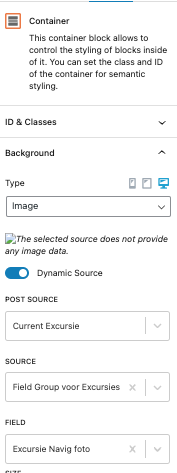
I have difficulty to display an Image as Dynamic content in Container Background on a Content Template when using a Custom Post types.
It works when I use the Container in a Content Template used on a Page
It does not work for me when I use Container in a Content template used on a Custom Post Type.
When I inspect the page it show the container loads /images/blank before the image that is available in the Custom Field
<div class="wp-block-toolset-blocks-container tb-container " data-toolset-blocks-container="e4deefff7047c4d8669a9de0fe23fdcf" style="background: url(lien caché) center -88px no-repeat;background-size:cover;" data-background="lien caché">
<h1 class="tb-heading has-text-color" data-toolset-blocks-heading="5944636be9b0ae5f39c0e9ca08b53048" data-last-update="1.4">Portugal</h1>
</div>
Hello. Thank you for contacting the Toolset support.
Can you please share problem URL and admin access details and share what image you want to display as background as dynamic image?
*** Please make a FULL BACKUP of your database and website.***
I would also eventually need to request temporary access (WP-Admin and FTP) to your site. Preferably to a test site where the problem has been replicated if possible in order to be of better help and check if some configurations might need to be changed.
I have set the next reply to private which means only you and I have access to it.
I've added another container block just top of the container block you added and I can see background image is working fine and when I see it working for container block I've added I can see its start working with your container block as well.
=> lien caché
I can see it working here on frontend:
- lien caché
what if you try to delete the existing container block and add new one and check if that help to resolve your issue.
It's a mystery 🙂
I can see it your sandbox.
I cleared Server/ Browsers / Plugin tools caches and still same result
I can see it in the Content Template displaying correctly but not on the Custom Post Type.
Maybe it's a setting in WP Ocean ??
If you think of something extra let me know.
I understand it's frustrating because on your side it works
The screenshot I took is from this page not from my sandbox:
=> lien caché
In order to minimize the cause of the issue and to ensure there is no plugin/theme conflict:
Could you please try to resolve your issue by deactivating all third-party plugins as well as the default theme to check for any possible conflicts with any of the plugins or themes?
- Do you see any difference?