Passer la navigation

[Résolu] creating map from uses where address is several user meta fields

This support ticket is created Il y a 3 years, 10 months. There's a good chance that you are reading advice that it now obsolete.

This is the technical support forum for Toolset - a suite of plugins for developing WordPress sites without writing PHP.

Everyone can read this forum, but only Toolset clients can post in it. Toolset support works 6 days per week, 19 hours per day.

Sun Mon Tue Wed Thu Fri Sat
- 10:00 – 13:00 10:00 – 13:00 10:00 – 13:00 10:00 – 13:00 10:00 – 13:00 -
- 14:00 – 18:00 14:00 – 18:00 14:00 – 18:00 14:00 – 18:00 14:00 – 18:00 -

Fuseau horaire du supporter : Asia/Kolkata (GMT+05:30)

Ce sujet contient 11 réponses, a 2 voix.

Dernière mise à jour par - Il y a 3 years, 10 months.

Assisté par: Minesh.

Author
Publications
#2520897

Im trying to build a map of a certain level of users in out site. The addresses are in meta fields created by our membership plugin

Ive set up the map marker like this

[wpv-map-marker map_id='map-1' marker_id='marker-[wpv-post-id]' marker_title='[wpv-post-title]' marker_usermeta='pmpro_baddress1, pmpro_bcity, pmpro_bstate, pmpro_bzipcode'][wpv-post-title]
[/wpv-map-marker]

But its not returning any results have I set this up correctly?

#2522273

Minesh
Supporter

Les langues: Anglais (English )

Fuseau horaire: Asia/Kolkata (GMT+05:30)

Hello. Thank you for contacting the Toolset support.

What if you try to use the [wpv-post-field] shortcode to get the value of your third-party plugin custom field.

For example:

[wpv-map-marker map_id='map-1' marker_id='marker-[wpv-post-id]' marker_title='[wpv-post-title]' marker_usermeta='[wpv-post-field name="pmpro_baddress1"], [wpv-post-field name="pmpro_bcity"], [wpv-post-field name="pmpro_bstate"], [wpv-post-field name="pmpro_bzipcode"]'][wpv-post-title]
[/wpv-map-marker]

More info:
- https://toolset.com/documentation/programmer-reference/views/views-shortcodes/#vf-153444

#2522577

Thanks Minesh, but no luck there

If i make a simple view with those shortcodes
<wpv-loop>

  • [wpv-user field="display_name"] [wpv-post-field name="pmpro_baddress1"], [wpv-post-field name="pmpro_bcity"], [wpv-post-field name="pmpro_bstate"], [wpv-post-field name="pmpro_bzipcode"]
    </wpv-loop>

    Iget the display name but no values in the others

#2522607

Minesh
Supporter

ahh - I would like to know the custom fields you are using (pmpro_baddress1, pmpro_bcity, pmpro_bstate, pmpro_bzipcode) those are post custom fields or user custom fields?

#2522609

They are user fields Minesh- sorry if i wasn't clear

#2522617

Minesh
Supporter

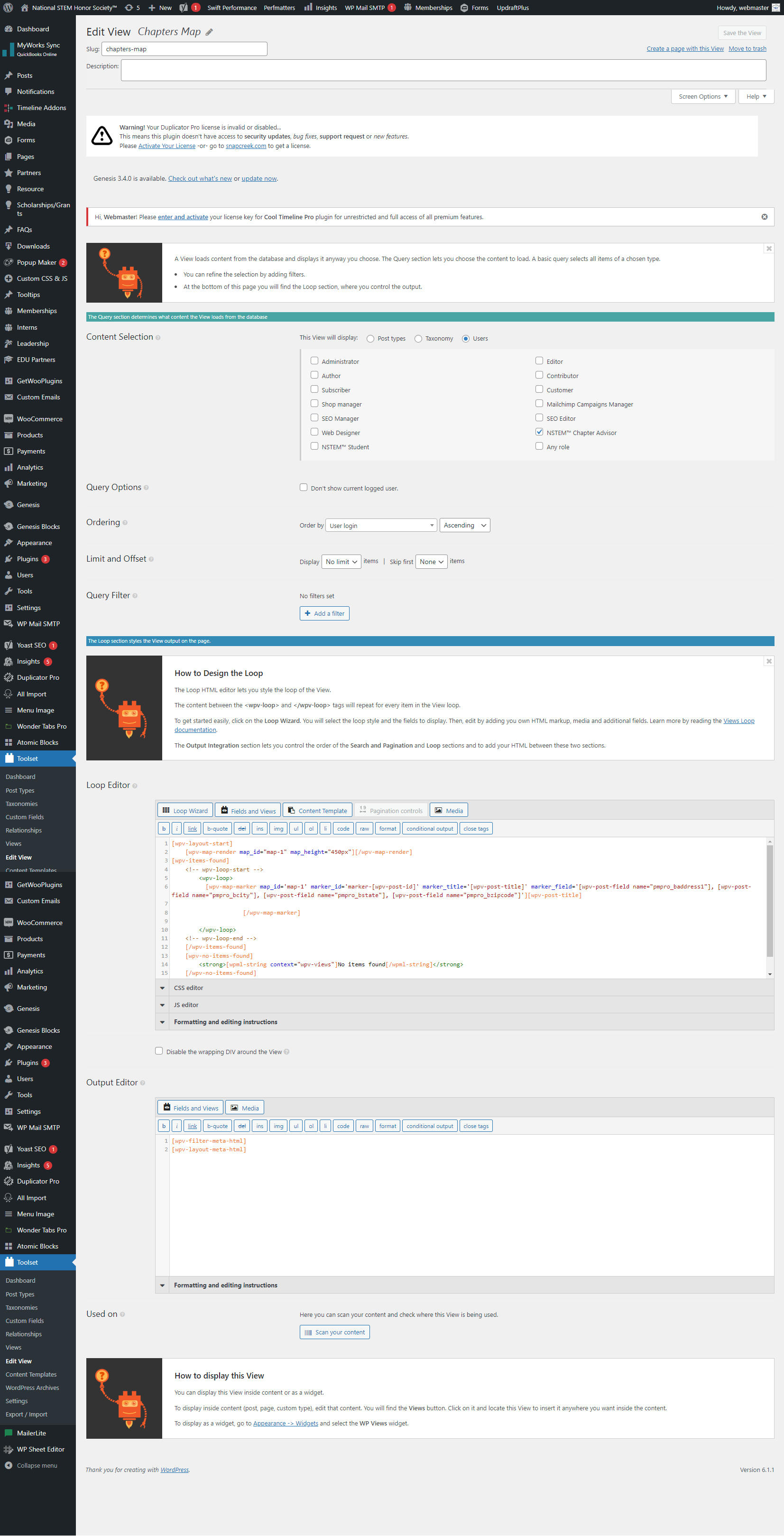
Can you please share edit page screenshot of your view - that will help me to clear most of the things.

#2522621
screenshot-nstem.org-2022.12.26-11_14_31.png

Yes sure, its attached

#2522637

Minesh
Supporter

I see you are using the user type view. To get the related user information you will have to use the shortcode [wpv-user]:
=> https://toolset.com/documentation/programmer-reference/views/views-shortcodes/#wpv-user

Can you please try to use the following shortcode and check if that help you to resolve your issue:

[wpv-map-marker map_id='map-1' marker_id='marker-[wpv-user field="ID"]' marker_title='[wpv-user field="user_login"]' marker_usermeta='[wpv-user field="pmpro_baddress1"], [wpv-user field="pmpro_bcity"], [wpv-user field="pmpro_bstate"], [wpv-user field="pmpro_bzipcode"]'] [wpv-user field="user_login"]
[/wpv-map-marker]
#2522643

Minesh my simple view now works so the wpv-user field="" shortcode is correct and the field names are correct
[wpv-items-found]

    <!-- wpv-loop-start -->
    <wpv-loop>

  • [wpv-user field="display_name"]- [wpv-user field="user_login"]-[wpv-user field="user_firstname"]| [wpv-user field="pmpro_baddress1"], [wpv-user field="pmpro_bcity"], [wpv-user field="pmpro_bstate"], [wpv-user field="pmpro_bzipcode"]

    </wpv-loop>

<!-- wpv-loop-end -->
[/wpv-items-found]

However my view to create the map still shows no markers is there something else i may have missed? Thanks
[wpv-items-found]
[wpv-map-render map_id="map-1" map_height="450px"][/wpv-map-render]
<!-- wpv-loop-start -->
<wpv-loop>
[wpv-map-marker map_id='map-1' marker_id='marker-[wpv-user field="ID"]' marker_title='[wpv-user field="user_login"]' marker_usermeta='[wpv-user field="pmpro_baddress1"], [wpv-user field="pmpro_bcity"], [wpv-user field="pmpro_bstate"], [wpv-user field="pmpro_bzipcode"]']

[/wpv-map-marker]

</wpv-loop>
<!-- wpv-loop-end -->
[/wpv-items-found]

#2522645

Minesh
Supporter

Can you please share problem URL where you added your view and admin access details.

*** Please make a FULL BACKUP of your database and website.***
I would also eventually need to request temporary access (WP-Admin and FTP) to your site. I have set the next reply to private which means only you and I have access to it.

#2522651

Minesh
Supporter

Can you please check now: lien caché

You do not need two views. So I've deleted the [wpv-view name="chapters-map"] shortcode block from the following page:
=> lien caché

As you can see now it only have one shortcode block with view's shortcode: [wpv-view name="list-chapters"]

Now, with the view "list-chapters", I've added the map shortcode outside the view's loop and marker shortcode within the loop as given under:
=> lien caché

[wpv-layout-start]
	
[wpv-items-found]
[wpv-map-render map_id="map-1" map_height="450px"][/wpv-map-render]

<ul>
	<!-- wpv-loop-start -->
		<wpv-loop>
          [wpv-map-marker map_id='map-1' marker_id='marker-[wpv-user field="ID"]' marker_title='[wpv-user field="user_login"]' address='[wpv-user field="pmpro_baddress1"], [wpv-user field="pmpro_bcity"], [wpv-user field="pmpro_bstate"], [wpv-user field="pmpro_bzipcode"]'] 

[/wpv-map-marker]
          <li>[wpv-user field="display_name"]- [wpv-user field="user_login"]-[wpv-user field="user_firstname"]| [wpv-user field="pmpro_baddress1"], [wpv-user field="pmpro_bcity"], [wpv-user field="pmpro_bstate"], [wpv-user field="pmpro_bzipcode"]</li>
          
                    
		</wpv-loop>
</ul>
	<!-- wpv-loop-end -->
	[/wpv-items-found]
	[wpv-no-items-found]
		<strong>[wpml-string context="wpv-views"]No items found[/wpml-string]</strong>
	[/wpv-no-items-found]
[wpv-layout-end]

The difference is I've added the "address" attribute to display the map address as you can see above with marker shortcode:

address='[wpv-user field="pmpro_baddress1"], [wpv-user field="pmpro_bcity"], [wpv-user field="pmpro_bstate"], [wpv-user field="pmpro_bzipcode"]'

Can you please confirm now it works as expected.

#2522665

My issue is resolved now. Thanks for your help