Passer la navigation

[Résolu] Conditional fails to evaluate empty distance as string

Ce fil est résolu. Voici une description du problème et la solution proposée.

Problem:

A conditional checking for an empty distance ("N" result) stopped working after Maps updates. The consent prompt never appeared and no non-geolocated content showed.

Solution:

The View had a Distance query filter, so Maps would not run it until the location was known and showed a "location needed" message instead. Remove the Distance filter, since the Content Template already calculates the distance. Update the custom "trim_view" shortcode in "Toolset > Settings > Custom Code" to return "N" when the output contains the location-required message.

This support ticket is created Il y a 1 semaine et 4 jours. There's a good chance that you are reading advice that it now obsolete.

This is the technical support forum for Toolset - a suite of plugins for developing WordPress sites without writing PHP.

Everyone can read this forum, but only Toolset clients can post in it. Toolset support works 6 days per week, 19 hours per day.

Ce sujet contient 4 réponses, a 1 voix.

Dernière mise à jour par - Il y a 1 semaine.

Assisté par: Christopher Amirian.

Auteur
Publications
#2913050
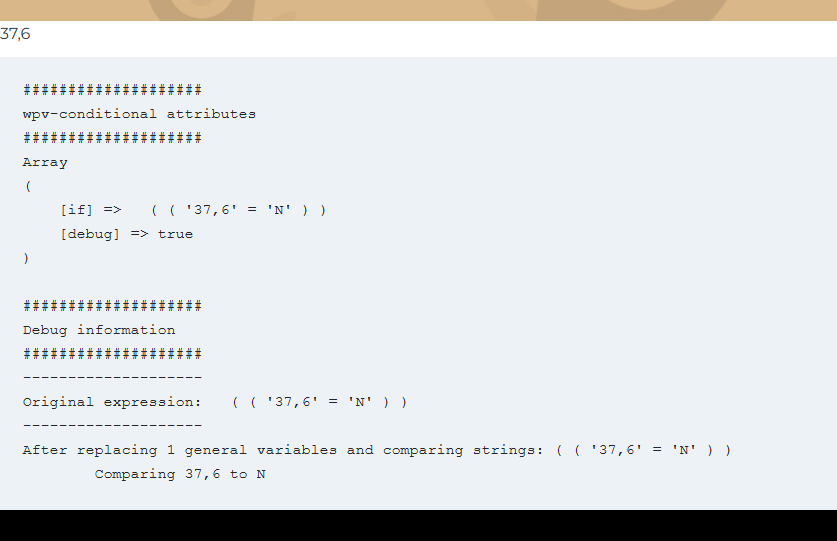
Screenshot 2026-11-11 181017.png

Hello,
I believe found a bug/issue with conditional when working with [toolset-maps-distance-value] inside [wpv-geolocation].
I have a view that calculates the distance between the visitor location and a post address to check if geolocation consent is active:

[wpv-geolocation]
    [wpv-conditional if="( '[toolset-maps-distance-value origin_source='visitor_location' postmeta='wpcf-user-address']' ne '' )"]
        [toolset-maps-distance-value origin_source='visitor_location' postmeta='wpcf-user-address']
    [/wpv-conditional]
    [wpv-conditional if="( '[toolset-maps-distance-value origin_source='visitor_location' postmeta='wpcf-user-address']' eq '' )"]
        [toolset-maps-distance-value origin_source='visitor_location' postmeta='wpcf-user-address']
    [/wpv-conditional]
[/wpv-geolocation]

The issue:
1. Testing the positive condition (ne '') works fine. It returns Y and all geolocated elements are displayed.
2. However, whenever a negative condition checking for empty value (eq '') is present, the browser location consent box never triggers, and none of the non-geolocated elements is shown on the page.
3. I enabled [wpv-conditional debug="true"] (see picture) and inspected the debug log. The parser evaluates the expression as: Original expression: ( ( '37,6' = 'N' ) ) comparing 37,6 to N ! this makes no sense at all !

It looks like the conditional is incorrectly trying to compare a calculated distance (e.g. 37,6) directly against 'N'. This breaks something in the [wpv-geolocation] and prevents the native browser consent box from showing.

To get the browsing consent box back the only solution is to remove the conditional testing for N, but in this way there is no way to show other elements when the consent is denied.

This issue didn't happen some times ago (sorry, can't tell with which version of Maps it was working fine, but it was), the view returned N. Did you change anything in Toolset Maps? Is there any other way to show non-geolocated elements/block if the user denies consent? please check and let me know
thanks
Kind Regards
Nicola

#2913464

Christopher Amirian
Supporter

Les langues: Anglais (English )

Hello Nicola,

Thank you for the details.

The content inside [wpv-geolocation] is only shown after the visitor shares their location. Before that, the shortcode shows the "location needed" message and asks the browser for the location. Once the location is known, the distance always has a value. So a check for an empty distance inside [wpv-geolocation] can never be true.

To show other content to visitors who did not share their location, put that check outside the [wpv-geolocation] block:

[wpv-geolocation]
  [wpv-conditional if="( '[toolset-maps-distance-value origin_source='visitor_location' postmeta='wpcf-user-address']' ne '' )"]
    [toolset-maps-distance-value origin_source='visitor_location' postmeta='wpcf-user-address']
  [/wpv-conditional]
[/wpv-geolocation]
[wpv-conditional if="( '[toolset-maps-distance-value origin_source='visitor_location' postmeta='wpcf-user-address']' eq '' )"]
  Your content for visitors without a shared location
[/wpv-conditional]

Please also make sure "toolset-maps-distance-value" is listed in Toolset > Settings > Front-end Content > Third-party shortcode arguments. Without it, the conditional cannot read the distance.

If the browser does not ask for the location at all, please check the site's location permission in your browser. Once a site is blocked, the browser does not ask again. You can also test in a private window.

Thanks.

#2913481

Hi Christian,

Thanks for the reply, though I think there is a misunderstanding about the actual issue I am facing. The solution you are giving is exactly how the conditional SHOULD behave, but my ticket is about the fact that it does not.

I already know how [wpv-geolocation] works and toolset-maps-distance-value is already properly registered in the Front-end Content settings. The real problem is that I need to apply conditional visibility across many pages, and obviously my homepage is where the user decides whether to give consent or not. To trigger the browser consent prompt, placing a geolocalized shortcode at the top of the page is enough. The View (code above) tries to calculate a distance: if it succeeds, it means the user has given consent (the View got the user's position and calculated the distance); if not, it should return blank. To test this output through conditionals, I set the View to return Y if it can calculate a distance, or N if it cannot. Further down the page(s), I test Y/N with conditionals to show geolocalized content (map, etc.) if Y, or other non-geolocalized content if N. This is what SHOULD happen, even according to your own code above.

What happens instead is this: if the user gives consent, everything works fine and the Y conditional shows its geolocalized content with no problem. However, if the user denies consent, the conditional testing N fails to display the alternative content. Not only that: even if the user gave consent, the mere presence of the negative conditional block on the page is enough to prevent the geolocalized content from showing AND stops the browser consent box from triggering at all! Deleting the negative block restores the positive side back to normal, while the negative side still never displays.

Before the recent Maps updates, this worked for both Y and N. Since the introduction of the "location needed" message, the N side has stopped working completely. Hiding that message with display:none does not change the behavior. I really don't understand why this message was introduced, as it clearly isn't "just a message" (furthermore, clicking the button inside that message does nothing.....) The only thing that matters when handling geolocation is being able to detect the user's choice in the browser's native consent box, nothing else. Once that is detected, the conditionals should work accordingly.
Please let me know.
Thanks
Regards

#2913532

Hello Nicola,

Thank you.

The code in your first message is different from the setup you describe. For example, the debug output compares the distance with 'N', so your conditionals test the result of the View, not the distance directly. To check this correctly, I need to see the real setup on your site.

The "Share my location" button inside the message should open the browser's location prompt immediately. If it does nothing on your site, there may be a JavaScript error on the page, and I would like to check that too.

Could you please give me temporary admin access to the site? Please set the next reply as private.

Please also include:

1. The URL of the homepage and of one other page where the Y/N conditionals are used.
2. The name of the View that returns Y or N.
3. Whether you see any errors in the browser console (right-click on the page > Inspect > Console) when you click "Share my location".

Thanks.

#2915255

Hello Nicola,

Thank you for the access. I found the cause and fixed it on your site.

Your "position-tracking-test" View had a Distance query filter (500 km from the visitor). Since the last Maps updates, Maps doesn't run such a View until the location is known. It shows the "location needed" message instead. So the View never returned "N", and nothing asked the browser for the location on page load. The only trigger was the "Share my location" button, which your CSS hides.

What I changed:

1. I deleted the Distance filter from the View. It isn't needed: the Content Template already calculates the distance, and the View shows one item.

2. I updated your "trim-view-output" snippet in Toolset > Settings > Custom Code:

add_shortcode( 'trim_view', function ( $atts ) {
	$content = render_view( array( 'name' => $atts['name'] ) );

	if ( false !== strpos( $content, 'toolset-maps-location-required' ) ) {
		return 'N';
	}

	return trim( $content );
} );

It returns "N" instead of the message. Without the message on the page, Maps asks the browser for the location on page load.

I tested both cases on your homepage:
- Without a location: "N", your consent banner shows, the map is hidden.
- With a location: "Y", the map shows, the banner is hidden.

Notes:
- The first [trim_view] on the homepage now prints a visible "N" or "Y". You can hide it with <span style="display:none">...</span>.
- You can remove the HTML/CSS block that hides the Maps message.

Please test in a private window, or after resetting the site's location permission in your browser. I can not test that one.


The custom code suggested above is not part of our official support policy. We will not be able to maintain or guarantee that it will work. It is an attempt to help you understand what should be done for scenarios where the built-in Toolset features are not there to handle your request.