Passer la navigation

[Résolu] Clarity on how to set whole div block with post link in loop editor

This support ticket is created Il y a 1 year, 6 months. There's a good chance that you are reading advice that it now obsolete.

This is the technical support forum for Toolset - a suite of plugins for developing WordPress sites without writing PHP.

Everyone can read this forum, but only Toolset clients can post in it. Toolset support works 6 days per week, 19 hours per day.

Sun Mon Tue Wed Thu Fri Sat
- 10:00 – 13:00 10:00 – 13:00 10:00 – 13:00 10:00 – 13:00 10:00 – 13:00 -
- 14:00 – 18:00 14:00 – 18:00 14:00 – 18:00 14:00 – 18:00 14:00 – 18:00 -

Fuseau horaire du supporter : Asia/Kolkata (GMT+05:30)

Ce sujet contient 2 réponses, a 1 voix.

Dernière mise à jour par georgeF-2 Il y a 1 year, 5 months.

Assisté par: Minesh.

Auteur
Publications
#2786726

Tell us what you are trying to do?

Hi there,

We have an objective to set the whole div block section to be linked to the post URL. I think we're not understanding fully how the editor formats after the save. Do you have suggestion on how to make the whole card background link to the custom post page?

Here's the page for reference:
lien caché

Here's what our loop editor looks like:

<div class="single-event" style="background-image:url( [wpv-post-featured-image size="large" output='raw'] );">
<div class="event-deails">
<h2 class="event-date">[types field="date"][/types]</h2>
<h4>c </h4>
<p>[wpv-post-excerpt] </p>
<div class="event-page-link">
lien caché
<hr>
<p class="event-date-time">[types field="date"][/types] <br/>
[types field="start-time"][/types] - [types field="end-time"][/types]</p>
</div>
</div>
</div>

#2786758

Minesh
Supporter

Les langues: Anglais (English )

Fuseau horaire: Asia/Kolkata (GMT+05:30)

Hello. Thank you for contacting the Toolset support.

Well - it should be something like this:

<em><u>lien caché</u></em>

As you can see we have wrapped the whole html with anchor tag and anchor tag is set to redirect to post URL.

#2786821
Screenshot 2024-12-04 at 9.55.21 AM.jpg

Hi there Minesh,

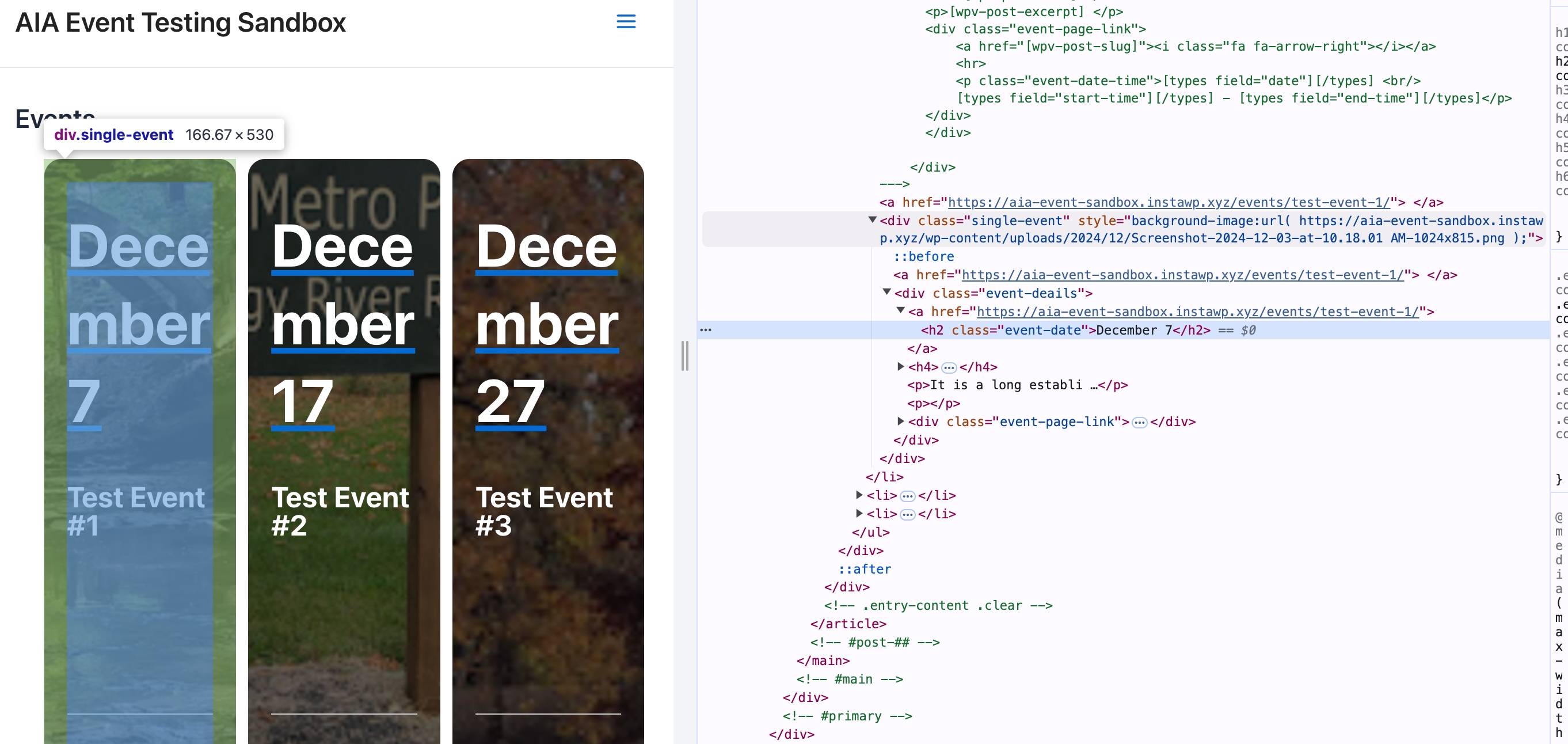
We tried something similar to this before reaching out to support. It seems like the anchor tag gets closed immediately instead of wrapping the whole thing (see attached image).

We're using your code above.

lien caché

#2786933

Minesh
Supporter

Les langues: Anglais (English )

Fuseau horaire: Asia/Kolkata (GMT+05:30)

That is strange.

Can you please send me problem URL and admin access details.

*** Please make a FULL BACKUP of your database and website.***
I would also eventually need to request temporary access (WP-Admin and FTP) to your site. Preferably to a test site where the problem has been replicated if possible in order to be of better help and check if some configurations might need to be changed.

I have set the next reply to private which means only you and I have access to it.

#2787101

Minesh
Supporter

Les langues: Anglais (English )

Fuseau horaire: Asia/Kolkata (GMT+05:30)

Can you please check now: lien caché

The issue was you can not have another link if you wrap whole item with another tag.

I've changed the [wpv-post-link] as it will add another anchor tag that should not happen, so I've changed the [wpv-post-link] to [wpv-post-title] so the loop item content template now looks like:

<em><u>lien caché</u></em>

Can you please confirm it now works as expected.

#2787241

Hi Minesh,

Excellent; this is fixed.

Thanks for checking/clarifying.