Hi,
thanks for toolset.
i'm not being able to update the product template. (the button stay gray)
Hi Aleksi,
Thank you for getting in touch.
In a case like this when the plugins are not functioning as intended we recommended that you disable the non-toolset plugins.
What this means is that you will need to go through your list of plugins and disable each of your plugins one at a time while checking to see if the issue still remains.
If this doesn't work . Would you mind allowing me to have admin access to the website so that I can have a more detailed look at this for you ?
Please where applicable please provide me with a link to an example page where I can see the issue.
I've enabled the private fields for your next response.
Thanks,
Shane
Hi Shane,
Thanks for your response.
I checked for newly installed plugin, deactivate theme, and the issue persist.
Here's to access the admin panel:
lien caché
And the issue is the product template that is not being able to update: lien caché
thanks.
Hi Aleksi,
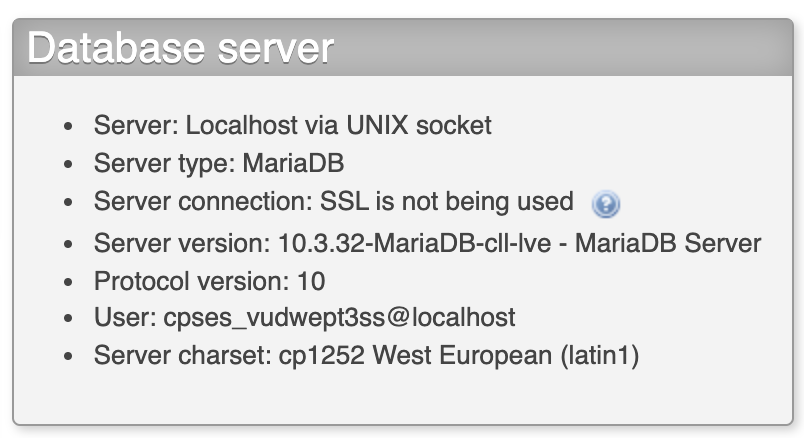
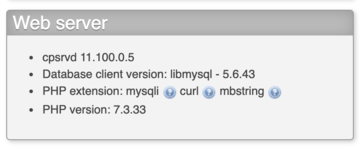
I had a look at your debug data and noticed that your mysql version is below the minimum requirements. Currently you have version 5.5 but we require at least 5.6
Can you go through our minimum server requirements and ensure that all these requirements are being met?
https://toolset.com/toolset-requirements/
This can explain why you're not able to use the update button.
Thanks,
Shane
thanks for your response, upon checking, wordpress and server are giving other information.
Not sure if toolset debug is giving the right information
Hi Aleksi,
At this point I would recommend that you remake the content template for the post.
The reason being that i've gone through the basic debugging steps and they have yielded no feasible results. The content template is still unable to be updated even when the plugins have been disabled and theme changed.
I also took a copy of your site to ensure that it wasn't an issue with your server causing the problem but the issue still remains even on the copy.
The conclusion here is that the template could've been corrupted somehow when the most recent save was done and as such I recommend remaking the template.
Thanks,
Shane
ok, it seems the issue was with the view data that was damaged.
thanks for the assistance.