Passer la navigation

[Résolu] Can not choose any Taxonomy views

This support ticket is created Il y a 1 month, 2 weeks. There's a good chance that you are reading advice that it now obsolete.

This is the technical support forum for Toolset - a suite of plugins for developing WordPress sites without writing PHP.

Everyone can read this forum, but only Toolset clients can post in it. Toolset support works 6 days per week, 19 hours per day.

Sun Mon Tue Wed Thu Fri Sat
- 10:00 – 13:00 10:00 – 13:00 10:00 – 13:00 10:00 – 13:00 10:00 – 13:00 -
- 14:00 – 18:00 14:00 – 18:00 14:00 – 18:00 14:00 – 18:00 14:00 – 18:00 -

Fuseau horaire du supporter : Asia/Kolkata (GMT+05:30)

Ce sujet contient 1 reply, a 1 voix.

Dernière mise à jour par Minesh Il y a 1 month, 2 weeks.

Assisté par: Minesh.

Auteur
Publications
#2833237
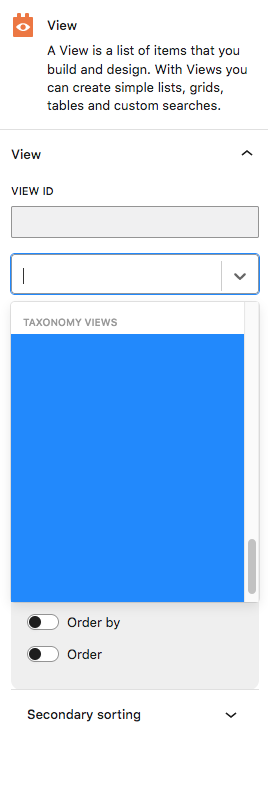
Screen Shot 2025-11-05 at 10.06.44 AM.png

I am trying to: Choose a Taxonomy View to insert into content template/page

Link to a page where the issue can be seen: lien caché

I expected to see: The taxonomy views to select in the drop-down box.

Instead, I got: Blue background, and no taxonomy views to select.

The View ID box is not writable (IT SHOULD BE), so I can not manually enter the view ID.
The View Name box WILL accept input, but it does NOT recognize any Taxonomy view names as valid selectable inputs.
I cannot edit the View block as HTML, so I cannot manually enter the View ID.

#2833325

Minesh
Supporter

Les langues: Anglais (English )

Fuseau horaire: Asia/Kolkata (GMT+05:30)

Hello. Thank you for contacting the Toolset support.

While using Toolset view block, you can only display the post type views. You can not display taxonomy or user type view.

To display the taxonomy view, you will have to first enable the legacy mode:
- https://toolset.com/course-lesson/enabling-legacy-version-of-toolset-views/

Once you enable the legacy mode, you should try to add the "Fields and Text" block and then click on the "Fields and Views" icon and add the taxonomy view you want to display.