Passer la navigation

[Résolu] Adding CSS code for Astericks to appear on mandatory questions

Ce fil est résolu. Voici une description du problème et la solution proposée.

Problem:

Display asterisks in field label of post forms.

Solution:

You can try HTML codes, for example:

https://toolset.com/forums/topic/adding-css-code-for-astericks-to-appear-on-mandatory-questions/#post-2150279

Relevant Documentation:

This support ticket is created Il y a 4 years, 9 months. There's a good chance that you are reading advice that it now obsolete.

This is the technical support forum for Toolset - a suite of plugins for developing WordPress sites without writing PHP.

Everyone can read this forum, but only Toolset clients can post in it. Toolset support works 6 days per week, 19 hours per day.

Sun Mon Tue Wed Thu Fri Sat
- 9:00 – 13:00 9:00 – 13:00 9:00 – 13:00 9:00 – 13:00 9:00 – 13:00 -
- 14:00 – 18:00 14:00 – 18:00 14:00 – 18:00 14:00 – 18:00 14:00 – 18:00 -

Fuseau horaire du supporter : Asia/Hong_Kong (GMT+08:00)

Ce sujet contient 2 réponses, a 2 voix.

Dernière mise à jour par katerinaH Il y a 4 years, 9 months.

Assisté par: Luo Yang.

Auteur
Publications
#2149673

Tell us what you are trying to do?
1) I'd like mandatory questions on post forms, to display a red asterisk next to them.
2) I also received the following error 'We could not connect to the Google Maps autocomplete service, but you can add an address manually' and wondered why that happens and if there's anything I can do to prevent it?

Is there any documentation that you are following?
https://toolset.com/forums/topic/automatic-display-of-asterisk-for-required-fields/
https://stackoverflow.com/questions/23141854/adding-asterisk-to-required-fields-in-bootstrap-3

But I don't understand what the solution was. I tried adding some of the HTML and CSS code as indicated to the end of one of my post forms but it didn't seem to work. Entering a manual asterisk next to the word text also doesn't work.

What is the link to your site? lien caché

#2150279
asterisk.JPG

Hello,

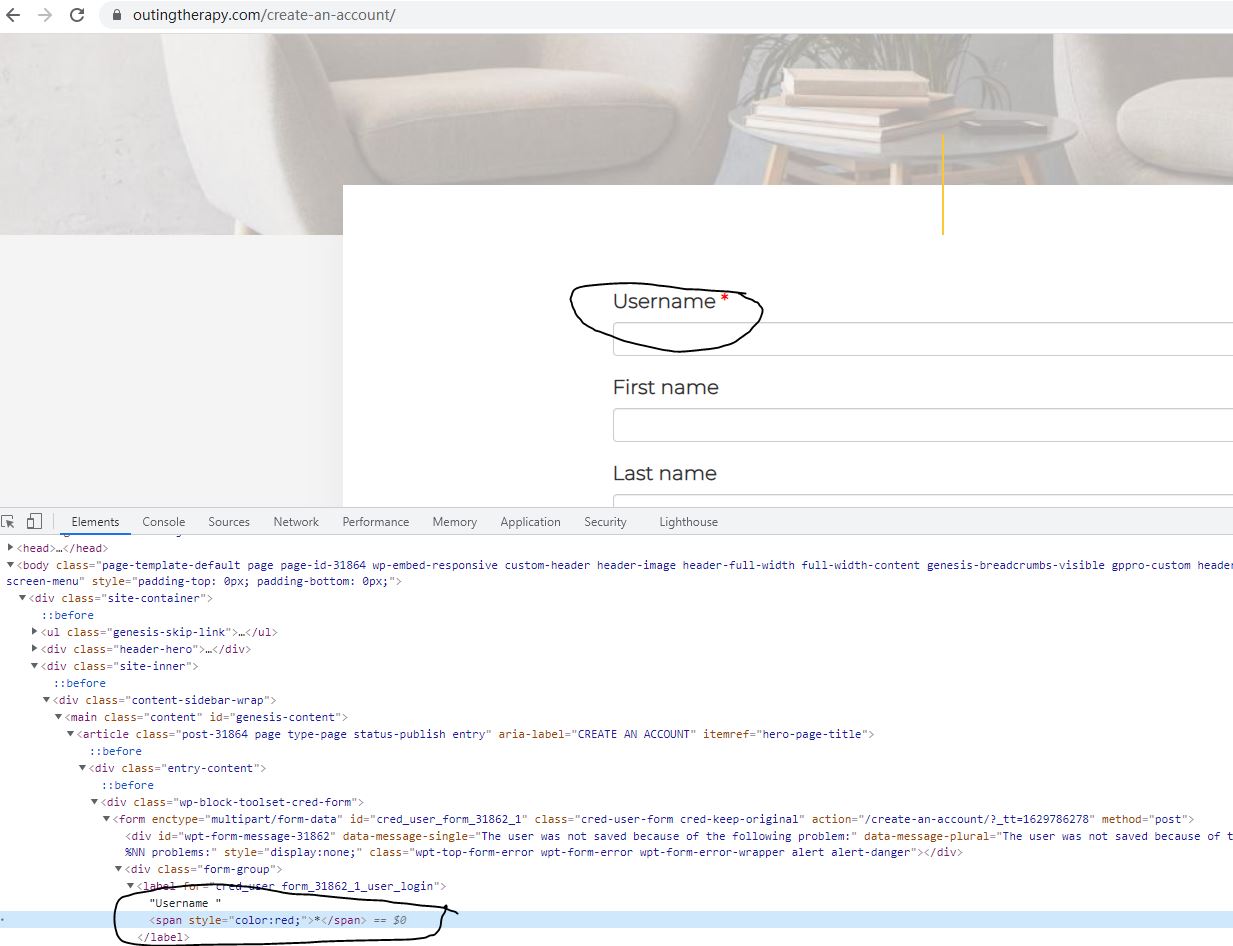
Q1) You can edit your Toolset post/user forms, in section "Form editor", switch to "Expert" mode, insert below HTML codes into where you want:

<span style="color:red;">*</span>

for example:

<label for="%%FORM_ID%%_post_title">[cred_i18n name='post_title-label']Post Title[/cred_i18n] <span style="color:red;">*</span></label>

See my screenshot asterisk.JPG

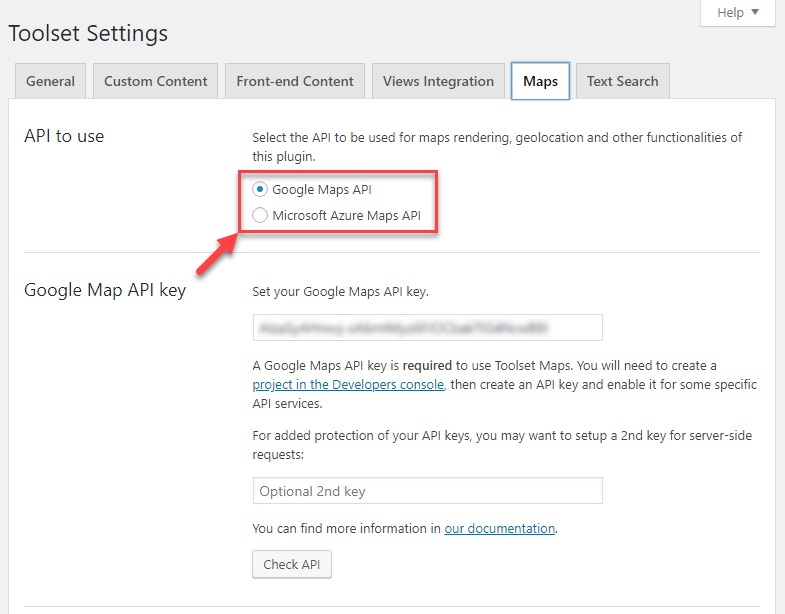
Q2) Please follow our document to setup the Google map API key in your website:
https://toolset.com/course-lesson/creating-a-maps-api-key/

In above document, screenshot:
https://toolset.com/wp-content/uploads/2018/07/toolset-maps-select-and-enter-maps-api-keys.png
There is a button "Check API", you can use it to check if the API key is setup correctly.

#2150345

My issue is resolved now. Thank you!