Passer la navigation

[Résolu] Adding a map in a view shows 2 copies of it – One empty and one working

This support ticket is created Il y a 4 years, 1 month. There's a good chance that you are reading advice that it now obsolete.

This is the technical support forum for Toolset - a suite of plugins for developing WordPress sites without writing PHP.

Everyone can read this forum, but only Toolset clients can post in it. Toolset support works 6 days per week, 19 hours per day.

Sun Mon Tue Wed Thu Fri Sat
- 9:00 – 12:00 9:00 – 12:00 9:00 – 12:00 9:00 – 12:00 9:00 – 12:00 -
- 13:00 – 18:00 13:00 – 18:00 13:00 – 18:00 14:00 – 18:00 13:00 – 18:00 -

Fuseau horaire du supporter : America/Jamaica (GMT-05:00)

Ce sujet contient 4 réponses, a 2 voix.

Dernière mise à jour par catherineB Il y a 4 years, 1 month.

Assisté par: Shane.

Auteur
Publications
#2355615
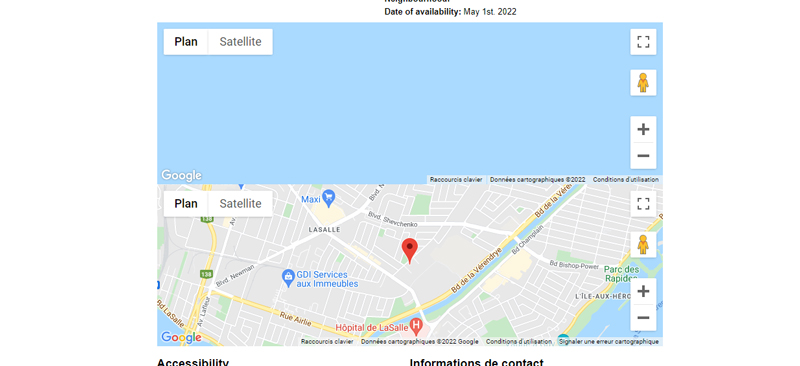
two-maps-shown.jpg

I'm trying to add a map showing the address of the post using this code following these instructions https://toolset.com/forums/topic/how-to-add-a-map/.

I added this code
[wpv-map-render map_id="carte-ili-fiche"][/wpv-map-render]
[wpv-map-marker map_id='carte-ili-fiche' marker_id='marker-carte-ili-fiche' marker_field='wpcf-adresse-gps'][/wpv-map-marker]

The problem is that the code makes two maps: first one is empty, second one shows the address.
I can't have just one: if I try to remove the first code line, then the working maps stops to work.

What is the link to your site?
lien caché

#2355649

Shane
Supporter

Les langues: Anglais (English )

Fuseau horaire: America/Jamaica (GMT-05:00)

Hi Catherine,

Thank you for getting in touch.
Would you mind allowing me to have admin access to the website so that I can have a more detailed look at this for you ?

Please where applicable please provide me with a link to an example page where I can see the issue.

I've enabled the private fields for your next response.

Thanks,
Shane

#2355693

Shane
Supporter

Les langues: Anglais (English )

Fuseau horaire: America/Jamaica (GMT-05:00)

Hi Catherine,

The problem is being caused by this code below on your content template.


<div id="js-map-element" class="lieu-geo"  data-marker-title="" data-marker-lat="" data-marker-lon="">
    <div id="js-main-map-canvas" class="google-maps team-map-reduced-height"></div>
</div>


You're using this code to initialize another map on the page that is not related to our Toolset Maps plugin.

Once you remove this the duplicate map should no longer be displayed.

Thanks,
Shane

#2355695

Oups! Thanks! 🙂
It works perfectly

#2355697

Solved 🙂