Passer la navigation

[Résolu] Access Control – custom user roles – unable to add new role (OK-button disabled)

This support ticket is created Il y a 4 years, 2 months. There's a good chance that you are reading advice that it now obsolete.

This is the technical support forum for Toolset - a suite of plugins for developing WordPress sites without writing PHP.

Everyone can read this forum, but only Toolset clients can post in it. Toolset support works 6 days per week, 19 hours per day.

Sun Mon Tue Wed Thu Fri Sat
- 10:00 – 13:00 10:00 – 13:00 10:00 – 13:00 10:00 – 13:00 10:00 – 13:00 -
- 14:00 – 18:00 14:00 – 18:00 14:00 – 18:00 14:00 – 18:00 14:00 – 18:00 -

Fuseau horaire du supporter : Asia/Kolkata (GMT+05:30)

Ce sujet contient 2 réponses, a 2 voix.

Dernière mise à jour par s1 Il y a 4 years, 2 months.

Assisté par: Minesh.

Auteur
Publications
#2353173

s1
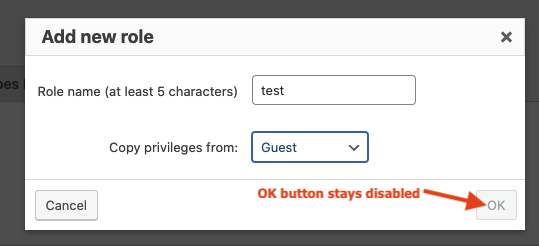
step2-popup.png
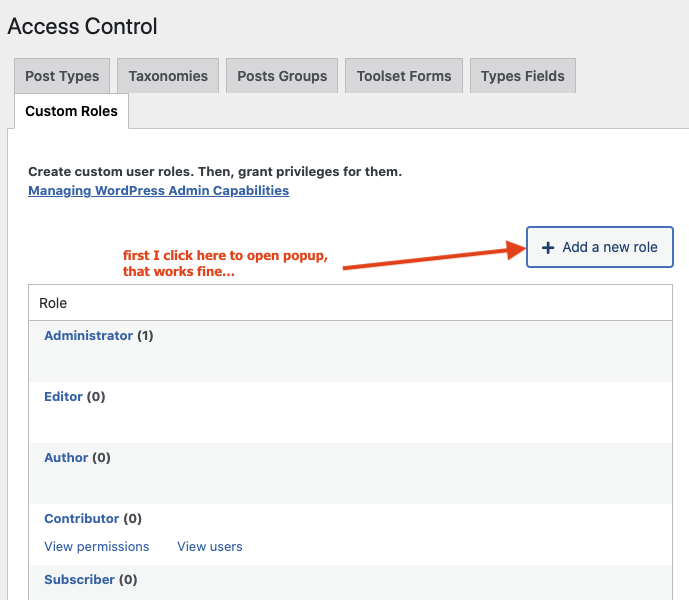
step1-customroles.png

I am trying to: add a new custom user role via Access

Link to a page where the issue can be seen: lien caché

I expected to see: when you click on "Add new role" button then pop-up appears and I fill in all fields, and want to click on "OK" button

Instead, I got: the "OK" buttons stays disabled (even after filling in all fields) so I cannot add the role

#2353545

Minesh
Supporter

Les langues: Anglais (English )

Fuseau horaire: Asia/Kolkata (GMT+05:30)

Hello. Thank you for contacting the Toolset support.

It seems you can not create a custom role with the name "test". I just created two new roles "test-one" and "testrole1" and both works fine. Can you please try to create role with name other than test and try to resolve your issue.

#2353573

s1

My issue is resolved now. Thank you!