Navigation überspringen

[Gelöst] Repeated divs below filters above content – Views Plugin

This support ticket is created vor 3 years, 4 months. There's a good chance that you are reading advice that it now obsolete.

This is the technical support forum for Toolset - a suite of plugins for developing WordPress sites without writing PHP.

Everyone can read this forum, but only Toolset clients can post in it. Toolset support works 6 days per week, 19 hours per day.

Sun Mon Tue Wed Thu Fri Sat
- 9:00 – 13:00 9:00 – 13:00 9:00 – 13:00 9:00 – 13:00 9:00 – 13:00 -
- 14:00 – 18:00 14:00 – 18:00 14:00 – 18:00 14:00 – 18:00 14:00 – 18:00 -

Zeitzone des Unterstützers: Asia/Karachi (GMT+05:00)

Dieses Thema enthält 2 Antworten, hat 2 Stimmen.

Zuletzt aktualisiert von kaleeR-3 vor 3 years, 4 months.

Assistiert von: Waqar.

Author
Artikel
#2548481
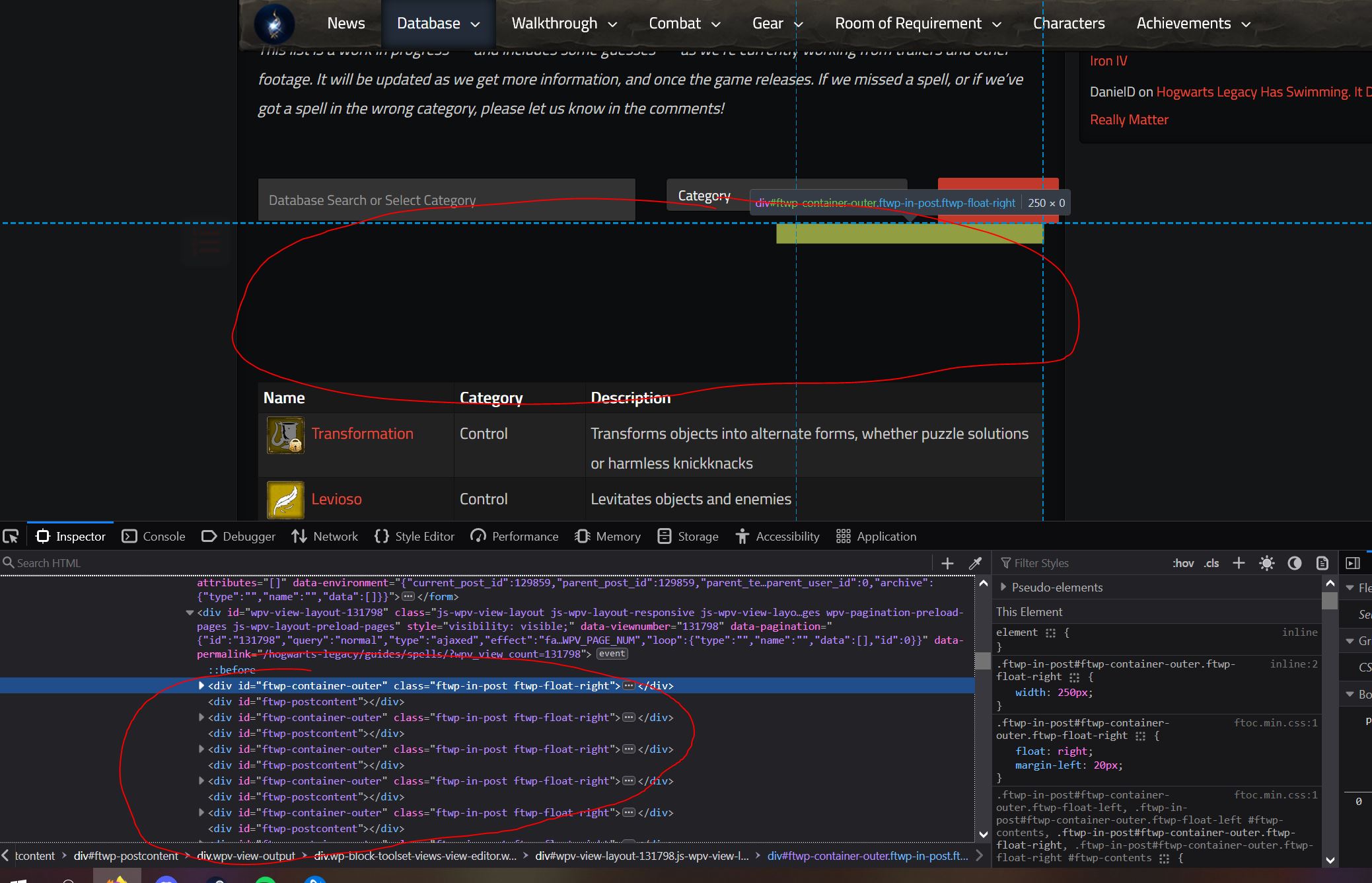
toolset blank space issue.JPG

I am trying to: Display a view

Link to a page where the issue can be seen:
versteckter Link

Everything is fine except there is a big white space between the filters and the table in the view. Edit to add, the blank space goes away when using pagination.

#2548617

Hi,

Thank you for contacting us and I'd be happy to assist.

From looking into the page's code, it looks like the "Fixed TOC" plugin is inserting some content automatically, in the view's container.

In the view's loop editor, please see if you can find a "wpv-post-body" shortcode that is calling the view's loop item template. In that shortcode, you can include the suppress_filters="true" attribute, so that third-party filters are not applied to it.
( ref: https://toolset.com/documentation/programmer-reference/views/views-shortcodes/#wpv-post-body )

For example:


[wpv-post-body view_template="template-name" suppress_filters="true"]

I hope this helps and please let me know how it goes.

regards,
Waqar

#2550775

My issue is resolved now. Thank you!