Navigation überspringen

[Gelöst] Button with dynamic text and url from select-field

This support ticket is created vor 2 years, 6 months. There's a good chance that you are reading advice that it now obsolete.

This is the technical support forum for Toolset - a suite of plugins for developing WordPress sites without writing PHP.

Everyone can read this forum, but only Toolset clients can post in it. Toolset support works 6 days per week, 19 hours per day.

Sun Mon Tue Wed Thu Fri Sat
- 9:00 – 13:00 9:00 – 13:00 9:00 – 13:00 9:00 – 13:00 9:00 – 13:00 -
- 14:00 – 18:00 14:00 – 18:00 14:00 – 18:00 14:00 – 18:00 14:00 – 18:00 -

Zeitzone des Unterstützers: Asia/Karachi (GMT+05:00)

Dieses Thema enthält 1 reply, hat 2 Stimmen.

Zuletzt aktualisiert von Waqar vor 2 years, 6 months.

Assistiert von: Waqar.

Author
Artikel
#2667663
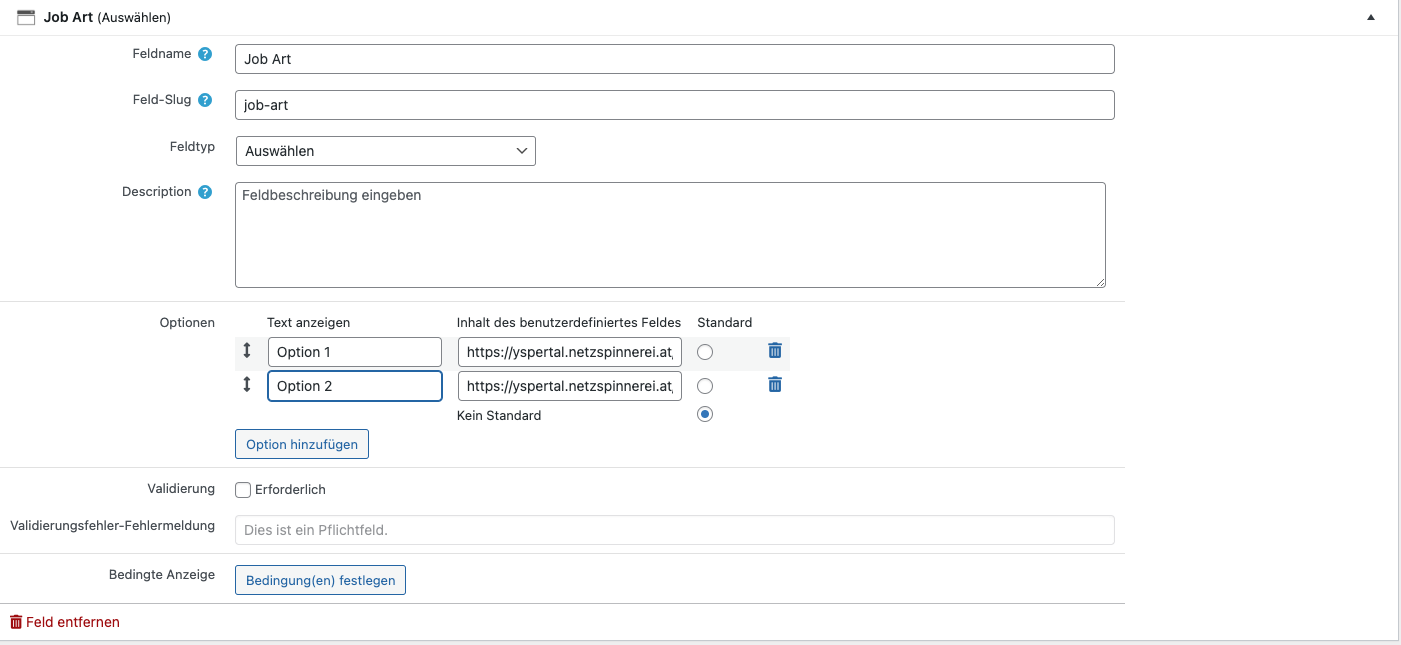
Bildschirmfoto 2023-11-23 um 16.55.44.png

Hi,

i created a custom field (selection) and want to display its name and value (url) as a button in a template.

I already tried a couple of solution none of which worked.

I want something like versteckter Link

I will attach a screenshot of the field. Please help me achieving that.

Thanks,
Daniel

#2667795

Hi Daniel,

Thank you for contacting us and I'd be happy to assist.

You'll need the raw value of the saved URL from the select field, which can be acquired through the Types Fields API:
https://toolset.com/documentation/customizing-sites-using-php/functions/#select

For example, for the field with slug 'job-art', the HTML code for the link will look like this:


<em><u>versteckter Link</u></em>

I hope this helps and please let me know if you need further assistance.

regards,
Waqar

#2667853

Thanks Waqar! I was able to figure it out with your help.

Would be great, if the Button-Block had this option.

Kind regards,
Daniel