This is the technical support forum for Toolset - a suite of plugins for developing WordPress sites without writing PHP.
Everyone can read this forum, but only Toolset clients can post in it. Toolset support works 6 days per week, 19 hours per day.
| Sun | Mon | Tue | Wed | Thu | Fri | Sat |
|---|---|---|---|---|---|---|
| - | 10:00 – 13:00 | 10:00 – 13:00 | 10:00 – 13:00 | 10:00 – 13:00 | 10:00 – 13:00 | - |
| - | 14:00 – 18:00 | 14:00 – 18:00 | 14:00 – 18:00 | 14:00 – 18:00 | 14:00 – 18:00 | - |
Fuseau horaire du supporter : Asia/Kolkata (GMT+05:30)
Ce sujet contient 14 réponses, a 2 voix.
Dernière mise à jour par simonM-5 Il y a 4 years, 5 months.
Assisté par: Minesh.

Hi Support
I recently migrated our site from a dev subdomain to a test subdomain using Duplicator Pro. However after migration to the test subdomain, most Pages weren't displaying properly on the test domain. All the Toolset custom Taxonomies disappeared from the front end. Our search pages, Toolset Forms and most of our custom post types use custom taxonomies. So the migrated test subdomain is rendered virtually unusable.
When I dug a bit deeper on the dev subdomain, I noticed that when Toolset Types is active that the standard WordPress Categories and Tags both disappear from the submenu of "Posts" in the WordPress admin.
I disabled all plugins on the dev subdomain, and immediately "Categories" and "Tags" appear as normal under the "Posts" menu. If I activate Toolset Types as the only active plugin, they disappear again.
I'd appreciate your help in getting to the bottom of this as soon as possible as I believe this is the cause of our failed migrations.
Thanks and regards
Simon







Hello. Thank you for contacting the Toolset support.
I've just logged-in to the admin panel and when I checked the left admin menu and yes I can confirm that at this moment I was not able to see Categories and tags within the post type post.
Then, I just navigate to Toolset => Post types => Edit post type "post" and then I just clicked on the button "save post type" and then I checked the left admin panel and check the post type post, I can see the Categories and Tags. Can you please check and confirm it works at your end as well.
HI Minesh
Thanks for that. Yes, I can confirm that I now see Categories and Tags under Posts.
Have you any suggestions as to how that occurred? I wouldn't normally think of using Toolset plugins to manipulate default WordPress objects such as Posts, Categories and Tags, rather only to manipulate "custom" objects. Can you explain what saving the standard Posts post type actually did in the background to make the Categories and Tags appear again?
Now that that is working as expected, I will create another Duplicator Package and migrate it to the test subdomain, but I suspect that won't have solved the (more important) issue that all our custom taxonomies go missing in the migrated site.
Kind regards
Simon
Have you any suggestions as to how that occurred? I wouldn't normally think of using Toolset plugins to manipulate default WordPress objects such as Posts, Categories and Tags, rather only to manipulate "custom" objects. Can you explain what saving the standard Posts post type actually did in the background to make the Categories and Tags appear again?
==>
I do not have much to share that, I was just thinking that the association of Taxonomies (Categories, Tags) should not be attached to post type when you migrated from one server to another due to any undesirable reason. So, I just go ahead and check the post type and just re-saved the post type and there I see its working.
Now that that is working as expected, I will create another Duplicator Package and migrate it to the test subdomain, but I suspect that won't have solved the (more important) issue that all our custom taxonomies go missing in the migrated site.
==>
Can you please tell me what taxonomies is missing with what post type and cross check with your post type that the taxonomies you are talking about it attached to your desired post type. If you do not see taxonomies are attached to your desired post type, try to follow the same step of editing post type and cross check and try to follow the same step to re-save the post type and see if taxonomies are back.


Hi Minesh
Your colleague Luo is currently working on the dev subdomain regarding password reset problems, so you may notice that the dev site only has Toolset and WPML plugins active.
However, you can log into our test subdomain using the same credentials (just replace dev with test in subdomain of the URL) to investigate the remaining migration issues.
I tried re-saving the Post Type "Job Ads" but unfortunately the custom Taxonomies didn't magically reappear.
Post Types appeared to have migrated correctly (at least it looked like that on the GUI), but when I went to Toolset > Taxonomies, only the two standard ones were there - Categories and Tags. Furthermore in Toolset > Dashboard, all the custom Taxonomies were missing.
I tried exporting the Types metadata from dev and importing that into test also, but that resulted in error messages when I did it all in one go, so I then did it for just custom Taxonomies and that seems to have resolved the issue with custom Taxonomies on test at least.
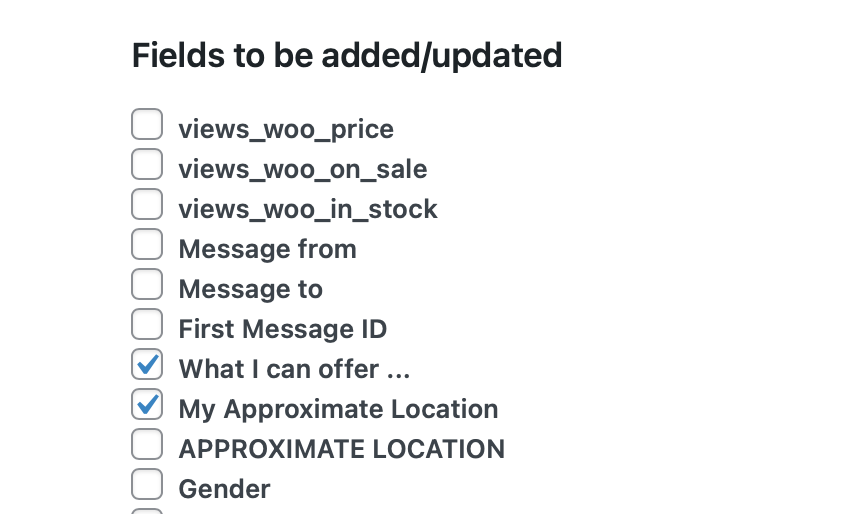
Then I noticed that some custom fields also hadn't migrated properly. Re-importing these manually cured that too, however there was also strange behaviour in the Import dialogue on test where certain items could not be unticked during the import process (see screenshot).
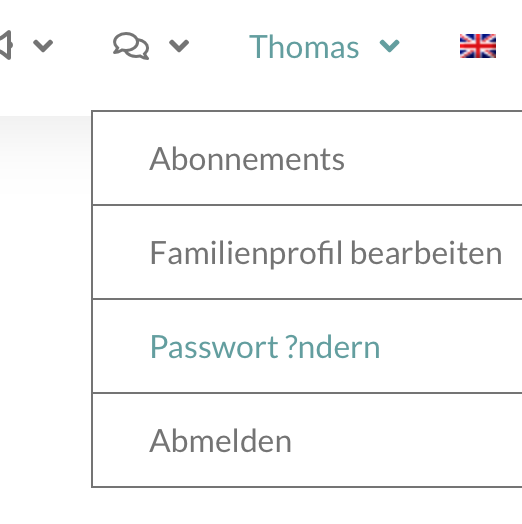
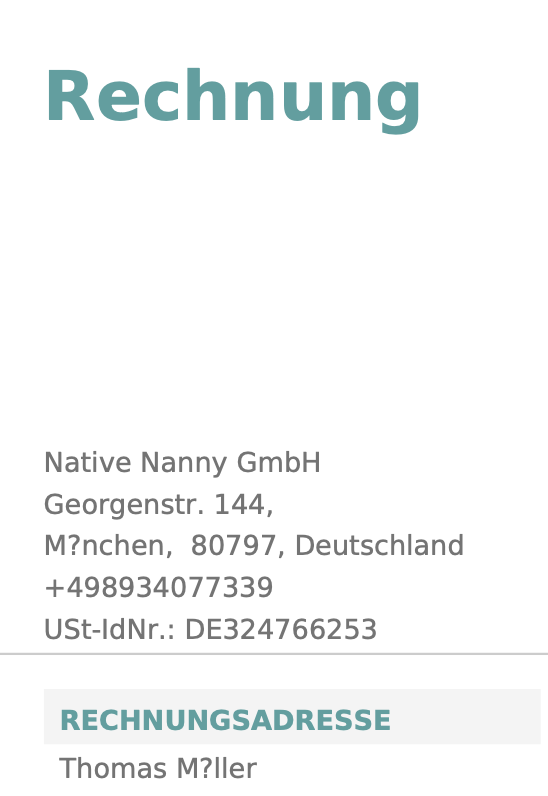
There are strange ? question marks appearing in various places around the site after migration. We have seen ? question marks replacing, for example:
- the German characters Ä, Ö, Ü, ä, ö, ü, ß (but only when viewing the site in English, in the German version these appear correctly in the same places)
- some space characters (but not all)
- some apostrophes ' (but not all)
- some emoji characters (but not all)
These ? question marks appear littered throughout the entire site, I have attached a few screenshots:
- Toolset Forms
- Toolset Forms notifications
- Content Templates
- Menu items
- Search fields
- Woo invoices
Both dev and test databases are set to use:
DB_CHARSET = UTF-8
DB_COLLATE = utf8_unicode_ci
Our expectation is to be able to take a Duplicator copy and just run it on a clean target environment without having to go back and check every single element of Toolset customisations and retest the entire site in every process from scratch.
Thanks and regards
Simon
Les nouveaux fils créés par Minesh et associés à celui-ci sont repris ci-dessous :
I suggest you open a new ticket with every new question you may have. This will help other users searching on the forum as well as help us to write correct problem resolution summery for the original issue reported. I urge you to create the new ticket for your after migration issue of special characters replaced with ? symbol.
Lets talk here about the taxonomy issue - the taxonomies is not assigned to post type when you migrate.
I tried to access the wp-admin using the following URL but it shows me connection timeout error:
- lien caché
Can you please share duplicator copy that I should try to migrate and check if its working at this end on my local server. Can you also tell me what taxonomies are assigned to "Job Ads" post type.
I have set the next reply to private which means only you and I have access to it.
I split the ticket with the issue of special character replaces with question mark and we will continue with that issue with the following split ticket.
=> https://toolset.com/forums/topic/split-categories-tags-missing-in-dev-custom-taxonomies-missing-in-migrated-site-special-characters-replaced-by-question-mark-after-migration/
Regarding taxonomy is not attached to post type, today I'm able to login to the test site you mentioned and I checked the dashboard and I can see the taxonomies are displayed with the post type on Toolset dashboard:
=> lien caché
HI Minesh
The taxonomies are only available on test because I had to manually import them. After the manual import they are there correctly, however I shouldn't have to do this manually after a Duplicator copy.
As I said in my previous update, it was not only the custom taxonomies which did not migrate correctly. I had to import the custom fields as well manually before we could see all the custom fields (and also there was that strange issue in the Import procedure).
Furthermore, our testing on the test environment produces new errors which we never saw on dev, eg
(1) when creating a Nanny Ad we are seeing the error message:
Warning: Creating default object from empty value in /var/www/web24632223/html/test/wp-content/plugins/cred-frontend-editor/library/toolset/cred/embedded/models/Forms.php on line 187
(2) in Find a Job, the search box is completely missing. (So I'm guessing that Views aren't properly migrating either?)
If you want I can provide you with some test logins representing the different roles, so you can reproduce the errors on the test site. Just shoot me a private reply.
Kind regards
Simon
Please share login details and mention the issue what should I look at where.
I have set the next reply to private which means only you and I have access to it.
I've downloaded the duplicator copy you shared and installed on my local test install and I can confirm that the taxonomy assignment is missing to post type when I visit the Toolset dashboard.
But then I installed the plugin "ALL in one WP Migration" and exported the site content and then imported to my local test install and strange thing is that I can see taxonomy assignment is working as expected. Its available with post type. There is no issue.
Can you please allow me to create a duplicator package from your production site or original site form where you created, if so, please share admin access details for your production site so that I can create a duplicator copy and then I would like to run a test with that duplicator copy.
HI Minesh
Sure, we don't have a production site yet. We are trialling moving the site now as we want to go live in Jan if all the technical issues are clean by then.
So go ahead and log into dev and go to Duplicator Pro > Packages and create a new Package as you want to. You can either download the install files via the GUI or use FTP, all of which you have access to.
Kind regards
Simon
I've created the duplicator package and downloaded it and then tried to install on my local test install and strange thing is that I can see the issue, taxonomies are not assigned to post type.
I'm not sure if its duplicator issue as migration is done by duplicator, as I shared already, when I've tried to migrate the site using the ALL In One WP Migration plugin, it works as expected and I do not see any issues.
I'll pass the issue to our next level support for further debugging, please hold on for further updates.
It seems that Duplicator is not a good option to migrate your site as I can see when I use "ALL in One WP Migration" plugin to export/import your site it works just fine and makes 1:1 copy of your site and migrate it to another domain without any issues.
Please check the following screenshot of Toolset Dashboard where I can see after migration the taxonomies does display accurately and attach to post type where applicable:
- lien caché
I suggest you should use "ALL in One WP Migration" plugin to migrate your site in your case:
- https://wordpress.org/plugins/all-in-one-wp-migration/
Hi Minesh
I now concur that this issue appears to be more likely to be a Duplicator Pro issue. I have raised a support ticket with them. If I need any more support regarding the issue from Toolset I will raise a new ticket. Thanks for your help.
My issue is resolved now. Thank you!
Hi Minesh
Thanks for the quick fix on the Categories and Tags issue under Posts.
I now concur that the other issues appear to be more likely due to Duplicator Pro. I have raised a support ticket with them. If I need any more support regarding the issue from Toolset I will raise a new ticket. Thanks for your help.
My issue is resolved now. Thank you!