Navigation überspringen

[Gelöst] Showing text in a conditional block

This support ticket is created vor 3 years, 4 months. There's a good chance that you are reading advice that it now obsolete.

This is the technical support forum for Toolset - a suite of plugins for developing WordPress sites without writing PHP.

Everyone can read this forum, but only Toolset clients can post in it. Toolset support works 6 days per week, 19 hours per day.

Sun Mon Tue Wed Thu Fri Sat
- 10:00 – 13:00 10:00 – 13:00 10:00 – 13:00 10:00 – 13:00 10:00 – 13:00 -
- 14:00 – 18:00 14:00 – 18:00 14:00 – 18:00 14:00 – 18:00 14:00 – 18:00 -

Zeitzone des Unterstützers: Asia/Kolkata (GMT+05:30)

Dieses Thema enthält 1 reply, hat 2 Stimmen.

Zuletzt aktualisiert von Minesh vor 3 years, 4 months.

Assistiert von: Minesh.

Author
Artikel
#2535841
conditions.jpg

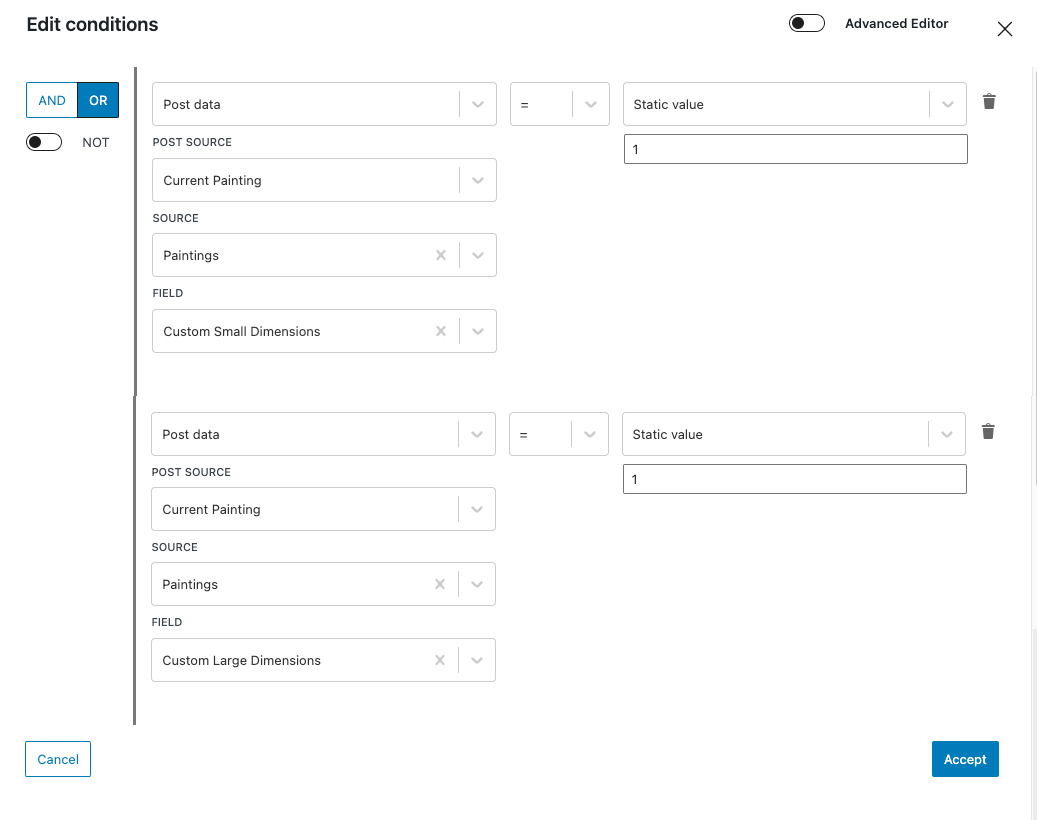
I have a "paintings" custom post type. I created two custom fields: "Custom Small Dimensions" and "Custom Large Dimensions". They are text fields. I only want the fields to show if they are populated. I added a conditional block with the settings shown in my attachment. I added a fields and text block to the conditional block and added the following: <p>Custom Small Dimensions: [types field='custom-small-dimensions'][/types]</p>
I tried this with a painting where the Custom Small Dimensions has data in it but the field won't show up.
Here is the painting: versteckter Link

#2536079

Minesh
Unterstützer

Sprachen: Englisch (English )

Zeitzone: Asia/Kolkata (GMT+05:30)

Hello. Thank you for contacting the Toolset support.

It seems that you are using wrong values to check for not empty field.

Here is the Doc that you should check that shows how you can set the condition for empty value.
=> https://toolset.com/course-lesson/using-toolset-conditional-block/#checking-for-empty-values

Now, for not empty values, once you set the condition for empty value then you should enable the "NOT" button available just under "AND | OR" buttons and save your conditions.