Navigation überspringen

[Gelöst] Disable/remove recaptcha

Dieser Thread wurde gelöst. Hier ist eine Beschreibung des Problems und der Lösung.

Problem:

I need to disable/remove recaptcha from a development site, in order to be able to test form submissions.

Solution:

You can go to Toolset Settings page-> Forms, setup the reCAPTCHA API key temporarily, then remove the recaptcha field in the post form.

Or you can switch to "Expert mode", remove the recaptcha field shortcode directly:
[cred_field field='recaptcha' class='form-control' output='bootstrap']

Relevant Documentation:

This support ticket is created vor 4 years, 1 month. There's a good chance that you are reading advice that it now obsolete.

This is the technical support forum for Toolset - a suite of plugins for developing WordPress sites without writing PHP.

Everyone can read this forum, but only Toolset clients can post in it. Toolset support works 6 days per week, 19 hours per day.

Sun Mon Tue Wed Thu Fri Sat
- 9:00 – 13:00 9:00 – 13:00 9:00 – 13:00 9:00 – 13:00 9:00 – 13:00 -
- 14:00 – 18:00 14:00 – 18:00 14:00 – 18:00 14:00 – 18:00 14:00 – 18:00 -

Zeitzone des Unterstützers: Asia/Hong_Kong (GMT+08:00)

Dieses Thema enthält 4 Antworten, hat 2 Stimmen.

Zuletzt aktualisiert von boelS vor 4 years, 1 month.

Assistiert von: Luo Yang.

Author
Artikel
#2344133

Tell us what you are trying to do?
I need to disable/remove recaptcha from a development site, in order to be able to test form submissions. Since I cannot use Google recaptcha keys on a development site, I need to just disable the recaptcha.
I tried simply removing the google keys from the Toolset-settings-form, but that did not help. The form still gets rejected on submission.
Is there any documentation that you are following?
No
Is there a similar example that we can see?
No
What is the link to your site?
versteckter Link

#2344351

Hello,

You can try these:
Edit the Toolset post/user form you mentioned above, find and remove the "reCaptcha" field, then test again.

After you move the website to the production website, you can just add it back.

More help:
https://toolset.com/course-lesson/protecting-forms-from-spam/

#2344797
Screen Shot 2022-04-19 at 4.28.18 PM.png

The problem is that I don't see a recaptcha field on the form.
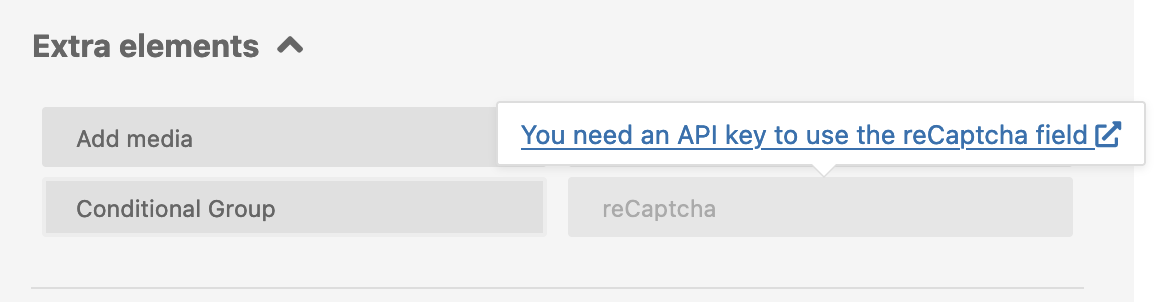
It also says I cannot add a recaptcha due to there being no keys entered. (see image attached)
Even so, if I try to fill out the new user form, I get an error message that the recaptcha was not filled.

#2344945

You can go to Toolset Settings page-> Forms, setup the reCAPTCHA API key temporarily, then remove the recaptcha field in the post form.

Or you can switch to "Expert mode", remove the recaptcha field shortcode directly:
[cred_field field='recaptcha' class='form-control' output='bootstrap']

#2347381

My issue is resolved now. Thank you!