Tell us what you are trying to do?
I have two post types: "Journals" and "People" post type.
I also created one form for "Journals" with one of value of the field is populated from "People" post type.
Is there a way to save in both Journals and People databases or create a relationship between the 2 post types with the form that I created?
Sorry for my bad English. I hope you understand with what I'm trying to explain.
Is there any documentation that you are following?
Is there a similar example that we can see?
What is the link to your site?
It looks like what you actually need is to create a post relationship between your post types, and then use forms to publish and connect them.
Please read through the documentation about post relationships and then let us know if there is something specific you need further help with: https://toolset.com/related-lesson/post-relationships/
Hi Nigel,
Thank you for your help.
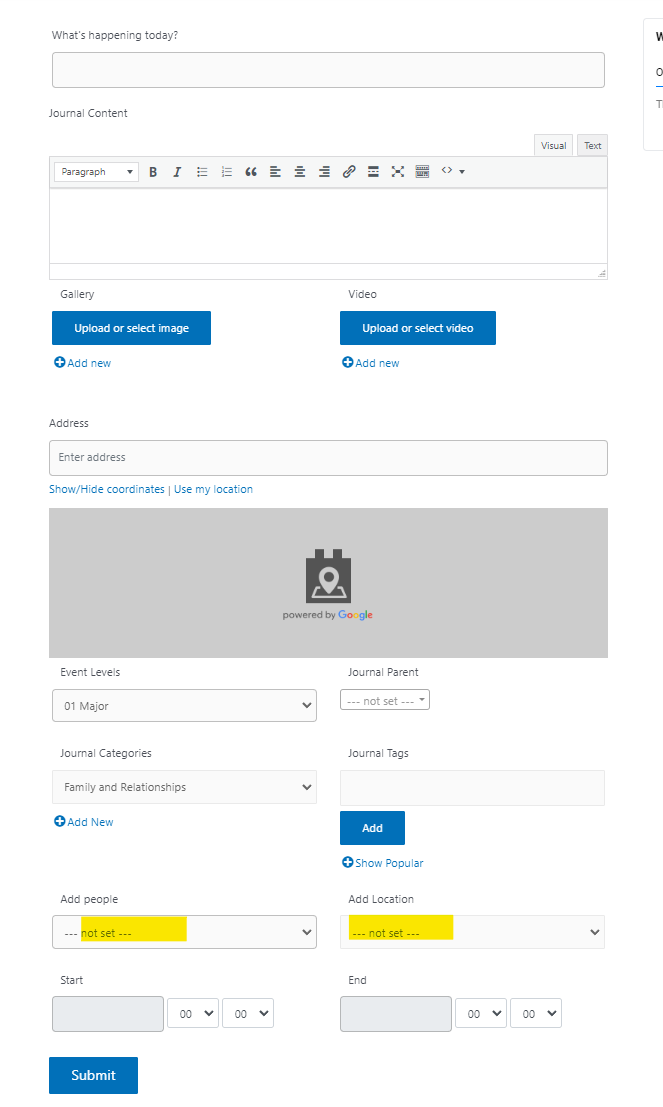
I attached screenshot of Journal form. Field "add people" value of the field is populated from "People" post type.
Is there any way to automatically create relationship between Journal and People when we submit from this form?
Should I use Post Reference Field?
I also have created relationship between post types and created relationship form, however this is not the way that I meant to do.
Hi,
Thanks for writing back.
From the screenshot, it looks like the relationship between the "Journal" and the "People" post has been created and the relationship field to select a "People" post is also correctly added in the "add new journal" form.
When the form will be submitted, the selected "People" post should be connected with the newly created "Journal" post. If this is not working in your form, you're welcome to share temporary admin login details of your website, along with the link to the page where this form can be seen.
Note: Your next reply will be private and it is recommended to make a complete backup copy, before sharing the access details.
regards,
Waqar
Thank you for sharing these details.
I see that the form "Submit Form" is using a generic field "people" for showing the "People" post to select.
But, I couldn't find any code snippet on your website, which can link the selected "People" post with the created "Journal" post, on the form submission.
You can use the "cred_save_data" hook and the "toolset_connect_posts" function for this:
https://toolset.com/documentation/programmer-reference/cred-api/#cred_save_data
https://toolset.com/documentation/customizing-sites-using-php/post-relationships-api/#toolset_connect_posts
At WP Admin -> Toolset -> Settings -> Custom Code a code snippet named "featuredimage" is already added, which uses the "cred_save_data" hook, to execute a custom function for the featured image:
add_action('cred_save_data', 'set_image_as_featured',10,2);
function set_image_as_featured($post_id, $form_data)
{
	// if a specific form
	if ($form_data['id']==1506)
	{
		if (isset($_POST['wpcf-gallery']))
		{
			$image = $_POST['wpcf-gallery'][0];
			// Save the first image as featured image
			set_post_thumbnail($post_id,attachment_url_to_postid($image));
		}
	}
}
You update that code snippet so that it also connects the selected people post with the created journal post, on the form's submission:
add_action('cred_save_data', 'set_image_as_featured',10,2);
function set_image_as_featured($post_id, $form_data)
{
	// if a specific form
	if ($form_data['id']==1506)
	{
		if (isset($_POST['wpcf-gallery']))
		{
			$image = $_POST['wpcf-gallery'][0];
			// Save the first image as featured image
			set_post_thumbnail($post_id,attachment_url_to_postid($image));
		}

		$people_gen_field = $_POST['people'];
		// if a people post is selected
		if(!empty($people_gen_field)) {
			// Connect it in a relationship with the created post
			toolset_connect_posts( 'journal-people', $post_id, $people_gen_field );
		}
	}
}
I hope this helps and let me know how it goes.
My issue is resolved now. Thank you!
Thank you! My issue is resolved