Tell us what you are trying to do?
Just recently within the last week I am getting this error when trying to ANYTHING with Views.
"This block has encountered an error and cannot be previewed." - What a pain!!
I have made no changes to configuration - no new plugins - no changes to anything that I am aware of.
So basically I am at a complete development halt. Nothing I can find online seems to help.
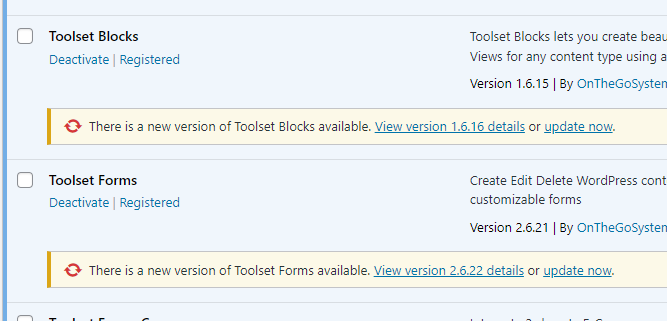
I thought I would see if my plugins were up to date.
They are not (see screenshot)
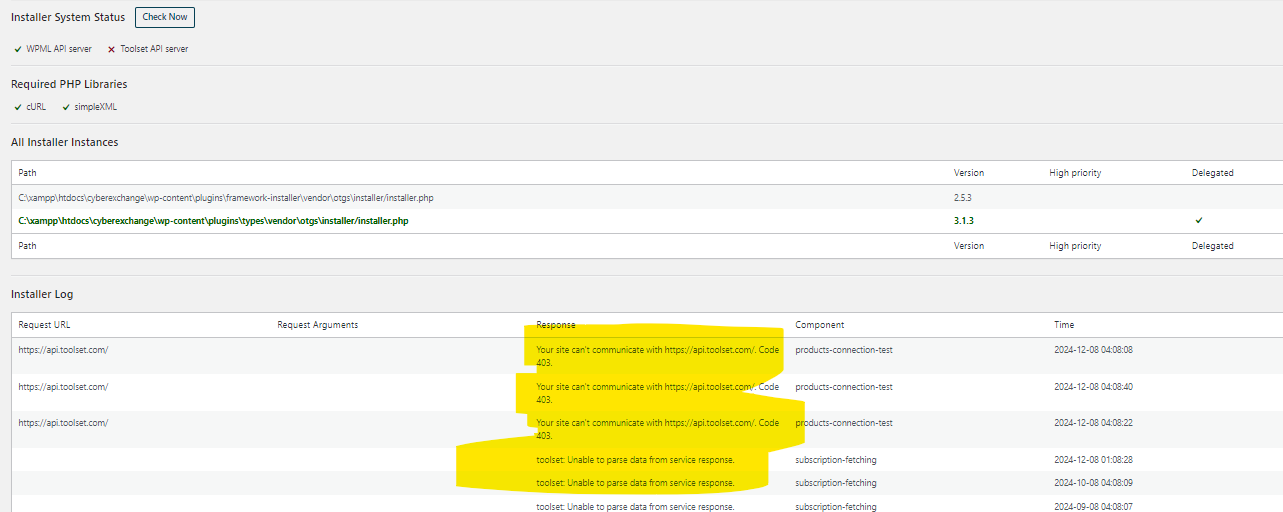
After some digging, I see the issue *seems* to be connecting to toolset.
I see the following messages.
Your site can't communicate with versteckter Link. Code 403.
products-connection-test 2024-12-08 04:08:40
Unable to parse data from service response.
subscription-fetching 2024-12-08 01:08:28
What can we do here?
I am just trying to update toolset plugins!
Is there any documentation that you are following?
BASIC wordpress plugin update
Is there a similar example that we can see?
It's a local site and has been working fine for months.
<see attached>
What is the link to your site?
It's local - no link to share with you ... versteckter Link
Hello there,
We had issues like this that were resolved by recreating the key.
To try to fix this issue, please to do the follow procedure:
- Temporarily remove your website here: (https://toolset.com/account/sites/). You won't lose any translation credits or the translation memory, this is just to force WPML to refresh the license status
- Add the website again and copy the new generated key, when adding it make sure that you use the exact same format as available inside the wp-admin > settings > general, eg.: http or https | www or non-www
- Now go to Plugins -> Add New -> Commercial
- Click on Unregister Toolset if you see it there
- Click on Register Toolset and enter the new key you just created
If it still doesn't work, try to register it in https://toolset.com/account/sites/ using 127.0.0.1 instead of localhost(127.0.0.1/cyberexchange) to see if you get different results.
Thank you,
Mateus
Mateus,
I tried your suggestion using both of these urls...
versteckter Link
versteckter Link
Still won't register.
Now I am left with an unregistered copy of toolset and this same error message:
Unable to parse data from service response.
Please advise ...
Hello there,
It is possible that your local environment is not able to connect to our servers to properly validate the license and get updates.
Can you please double-check if you have the curl lib version: 7.81.0 or higher installed and that you can connect to api.toolset.com using curl?
Also, kindly open the terminal and check if you're able to resolve the domain api.toolset.com by doing a ping api.toolset.com command. It should resolve to an IP such as 34.234.134.27.
Thank you, please let us know.
Mateus