Navigation überspringen

[Gelöst] Wrong toolset versions on updates

This support ticket is created vor 2 years. There's a good chance that you are reading advice that it now obsolete.

This is the technical support forum for Toolset - a suite of plugins for developing WordPress sites without writing PHP.

Everyone can read this forum, but only Toolset clients can post in it. Toolset support works 6 days per week, 19 hours per day.

Sun Mon Tue Wed Thu Fri Sat
- 10:00 – 13:00 10:00 – 13:00 10:00 – 13:00 10:00 – 13:00 10:00 – 13:00 -
- 14:00 – 18:00 14:00 – 18:00 14:00 – 18:00 14:00 – 18:00 14:00 – 18:00 -

Zeitzone des Unterstützers: Asia/Kolkata (GMT+05:30)

Dieses Thema enthält 3 Antworten, hat 2 Stimmen.

Zuletzt aktualisiert von Minesh vor 2 years.

Assistiert von: Minesh.

Author
Artikel
#2698715
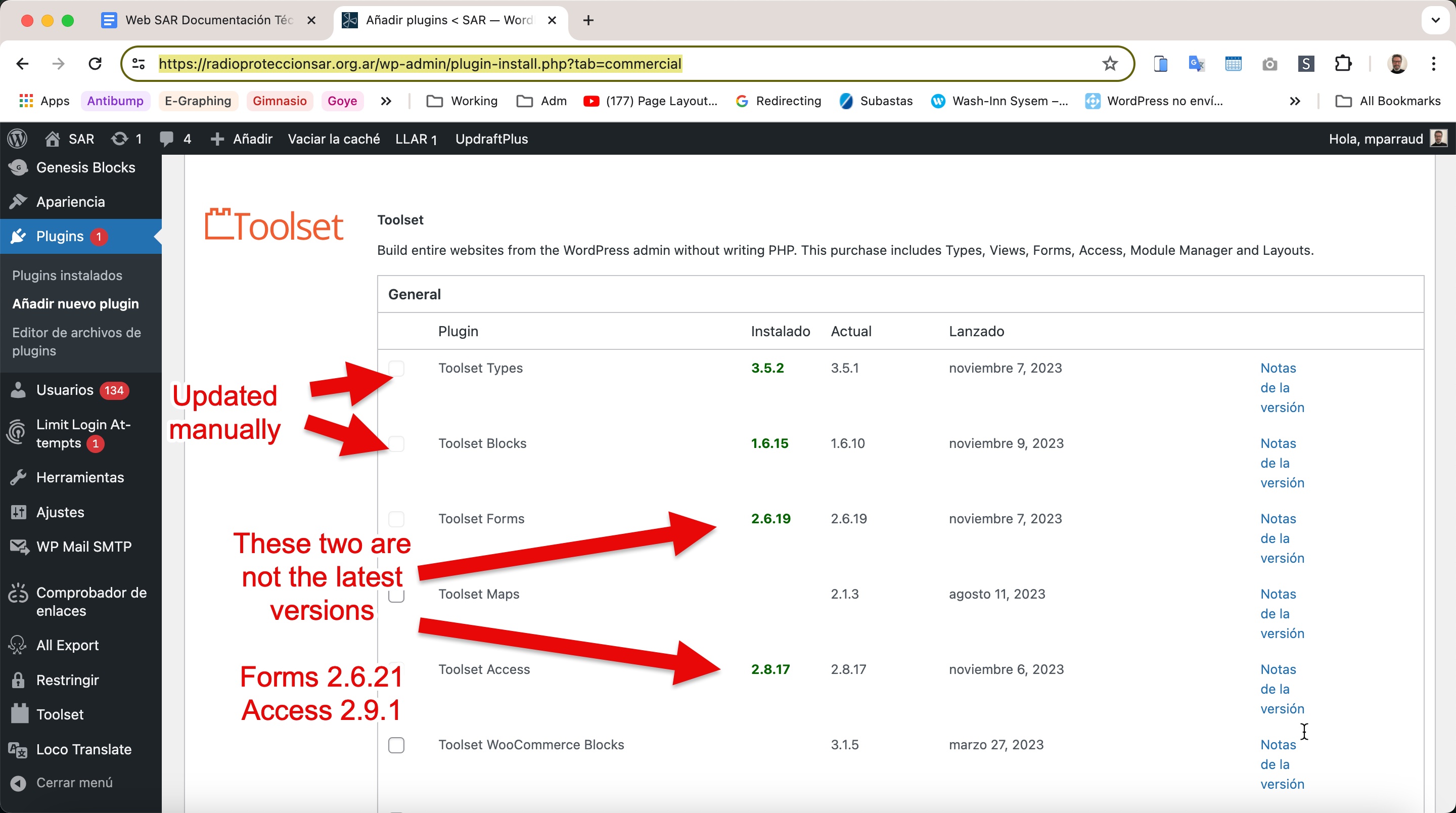
toolset updates not working.jpg

I am trying to:
When I check for Toolset updates from versteckter Link, it shows that there are no updates.

Then, I check the manual download of Toolset (https://toolset.com/account/downloads/) and verify that there are new versions available.

I manually updated Toolset Types and Toolset Blocks, but it still shows the previous versions.

Link to a page where the issue can be seen:
versteckter Link

I expected to see:
latest versions of toolset plugins

Instead, I got:
previous versions

#2698775

Minesh
Unterstützer

Sprachen: Englisch (English )

Zeitzone: Asia/Kolkata (GMT+05:30)

Hello. Thank you for contacting the Toolset support.

Have you try to click on the button "Check for Updates" on "commercial" page?
- versteckter Link

I just checked on my test site where Toolset plugins were outdated and I clicked on the button "Check for Updates" and updated all Toolset plugins to latest version and I can see it does show latest plugin version.

Please make sure to delete the cache as well.

#2698794

I made a screencast for you:

versteckter Link

I deleted the cache, and click on the "check for updates" button

#2698795

Minesh
Unterstützer

Sprachen: Englisch (English )

Zeitzone: Asia/Kolkata (GMT+05:30)

I'm not sure what's going wrong with your setup as I just created a sandbox site and you can auto-login to it using the following link:
- versteckter Link

I try to upload the Toolset Types plugin and then when I check on "commercial" page and click on "Check for Updates" button everything seems ok.
- versteckter Link

Maybe you can try to delete all Existing Toolset plugins and then try to just upload and activate the Toolset Types plugin and then from "commercial" page you should try to install other addon Toolset plugins.