This is the technical support forum for Toolset - a suite of plugins for developing WordPress sites without writing PHP.
Everyone can read this forum, but only Toolset clients can post in it. Toolset support works 6 days per week, 19 hours per day.
Dieses Thema enthält 12 replies, hat 1 Stimme.
Zuletzt aktualisiert von - 1 month, 3 weeks ago.
Assistiert von: Christopher Amirian.

I am trying to:
update to Views 3.6.26
Link to a page where the issue can be seen:
Since the site is live, I reverted back to view version 3.6.21 so that the search function can work
I expected to see:
views search continuing to work as it did for many years
Instead, I got:
custom search filter stopped working with Views 3.6.26



Hi,
Welcome to Toolset Support. Could you please create a copy of the website and update Toolset there so that we can investigate the issue?
Also, please provide more detailed information about what you mean when you say it is broken. Does it display a blank screen, or are the search results not appearing?
Finally, please let us know whether you use any custom code in the View for the custom search and whether you created it using Legacy Views or Toolset Blocks.
Thanks.
Hello Christopher,
I would like to send a copy of the site via Duplicator. Can you provide a way for private reply?
To answer your questions:
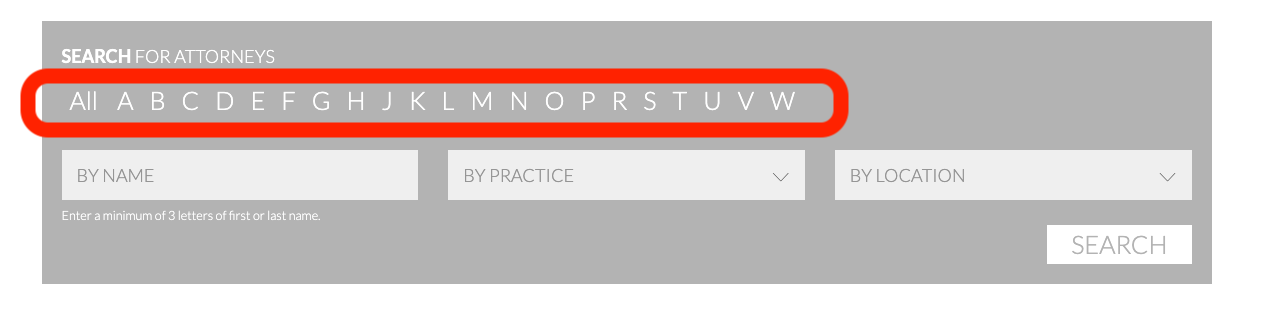
The part that no longer works as it should when using View 3.6.26 is the alphabetical search option. See screenshot. In 3.6.26, clicking on the any of the alphabets no long result in a filtered search of last names. It just reloads the search page, unfiltered.
I tried to find the support ticket that I created which relates to this custom search feature, but it seem that it was removed from my support ticket archive.
Below is the custom PHP code that was added to make the alphapetical search work.
// ======================================================================== Views Alphabetic Search Filter

// ===================== shortcode
add_shortcode('wpv-heading-aux', 'wpv_heading_aux');
function wpv_heading_aux($atts, $content = '') {
  static $heading = null;
  static $index = 0;
  extract( shortcode_atts( array(
        'condition' => '',
        'value' => '',
    ), $atts ) );
  $index++;
  $letter = strtoupper(substr($value,0,1));
  $output = '';
  if ($heading != $letter) {
    $heading = $letter;
    if ($index > 1) {
        $output = '</li>';
    }
    $output .= '<li data-letter="' . $letter . '">' . $letter ;
  }
  return $output;
}

add_filter( 'wpv_filter_query', 'display_all_letters_func', 9999, 3 );
function display_all_letters_func( $query_args, $view_settings, $view_id ) {
     if ($view_id == 231) {
          $query_args['suppress_filters'] = true;
     }
    return $query_args;
}

// ===================== views public filters

add_filter( 'wpv_filter_query', 'search_by_first_letter_of_title', 99, 3 );
function search_by_first_letter_of_title( $query_args, $view_settings, $view_id ) {
     if ($view_id = 213) {
          $types = (array) $query_args['post_type'];
          if ( !is_admin() && in_array( 'attorney', $types ) ) {
               add_filter( 'posts_where', 'posts_where_first_letter');
          }
     }
    return $query_args;
}

function posts_where_first_letter( $where ) {
    remove_filter( 'posts_where', 'posts_where_first_letter');
    if (!empty($_GET['last-name'])) {
        $param = esc_sql($_GET['last-name']);
        //$where = str_replace( "wp_postmeta.meta_key = 'wpcf-last-name' AND CAST(wp_postmeta.meta_value AS CHAR) LIKE '%" . $param . "%'", "wp_postmeta.meta_key = 'last-name' AND CAST(wp_postmeta.meta_value AS CHAR) LIKE '" . $param . "%'", $where );
		$where .= " AND wp_postmeta.meta_key = 'wpcf-last-name' AND CAST(wp_postmeta.meta_value AS CHAR) LIKE '" . $param . "%'";
     }

     return $where;
}
Below is the codes in View:
Search and Pagination:
[wpv-filter-start hide="false"]
[wpv-filter-controls]

<div style="display:none;">
[wpv-control field="last-name" url_param="last-name" type="textfield"]

 [wpv-filter-submit name="Submit" type="input"]

</div>

[/wpv-filter-controls]
[wpv-filter-end]
Loop:
[wpv-layout-start]
    [wpv-items-found]
   <!-- wpv-loop-start -->
      <ul id="wpv_heading_tab" style="display:none;">
        <li data-letter="">All</li>
        <wpv-loop>
          [wpv-heading-aux condition="letter" value="[types field="last-name" output="raw"][/types]"][/wpv-heading-aux]
        </wpv-loop>
      </ul>
    <!-- wpv-loop-end -->
    [/wpv-items-found]
    [wpv-no-items-found]
        [wpml-string context="wpv-views"]<strong>No items found</strong>[/wpml-string]
    [/wpv-no-items-found]
[wpv-layout-end]
It was created in Legacy Views
Thanks

Christopher Amirian
Hi,
Thank you for the details. First, there is a genuine bug in this PHP condition:
if ($view_id = 213) {
It uses a single equals sign, so it performs an assignment rather than a comparison. It always evaluates as true, which means that the posts_where filter is attached to every View, not only View 213. This has likely been masked all these years because the inner check for the attorney post type limited the impact.
It should be:
if ($view_id == 213) {
This is worth correcting regardless of the update issue.
Second, and more likely the actual cause, the alphabetical filter does not use the Views Query API. It hooks into posts_where and appends raw SQL that hardcodes the table name and assumes a specific query structure:
$where .= " AND wp_postmeta.meta_key = 'wpcf-last-name' AND CAST(wp_postmeta.meta_value AS CHAR) LIKE '" . $param . "%'";
Even a slight change, such as adding or reordering a meta clause, could cause the appended condition to no longer match the join. The filter would then silently stop working.
The PHP code involves a significant amount of customization that is well outside our support scope, even if one of our supporters previously suggested it as a workaround.
To understand what changed, create a copy of the website with version 3.6.26 active. Then, temporarily add the following code and load the search page:
add_filter( 'posts_request', function( $sql, $query ) {
    if ( ! is_admin() ) {
        error_log( '=== VIEW SQL: ' . $sql );
    }
    return $sql;
}, 999, 2 );
Then, check the PHP debug log and compare the SQL generated by versions 3.6.26 and 3.6.21 when running the same code.
If you can provide the difference, I will do my best to determine whether I can suggest an updated version of the code. However, this is a very complex customization and is outside our support scope.
Thank you for your understanding.
Thanks for catching the error in the php code Christopher and your help. I copied the site to a localwp environment. After I add the error log filter, where/how can I view the PHP debug log?
Christopher Amirian
Hi,
You can enable WordPress debug logging. Open wp-config.php in the site root and add these lines above the line that says "That's all, stop editing!":
define( 'WP_DEBUG', true );
define( 'WP_DEBUG_LOG', true );
define( 'WP_DEBUG_DISPLAY', false );
WP_DEBUG_LOG writes messages to wp-content/debug.log, and WP_DEBUG_DISPLAY set to false keeps them out of the page output so the front end stays readable.
https://developer.wordpress.org/advanced-administration/debug/debug-wordpress/
Check the log file.
1. With 3.6.26 active and the posts_request snippet in place, load the search page and click one of the letters.
2. Open debug.log, find the entry starting with === VIEW SQL: and copy the whole SQL statement.
3. Delete debug.log, roll the site back to 3.6.21, repeat steps 1 and 2.
You'll get a lot of log entries, since that filter logs every front-end query on the page. The one you want is the longest statement, the one containing wp_postmeta and your attorney post type.
Send me both SQL statements. The key thing I'll be looking for is how the postmeta table appears in each, whether it's wp_postmeta or an alias such as mt1, and whether the join structure differs between the two versions.
Thanks.
Thanks Christopher, here are the logs:
with Types 3.6.26:
[25-Aug-2026 17:28:06 UTC] === VIEW SQL: SELECT   wp_posts.*
					 FROM wp_posts
					 WHERE 1=1  AND (wp_posts.ID = '214') AND wp_posts.post_type = 'page'

					 ORDER BY wp_posts.post_date DESC

[25-Aug-2026 17:28:06 UTC] === VIEW SQL: SELECT   wp_posts.*
					 FROM wp_posts  LEFT JOIN wp_term_relationships ON (wp_posts.ID = wp_term_relationships.object_id)
					 WHERE 1=1  AND (
  wp_term_relationships.term_taxonomy_id IN (211)
) AND wp_posts.post_type = 'wp_global_styles' AND ((wp_posts.post_status = 'publish'))
					 GROUP BY wp_posts.ID
					 ORDER BY wp_posts.post_date DESC
					 LIMIT 0, 1
[25-Aug-2026 17:28:06 UTC] === VIEW SQL: SELECT   wp_posts.*
					 FROM wp_posts
					 WHERE 1=1  AND wp_posts.ID NOT IN (6687,6703,6704,6705,6706,6707) AND wp_posts.post_parent = 214  AND wp_posts.post_type = 'page' AND ((wp_posts.post_status = 'publish'))

					 ORDER BY wp_posts.post_title ASC
					 LIMIT 0, 1
[25-Aug-2026 17:28:06 UTC] === VIEW SQL: SELECT   wp_posts.*
					 FROM wp_posts  INNER JOIN wp_postmeta ON ( wp_posts.ID = wp_postmeta.post_id )
					 WHERE 1=1  AND wp_posts.ID NOT IN (6687,6703,6704,6705,6706,6707) AND (
  wp_postmeta.meta_key = 'wpcf-last-name'
) AND wp_posts.post_type = 'attorney' AND ((wp_posts.post_status = 'publish'))
					 GROUP BY wp_posts.ID
					 ORDER BY wp_postmeta.meta_value ASC

[25-Aug-2026 17:28:08 UTC] === VIEW SQL: SELECT   wp_posts.*
					 FROM wp_posts  LEFT JOIN wp_term_relationships ON (wp_posts.ID = wp_term_relationships.object_id)
					 WHERE 1=1  AND (
  wp_term_relationships.term_taxonomy_id IN (211)
) AND wp_posts.post_type = 'wp_global_styles' AND ((wp_posts.post_status = 'publish'))
					 GROUP BY wp_posts.ID
					 ORDER BY wp_posts.post_date DESC
					 LIMIT 0, 1
with Types 3.6.21:
[25-Aug-2026 17:37:31 UTC] === VIEW SQL: SELECT   wp_posts.*
					 FROM wp_posts
					 WHERE 1=1  AND (wp_posts.ID = '214') AND wp_posts.post_type = 'page'

					 ORDER BY wp_posts.post_date DESC

[25-Aug-2026 17:37:31 UTC] === VIEW SQL: SELECT   wp_posts.*
					 FROM wp_posts  LEFT JOIN wp_term_relationships ON (wp_posts.ID = wp_term_relationships.object_id)
					 WHERE 1=1  AND (
  wp_term_relationships.term_taxonomy_id IN (211)
) AND wp_posts.post_type = 'wp_global_styles' AND ((wp_posts.post_status = 'publish'))
					 GROUP BY wp_posts.ID
					 ORDER BY wp_posts.post_date DESC
					 LIMIT 0, 1
[25-Aug-2026 17:37:31 UTC] === VIEW SQL: SELECT   wp_posts.*
					 FROM wp_posts
					 WHERE 1=1  AND wp_posts.ID NOT IN (6687,6703,6704,6705,6706,6707) AND wp_posts.post_parent = 214  AND wp_posts.post_type = 'page' AND ((wp_posts.post_status = 'publish'))

					 ORDER BY wp_posts.post_title ASC
					 LIMIT 0, 1
[25-Aug-2026 17:37:31 UTC] === VIEW SQL: SELECT   wp_posts.*
					 FROM wp_posts  INNER JOIN wp_postmeta ON ( wp_posts.ID = wp_postmeta.post_id )
					 WHERE 1=1  AND wp_posts.ID NOT IN (6687,6703,6704,6705,6706,6707) AND (
  wp_postmeta.meta_key = 'wpcf-last-name'
) AND wp_posts.post_type = 'attorney' AND ((wp_posts.post_status = 'publish')) AND wp_postmeta.meta_key = 'wpcf-last-name' AND CAST(wp_postmeta.meta_value AS CHAR) LIKE 'O%'
					 GROUP BY wp_posts.ID
					 ORDER BY wp_postmeta.meta_value ASC

[25-Aug-2026 17:37:31 UTC] === VIEW SQL: SELECT   wp_posts.*
					 FROM wp_posts  LEFT JOIN wp_term_relationships ON (wp_posts.ID = wp_term_relationships.object_id)
					 WHERE 1=1  AND (
  wp_term_relationships.term_taxonomy_id IN (211)
) AND wp_posts.post_type = 'wp_global_styles' AND ((wp_posts.post_status = 'publish'))
					 GROUP BY wp_posts.ID
					 ORDER BY wp_posts.post_date DESC
					 LIMIT 0, 1
Christopher Amirian
Thanks. The join statements are identical, so the issue was not that. I can try to spend time to see why this is happening but I can not guarantee any fix.
I'd appreciate it if you could give me the URL/User/Pass of your WordPress dashboard after you make sure that you have a backup of your website.
It is absolutely important that you give us a guarantee that you have a backup so if something happens you will have a point of restore.
Make sure you set the next reply as private.
Thanks.
Since the copy of the site I'm working from to troubleshoot is on a localwp environment and not accessible online, Can I provide you a copy of the site via the Duplicator plugin and provide credentials to that environment? I did not see an option to upload files in the private reply.
Thanks
Christopher Amirian
That is ok. Please send the duplicator info by setting the next reply as private. Also gi e us the login information so we can actually be able to login on the local installaiton.
Thanks.
Hi Christopher, I was able to use the duplicator files to upload to a temporary webspace. Can you send me another private form so that I can provide the access credentials.
Thanks
Christopher Amirian
Hi,
Sure, you can set your next reply as private.
Just to make sure we are on the same page, I managed to download the Duplicator files, but I could not install them in my local MAMP environment.
The Cloudways method I mentioned would be an easier way to copy the website. The copy will remain private and will be deleted as soon as we are able to provide a suggestion or further information regarding your code.
Thanks.
Christopher Amirian
Hi,
Thanks. I think I have found the issue.
Go to "Toolset > Views > Attorney Search" and expand the JavaScript editor in the Search and Pagination section. You currently have the following code:
$('#wpv_control_textfield_last-name').attr('value', letter);
That ID has changed in the new version, so the same selector no longer works. Instead, use a dynamic selector. I have already added it to your website and confirmed that it works.
Replace the code above with:
$('input[name="last-name"]').val(letter);
This code is ID-agnostic and will always target the correct input field.
Thanks.
Thanks for the quick solution Christopher. It works on my local environment and on the temporary webspace I shared. I will apply to the live site this evening. I saw that the exact code was commented out in the line above, So I must have used it in the past. I don't remember what changed for the alternate code to be there.
Thanks again and have a great rest of your day!


