Navigation überspringen

[Gelöst] View filter by shortcode attribute no longer working

This support ticket is created vor 3 weeks, 5 days. There's a good chance that you are reading advice that it now obsolete.

This is the technical support forum for Toolset - a suite of plugins for developing WordPress sites without writing PHP.

Everyone can read this forum, but only Toolset clients can post in it. Toolset support works 6 days per week, 19 hours per day.

Sun Mon Tue Wed Thu Fri Sat
- 10:00 – 13:00 10:00 – 13:00 10:00 – 13:00 10:00 – 13:00 10:00 – 13:00 -
- 14:00 – 18:00 14:00 – 18:00 14:00 – 18:00 14:00 – 18:00 14:00 – 18:00 -

Zeitzone des Unterstützers: Asia/Kolkata (GMT+05:30)

Dieses Thema enthält 9 Antworten, hat 1 Stimme.

Zuletzt aktualisiert von davidL-7 vor 2 weeks, 3 days.

Assistiert von: Minesh.

Author
Artikel
#2869633
Screenshot 2026-07-21 at 1.33.17 PM.png
Screenshot 2026-07-21 at 1.29.46 PM.png
Screenshot 2026-07-21 at 1.29.34 PM.png

Hi! We've been successfully displaying a View for quite some time using a shortcode:

[wpv-view name="display-current-aid-account" aidaccountid="[types field='aid-account-id' output='raw'][/types]"]

(Minesh helped me work this out in February of 2025 -- see https://toolset.com/forums/topic/filtering-a-view-within-another-view-by-shortcode/ -- and it's been successfully working ever since.)

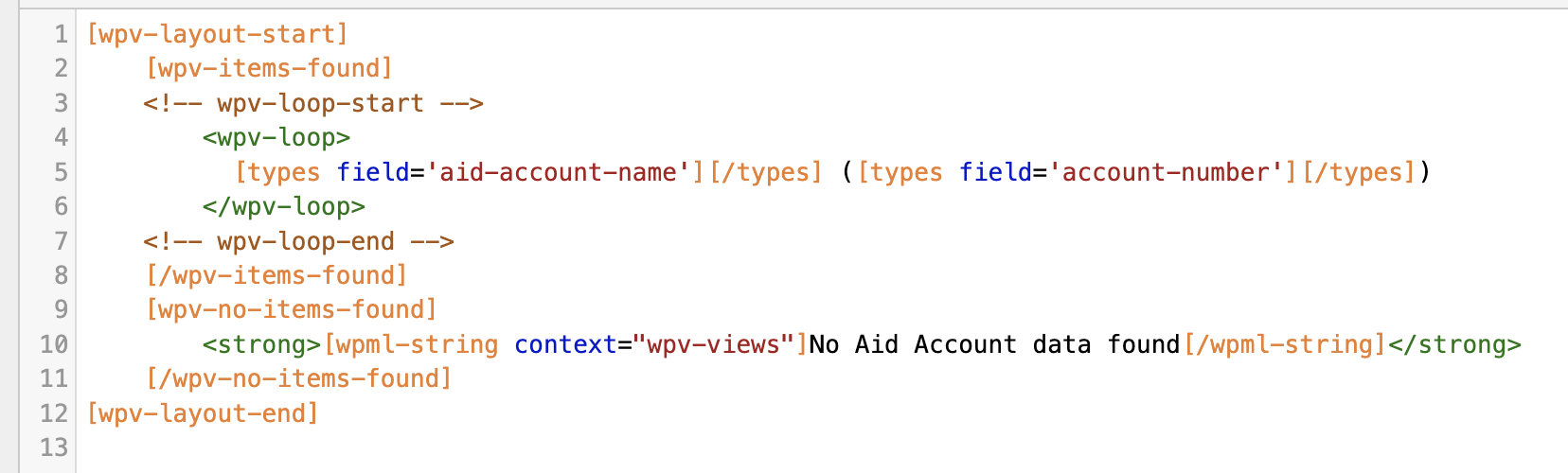
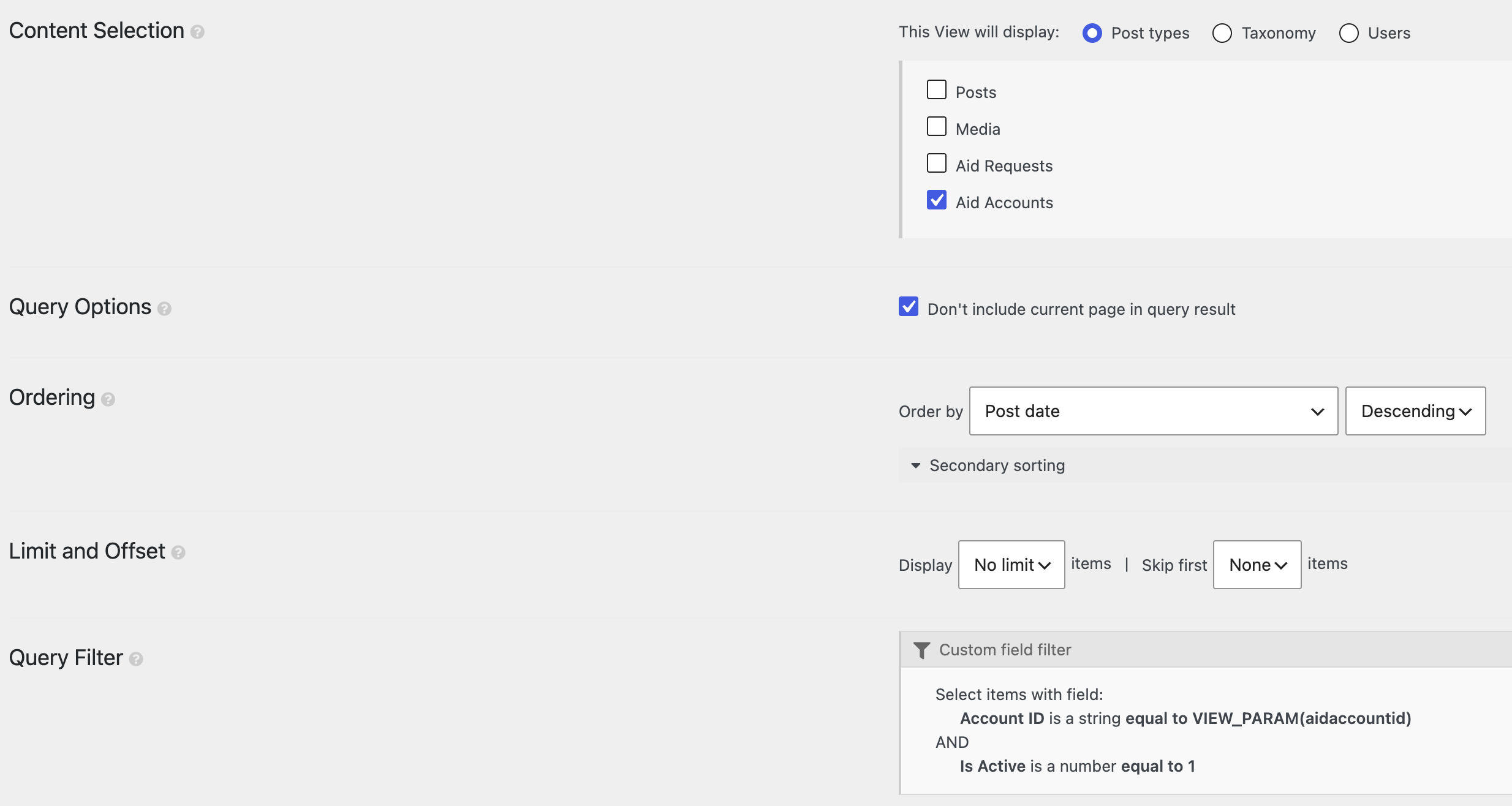
The view "display-current-aid-account" is pretty simple; attached are images of the query and the loop editor. Where we were returning successful queries before, we're now getting the "no items found" result.

I've confirmed that

[types field='aid-account-id' output='raw'][/types]

is still returning a value, and have confirmed that that value still matches the field in the post and should be returning a result.

Any idea on what might have changed, or why this might be failing after having worked for so long?

#2869694

Minesh
Unterstützer

Sprachen: Englisch (English )

Zeitzone: Asia/Kolkata (GMT+05:30)

Hello. Thank you for contacting the Toolset support.

This is a second reprot as far as I know. But I need the exact steps to reproduce the issue.

Can you please share problem URL and admin access details and let me quick check your settings and then I will proceed further accordingly.

*** Please make a FULL BACKUP of your database and website.***
I would also eventually need to request temporary access (WP-Admin and FTP) to your site. Preferably to a test site where the problem has been replicated if possible in order to be of better help and check if some configurations might need to be changed.

I have set the next reply to private which means only you and I have access to it.

#2870866

Hi Minesh and Toolset team,

I wanted to check in on this bug, since I haven't received a response to my post of six days ago, and it's unlike the Toolset support team to take that long to respond. Please let me know if you have any questions on my bug report or any difficulties in accessing the staging site. This bug is effecting the ability of the clients to use the system, so we're hoping to find a resolution as soon as possible.

Thank you,
David

#2870877

We’re seeing the same regression on another site after updating Toolset Views (around 3.6.26).

### Pattern
A parent View/loop embeds a nested View with a Types shortcode inside a query-filter attribute, e.g.:

[wpv-view name="display-current-aid-account" aidaccountid="[types field='aid-account-id' output='raw'][/types]"]

or, in our case:

[wpv-view name="quote-view-prices" ids="[types field='product-ids'][/types]"]

The Types field still outputs the correct value when used on its own, but the nested View returns no results (“no items found” / empty loop).

### Root cause
In `wp-views/embedded/inc/wpv.class.php`, before `do_blocks()` runs on the View layout HTML, Views temporarily replaces shortcodes with placeholders like `<!--WPV_SC_xxxx_N-->` (including `[types ...][/types]` and `[wpv-view ...]`).

Because `[types]` inside a `[wpv-view]` attribute is protected first, then the outer `[wpv-view]` is protected with that placeholder still in the attribute, restoring placeholders in creation order leaves the nested View’s attribute as something like:

aidaccountid="<!--WPV_SC_xxxx_0-->"

instead of the resolved Types value. That string casts to `0` in the shortcode ID/attribute filter, so the nested query becomes empty (`post__in = [0]` / no matches).

We confirmed this by logging `$WP_Views->get_view_shortcodes_attributes()` during `wpv_filter_query`: the nested View received the `WPV_SC` placeholder rather than the real field value.

### Workaround
1. Prefer restoring placeholders outermost-first in that `do_blocks` protection block (reverse the `$wpv_sc_map` restore loop).
2. And/or resolve unresolved Types shortcodes in View shortcode attributes before the ID/attribute query filter runs.

Custom Code snippet (Toolset → Settings → Custom Code), generalized for any shortcode attribute:

php
<?php
/**
 * Workaround: Views 3.6.x can leave [types]/[wpv-*] unresolved inside
 * nested View shortcode attributes (or as <!--WPV_SC_...--> tokens),
 * which breaks filters like ids="" / custom attributes.
 */
toolset_snippet_security_check() or die( 'Direct access is not allowed' );

add_filter( 'wpv_filter_query', 'toolset_fix_nested_view_shortcode_attrs', 12, 3 );
function toolset_fix_nested_view_shortcode_attrs( $query, $view_settings, $view_id ) {
	global $WP_Views;

	if ( ! $WP_Views || empty( $WP_Views->view_shortcode_attributes ) ) {
		return $query;
	}

	$index = count( $WP_Views->view_shortcode_attributes ) - 1;
	$attrs = $WP_Views->view_shortcode_attributes[ $index ];
	if ( ! is_array( $attrs ) ) {
		return $query;
	}

	$changed = false;

	foreach ( $attrs as $key => $value ) {
		if ( ! is_string( $value ) || $value === '' ) {
			continue;
		}

		// Unresolved shortcode still present in the attribute value.
		if ( false !== strpos( $value, '[types' ) || false !== strpos( $value, '[wpv-' ) ) {
			$resolved = trim( do_shortcode( $value ) );
			if (
				$resolved !== ''
				&& $resolved !== $value
				&& false === strpos( $resolved, '[' )
				&& false === strpos( $resolved, 'WPV_SC_' )
			) {
				$attrs[ $key ] = $resolved;
				$changed       = true;
			}
			continue;
		}

		// Placeholder left behind when restore order is wrong.
		// Reverse-restoring WPV_SC tokens in wpv.class.php is the proper fix;
		// without that, fall back is site-specific (read the intended meta/field).
		if ( false !== strpos( $value, 'WPV_SC_' ) || false !== strpos( $value, '<!--' ) ) {
			// Optional: leave a note in error_log while testing.
			// error_log( "Broken View attr {$key} on view {$view_id}: {$value}" );
		}
	}

	if ( $changed ) {
		$WP_Views->view_shortcode_attributes[ $index ] = $attrs;
	}

	return $query;
}

If attributes are still arriving as `<!--WPV_SC_...-->` (not as `[types...]`), also reverse the restore loop in `wpv.class.php` around the `do_blocks()` protection so nested shortcodes inside attributes are restored before use:

php
foreach ( array_reverse( $wpv_sc_map, true ) as $ph => $original ) {
	$layout_meta_html = str_replace( $ph, $original, $layout_meta_html );
}

Together, reverse restore + resolving `[types]` via `do_shortcode()` in `wpv_filter_query` priority 12 fixed this for us.


#2870925

Minesh
Unterstützer

I've hotfix version available and I want to apply on your staging site.

Can you please grant me admin level permission so I can upload the hotfix version and then you can check if that works and if that works you can take full backup of your live site and upload and activate the hotfix version available on your stating site.

Later when we publish the official version that contains the fix for this issue, I will update you.

I have set the next reply to private which means only you and I have access to it.

#2870998

Hi Minesh,

You now have admin level permissions with the credentials I supplied in the private message of July 22 (#2869767; Sorry, I thought I had given them to you, but I neglected to change the role... you should be all set now).

I may have to manually install the hotfix rather than simply push the staging site to live, so if you can let me know what files need to change that would be helpful.

Thanks!
David

#2870999

Also wanted to let you know that I just saw your reply of July 28, so I'm parsing through that right now. Thank you so much for investigating this with us!

#2871001
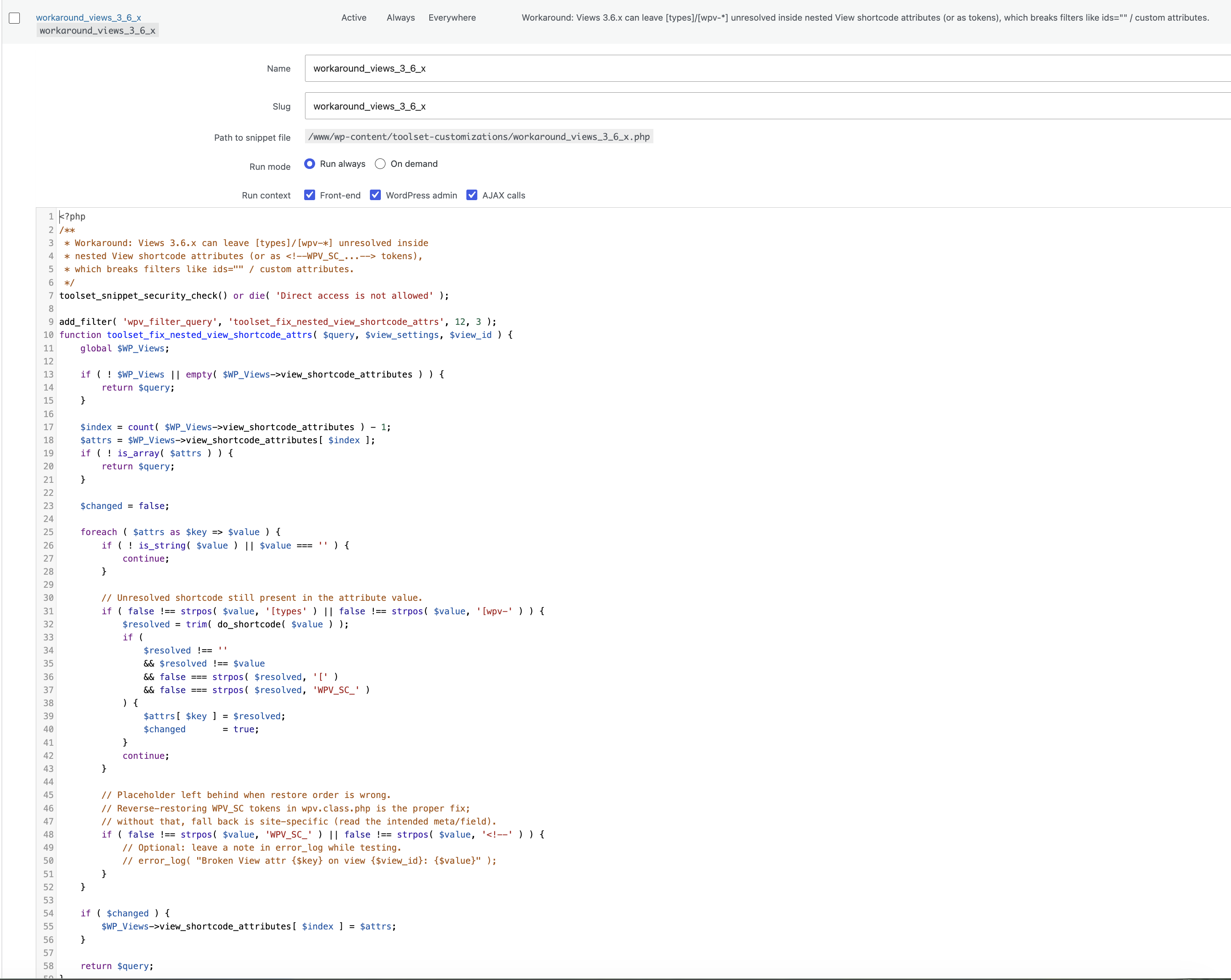
Screenshot 2026-07-29 at 11.23.57 AM.png

Just a follow up to let you know that I tried to patch the live production site based on the info in your July 28 message, but wasn't successful. Here's what I did:

1) Added a new custom code snipped under Toolset > Settings, named "workaround_views_3_6_x" (screenshot attached)

2) Edited /wp-content/plugins/toolset-blocks/embedded/inc/wpv.class.php, like so:

$layout_meta_html = do_blocks( $protected_html );
						/*
						foreach ( $wpv_sc_map as $ph => $original ) {
							$layout_meta_html = str_replace( $ph, $original, $layout_meta_html );
						}
						*/
						foreach ( array_reverse( $wpv_sc_map, true ) as $ph => $original ) {
    						$layout_meta_html = str_replace( $ph, $original, $layout_meta_html );
						}

Didn't break anything, but wasn't successful. Clearly I'm not an expert, so I may have missed something. Will look forward to your hot fix. Thanks!

#2871074

Minesh
Unterstützer

Can you please check now.

I've uploaded and activated the patched Toolset Views version and it seems to be working.

I already installed and activated the plugin "WP Anything Downloader" - so you can download the latest Toolset Views plugin from your plugins page:
- versteckter Link

And then please make sure you take full backup of your live/production site and then deactivate and delete the existing Toolset Blocks/Views plugin and then install the above downloaded version of Toolset Views plugin and activate it on your live/production site.

#2871135

Thanks Minesh! I'll install the update this evening, and then follow up to confirm success and/or report any issues. More to come!

#2871262

Hi Minesh,

I just installed the patched version of Views per your instructions, and am confirming that the issue is fixed on our live/production site.

Thank you again for your support, we couldn't have done it without you!