Tell us what you are trying to do? Use a different color of marker on the map depending on a custom taxomony
Is there any documentation that you are following? https://toolset.com/documentation/legacy-features/views-plugin/displaying-taxonomies-conditionally/#specific
What is the link to your site? versteckter Link
What I did:
On that page: versteckter Link
I have a view with my listings on the left and a content template with a map on the right.
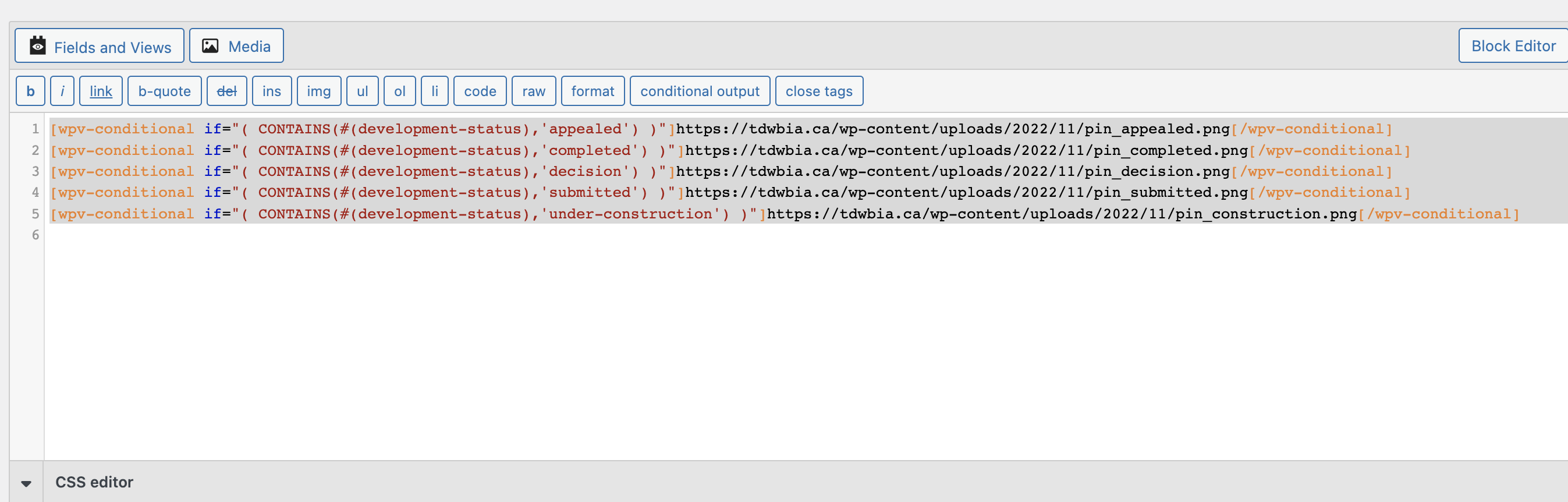
On the map, I created a marker and, as marker ID, I assigned a content template that contains my conditionnal outputs based on taxonomie.
I have attached a picture of the content template and the map content template where the marker is.
My issue is: the markers are not showing at all.
Can you help? Thanks!
Hi Melanie
I'm not sure you can expect the wpv-post-body shortcut to resolve where you have it (as a value for the marker_icon attribute of the wpv-map-render shortcode).
You could check that by removing all of the conditional shortcodes from your linked template and just have it output one of the png file urls for your custom markers: do the markers appear with this custom marker graphic?
In any case, you would be setting a custom marker icon at the map level (for all markers) rather than at the marker level (where different icons could be used by different markers on the same map).
What you want should be possible, though. See the screenshot from the Real Estate reference site in the documentation here: https://toolset.com/documentation/legacy-features/maps-plugin/displaying-markers-on-maps/#displaying-a-map-with-a-list-of-markers-coming-from-a-view
You could check how it is done on the real estate site by spinning up a copy at discover-wp.com.
I suggest your review that page of documentation about adding maps with legacy shortcodes.
Without creating a real estate site myself, I expect you will find that the different custom marker icons are added at the level of the wpv-map-marker shortcode. You can insert the same shortcode but with different custom icons several times, each one wrapped in a conditional shortcode to test the taxonony.
Does that make sense?
Hi Nigel,
Thank you for your help.
However, I did try adding the conditional content template to the marker instead of to the map and it's worse.
If I put just one pin without conditions on the content template it works when inserted in the map but doesn't when inserted in the marker.
The real estate agency on discover-wp.com is not the same as the documentation and doesn't show custom pins.
OK, I set up a demo on a sandbox so that you can see how it is done.
The working page—which shows different icons for different locations based on their category—can be seen here: versteckter Link
You can log in to the admin pages with this link: versteckter Link
And, the link to edit the View responsible is here: versteckter Link
If you get stuck, let me know.
My issue is resolved now. Thank you!