Dieser Thread wurde gelöst. Hier ist eine Beschreibung des Problems und der Lösung.
Problem:
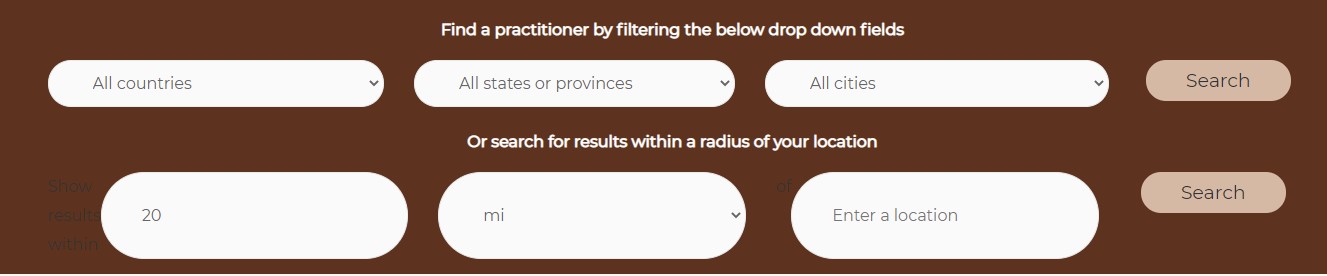
Update of Maps changes the Search View - Hide or remove "Show results within" text of location/address/map search filter Solution:
To remove/hide "Show results within" text of location search filter when using the blocks, you will have to add the custom JS code.
Tell us what you are trying to do?
I am updating the Toolset Maps plugin from version 2.0.8 to 2.0.11, and when I do so the Search by Radius part in the search bar changes. It looks like it looses the Settings and some custom CSS that I've applied.
I tried to redo the settings, however when I want to edit the View, it seems I lose the Search bar I've created and I have to recreate it. Also the search results show up in there, I can't seem to select to show only the search bar.
I want to avoid to have to create the View from scratch again. I hope you can help me.
Is there any documentation that you are following?
No
Is there a similar example that we can see?
No, however I've made a screenshot of what happens when I update the Maps plugin. Please find it in the uploads section.
What is the link to your site? versteckter Link
However, I have created a staging site where we can troubleshoot in case it is needed. I can send the login data in a private reply.
Hello. Thank you for contacting the Toolset support.
As I understand, you want to only display the "Enter the location" field for the location search and hide the other fields - correct?
*** Please make a FULL BACKUP of your database and website.***
I would also eventually need to request temporary access (WP-Admin and FTP) to your site. Preferably to a test site where the problem has been replicated if possible in order to be of better help and check if some configurations might need to be changed.
I have set the next reply to private which means only you and I have access to it.
Hello Minesh,
Happy New Year to you!
I tried your custom JS solution, and it looks good until you start using the search functionality. Then it jumps back to the old state. I cleared all browser and server cache before trying.
Here is a screencast link that I made to show you what I mean. versteckter Link?
Could you have a look at it again, please?
Thank you.
Hacer
I've adjusted the code as given under to "Custom JS" section.
jQuery(document).ready(function($){

$("div.form-group:contains('Show results within')").html(function() {
     return $(this).html().replace("Show results within", "").replace("of",'');

  });
   var places = new google.maps.places.Autocomplete(document.getElementById('toolset-maps-distance-center'));

});
jQuery( document ).on( 'js_event_wpv_parametric_search_form_updated', function( event, data ) {
/**
* data.view_unique_id (string) The View unique ID hash
* data.view_changed_form (object) The jQuery object for the View form after being updated
* data.view_changed_form_additional_forms_only (object) The jQuery object containing additional forms from other instances of the same View inserted using the [wpv-form-view] shortcode
* data.view_changed_form_additional_forms_full (object) The jQuery object containing additional forms from other instances of the same View inserted using the [wpv-view] shortcode
*/
jQuery("div.form-group:contains('Show results within')").html(function() {
return jQuery(this).html().replace("Show results within", "").replace("of",'');
});
var places = new google.maps.places.Autocomplete(document.getElementById('toolset-maps-distance-center'));
});