This issue was marked as resolved, but it has not been resolved. Please refer to this ticket for site access and info https://toolset.com/forums/topic/update-buttons-grays-out/
I am trying to: update page content
Link to a page where the issue can be seen: versteckter Link
I expected to see: being able to update page
Instead, I got: grayed out update page, sometimes update button returns, sometimes it stays grayed out.
HTPASSWD ACCESS TO STAGING SITE:
U: foundry
P: foundry
Hi Kyle,
Thank you for getting in touch.
The ticket was closed because there wasn't any activity on it for several days.
As per our previous discussion it would appear that there are some differences between your live site and your staging site.
Have you gotten any response from your hosting company?
Please let me know.
Thanks,
Shane
I understand, its just frustrating that the issue is marked as resolved when the issue is still present.
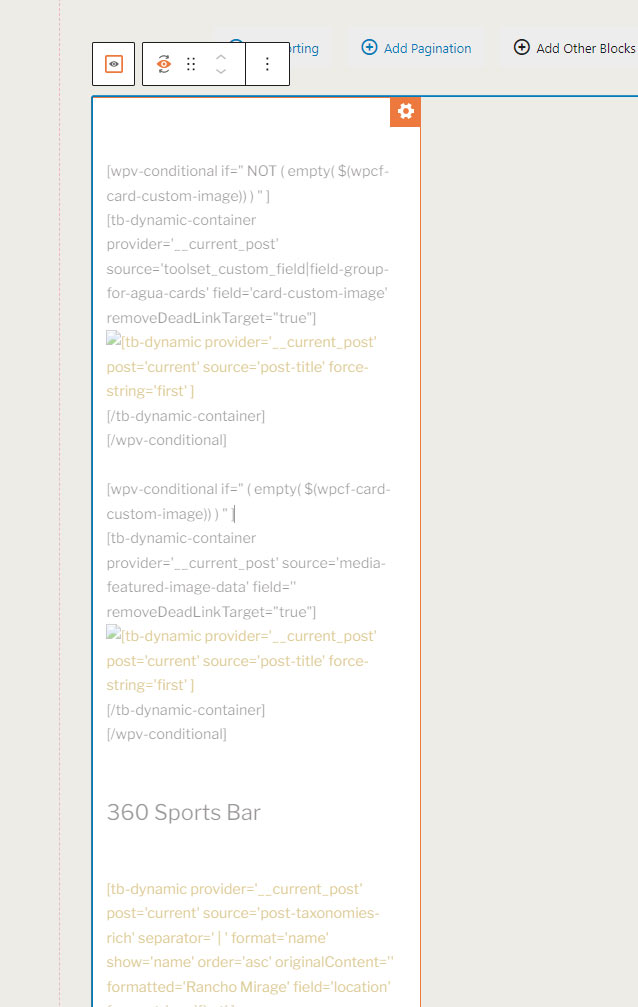
I checked with our hosting support team and confirmed that there are no AJAX requests timing out. The issue occurs on pages that have a section of conditional toolset code. It was built by a developer who doesn't work with us anymore and we don't have any notes on how it works. I'm wondering if there's something incorrect with the way this conditional code was written. If you see the attached screenshot, that's the area in question that you'll be able to see on the page I linked to this ticket.
This issue has been plaguing us and our client on a number of pages, we're really hoping we can find a resolution. Otherwise we are making website updates via SQL code haha.
Hi Kyle,
I had a look on the content template that the view is loading and it appears that your template is loading some incomplete conditionals.
I'm unsure what field that the conditional should be checking for but if you can look at the template below and let me know if you have an idea then I could complete the conditionals for you.
versteckter Link
Thanks,
Shane
Hi Shane,
That section is supposed to be pulling posts of post type "Agua Special" if they have a matching category that corresponds to the page title. We think the script is complete.
What section of the conditional is incomplete.
Regards,
Jake
Hi Jake,
From what I checked the issue is definitely coming from the restaurant specials cards view block.
Specifically the content template you're using to display the items.
I would suggest here that you build a dedicated content template for this view and then re-add it rather than loading a content template for a different post type.
The reason for this is your view is listing out Pages but the content template is set to display on the "Agua Modules" post type.
The Pages and Agua Modules post type may not share the same data which can lead to conflicts. Having a dedicated content template for this view's data will allow you to better manage what is displayed for this particular view.
The moment I remove the content template from the view, the update button starts to work again.
Thanks,
Shane