Navigation überspringen

[Gelöst] Uncanny Automator Plugin Conflict with Toolset

Dieser Thread wurde gelöst. Hier ist eine Beschreibung des Problems und der Lösung.

Problem:

Got some PHP error message with plugin "restrict-content-pro-wp-job-manager-custom".

Solution:

This issue is on "restrict-content-pro-wp-job-manager-custom" plugin, is not related with Toolset plugins.

Relevant Documentation:

This support ticket is created vor 4 years, 7 months. There's a good chance that you are reading advice that it now obsolete.

This is the technical support forum for Toolset - a suite of plugins for developing WordPress sites without writing PHP.

Everyone can read this forum, but only Toolset clients can post in it. Toolset support works 6 days per week, 19 hours per day.

Sun Mon Tue Wed Thu Fri Sat
- 9:00 – 13:00 9:00 – 13:00 9:00 – 13:00 9:00 – 13:00 9:00 – 13:00 -
- 14:00 – 18:00 14:00 – 18:00 14:00 – 18:00 14:00 – 18:00 14:00 – 18:00 -

Zeitzone des Unterstützers: Asia/Hong_Kong (GMT+08:00)

Dieses Thema enthält 2 Antworten, hat 2 Stimmen.

Zuletzt aktualisiert von michaelT-18 vor 4 years, 7 months.

Assistiert von: Luo Yang.

Author
Artikel
#2217243

I am trying to:
Setup Uncanny Automator on my site

Link to a page where the issue can be seen:
versteckter Link

I expected to see: No error messages

Instead, I got:
Deprecated: Non-static method RCP_WPJM_Custom::get_credits_for_period() should not be called statically in /home/customer/www/nannyz.com/public_html/wp-content/plugins/restrict-content-pro-wp-job-manager-custom/rcp-menu-widget.php on line 36

I contacted the plugin's support and they requested that I set up a staging site, which I have done here:
versteckter Link

Uncanny Automator's Support's response was:
"I performed a theme/plugin conflict test on your staging site and it looks like the "Toolset Views" plugin is causing the notices (I left it deactivated).

Please note, that notices are not errors, WordPress core developers use them to communicate with developers about the upcoming changes in core that might affect their code. It is never recommended to display notices and warnings on live/production sites, as those are only intended for developers.

I would recommend setting the WP_DEBUG mode in your wp-config.php file to false for now while contacting the Toolset Views plugin developers and requesting them to update their code according to the notices. If you still want to log those notices, you can set the WP_DEBUG_LOG constant to true. More information about debug modes can be found here: https://wordpress.org/support/article/debugging-in-wordpress/"

#2217385
staging.jpg

Hello,

I have removed the website credentials from your post, it is not safe to put them there.

I can login into your website, and have done below steps in your staging site:
1) Deactivate all Toolset plugins
versteckter Link
2) Test the problem page in fronend:
versteckter Link
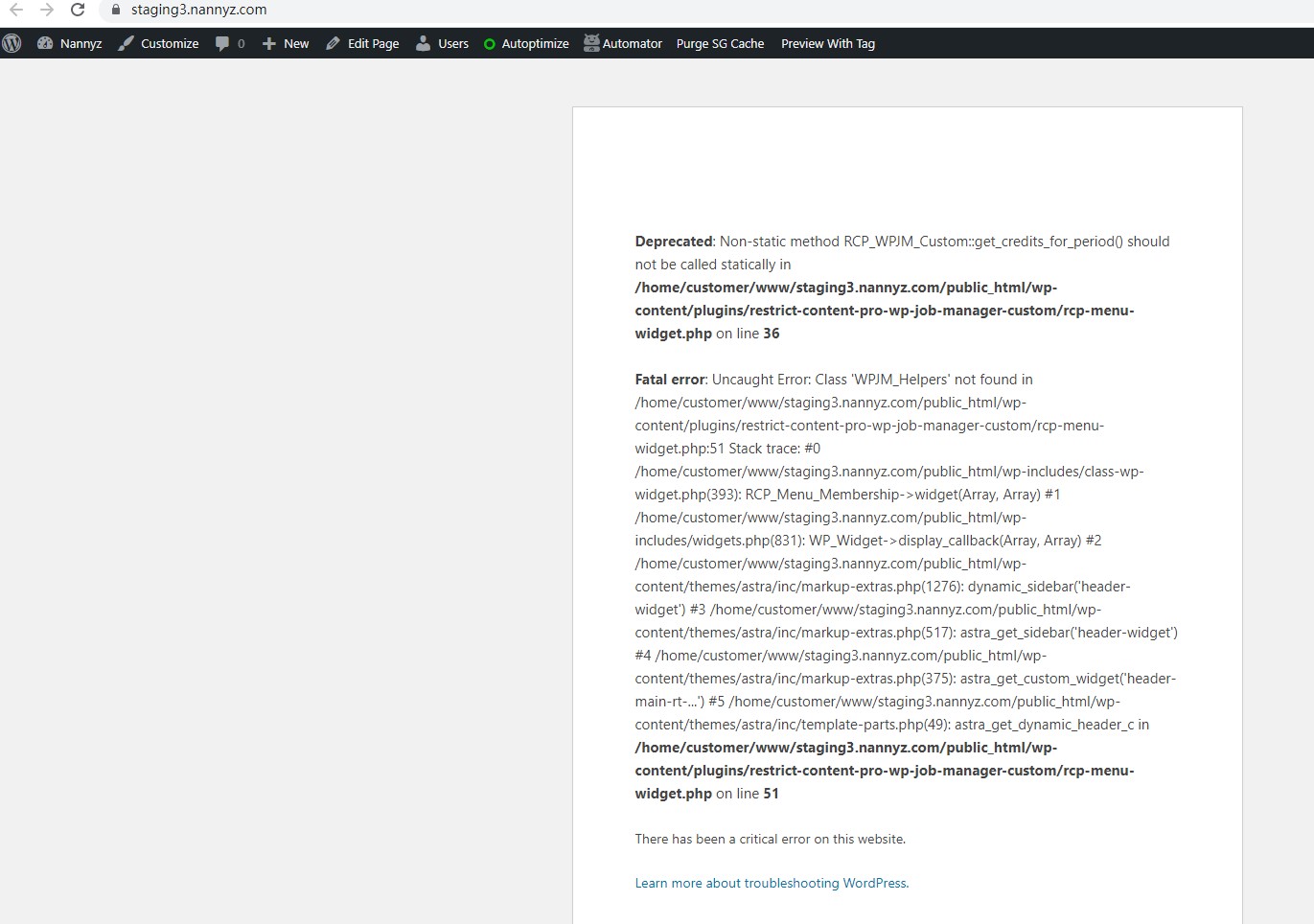
I see the same PHP errors, see my screenshot staging.jpg

Can you confirm it? this problem is not related with Toolset plugins, according the PHP error message, you should check it with the plugin author of "restrict-content-pro-wp-job-manager-custom"

#2218003

Thanks for your help,
I'll go back to other plugin support teams