Navigation überspringen

[Gelöst] stretched blog images preview

Dieser Thread wurde gelöst. Hier ist eine Beschreibung des Problems und der Lösung.

Problem:

Blog preview images appeared stretched on the category archive page, while other images displayed correctly.

Solution:

After investigation, it was confirmed that the affected page was not created with Toolset, since deactivating Toolset Types and Blocks did not affect it and no Toolset archives or templates were assigned. Therefore, the issue was unrelated to Toolset.

This support ticket is created vor 8 months. There's a good chance that you are reading advice that it now obsolete.

This is the technical support forum for Toolset - a suite of plugins for developing WordPress sites without writing PHP.

Everyone can read this forum, but only Toolset clients can post in it. Toolset support works 6 days per week, 19 hours per day.

Dieses Thema enthält 2 Antworten, hat 1 Stimme.

Zuletzt aktualisiert von Christopher Amirian vor 8 months.

Assistiert von: Christopher Amirian.

Author
Artikel
#2829621

I am trying to: resize the images

Link to a page where the issue can be seen: versteckter Link

I expected to see: right size like the other ones

Instead, I got:

#2830042

Nigel
Unterstützer

Sprachen: Englisch (English ) Spanisch (Español )

Zeitzone: Europe/London (GMT+01:00)

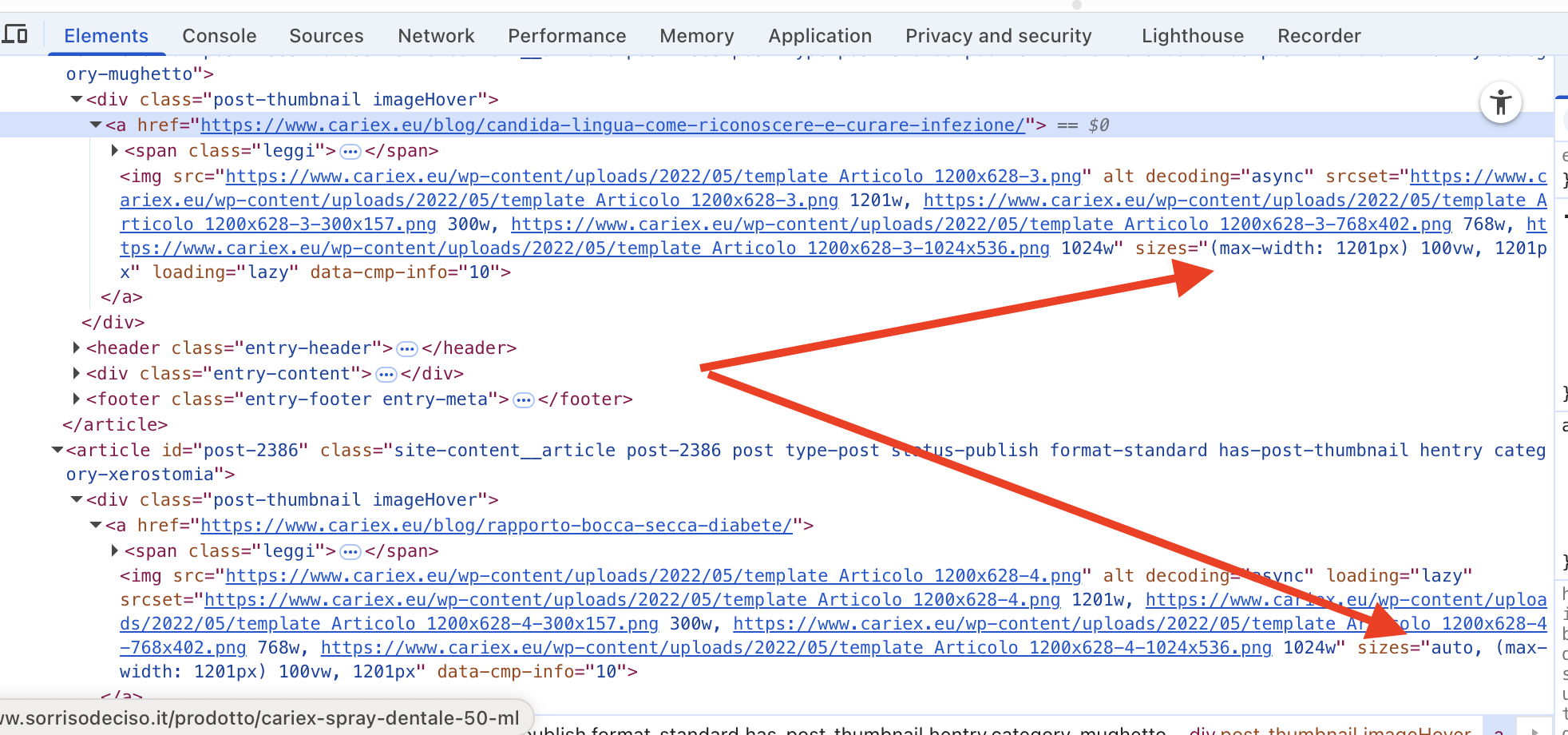
Screenshot 2025-10-20 at 16.59.20.png

Hi there

While waiting for a colleague to take this ticket I took a quick look at your site.

From the front end I can see why the presentation of the images is different.

As you can see in my screenshot, for the img elements, with some of the images (the problem images) the sizes attribute includes "auto", but for the images which look correct they do not.

I'm not sure if that is enough to help you identify what the source of the problem may be.

I can't tell exactly how you have made this page (I see that it is a category archive).

If you need more help then I think we would need to be able to access your site to take a look at how the page is made, so let me set a private reply now in case you want to share credentials with us to examine your site.

#2830166

Christopher Amirian
Unterstützer

Sprachen: Englisch (English )

Hi,

Welcome to Toolset support. I wonder how you determined that the page in question is created by Toolset?

I deactivated the Toolset Types and Toolset Blocks plugins and the page was still there.

This shows that the page is not created by Toolset in the first place.

I also checked the Toolset > WordPress Archieves and Toolset > Content Templates menus and there was no archive creted using Toolset.

So the issue is not relted to our plugin.

Thanks.