Navigation überspringen

[Gelöst] single field is missing (front end).

This support ticket is created vor 2 years, 1 month. There's a good chance that you are reading advice that it now obsolete.

This is the technical support forum for Toolset - a suite of plugins for developing WordPress sites without writing PHP.

Everyone can read this forum, but only Toolset clients can post in it. Toolset support works 6 days per week, 19 hours per day.

Sun Mon Tue Wed Thu Fri Sat
- 10:00 – 13:00 10:00 – 13:00 10:00 – 13:00 10:00 – 13:00 10:00 – 13:00 -
- 14:00 – 18:00 14:00 – 18:00 14:00 – 18:00 14:00 – 18:00 14:00 – 18:00 -

Zeitzone des Unterstützers: Asia/Kolkata (GMT+05:30)

Dieses Thema enthält 2 Antworten, hat 2 Stimmen.

Zuletzt aktualisiert von keijoM vor 2 years, 1 month.

Assistiert von: Minesh.

Author
Artikel
#2691374
bug.png

I am trying to:
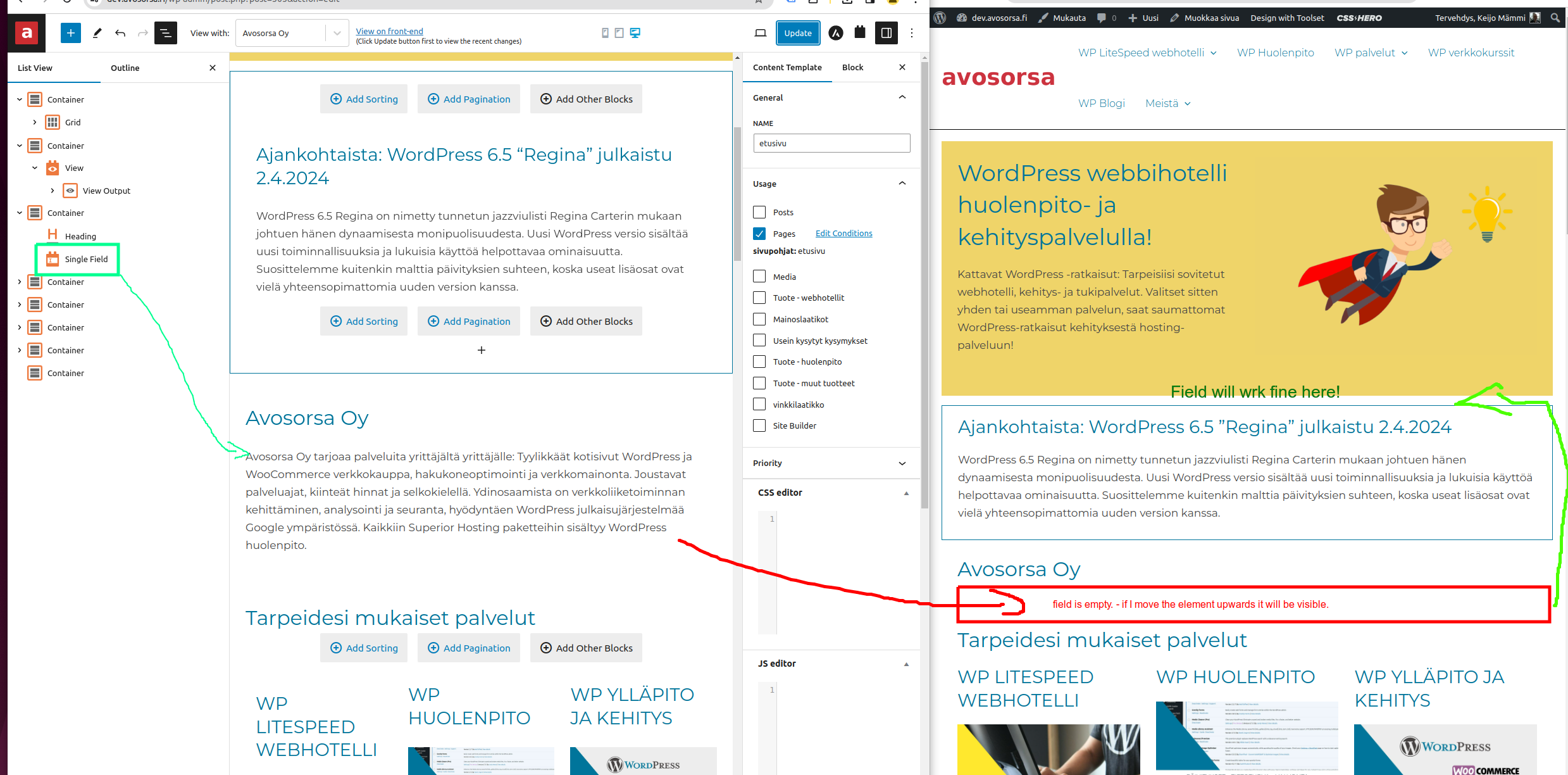
Print post content below container that include View

Link to a page where the issue can be seen:
versteckter Link

I expected to see:
body content below "avosorsa Oy"heading

Instead, I got: empty row - if I move the element (container) upwards it works correctly.

#2691393

Minesh
Unterstützer

Sprachen: Englisch (English )

Zeitzone: Asia/Kolkata (GMT+05:30)

Hello. Thank you for contacting the Toolset support.

Can you please check now:
- versteckter Link

I'm not sure but this could be related to when multiple shingle field blocks added to content template to display the post body field.

As a workaround - you can use the "Fields and Text" block and add the [wpv-post-body] shortcode to display the post body field. Which I already added to the content template you are using:
- versteckter Link

[wpv-post-body view_template="None"]

Can you please confirm it works as expected.

#2692462

Hello,

Block named "Fields and Text" work well. I solved it by creating a new custom field for each Post type. So, only one post body field is printed on a page at a time.

Case closed 🙂

#2692463

...