Navigation überspringen

[Gelöst] Show sub category in search bar widget

This support ticket is created vor 1 year, 4 months. There's a good chance that you are reading advice that it now obsolete.

This is the technical support forum for Toolset - a suite of plugins for developing WordPress sites without writing PHP.

Everyone can read this forum, but only Toolset clients can post in it. Toolset support works 6 days per week, 19 hours per day.

Sun Mon Tue Wed Thu Fri Sat
- 10:00 – 13:00 10:00 – 13:00 10:00 – 13:00 10:00 – 13:00 10:00 – 13:00 -
- 14:00 – 18:00 14:00 – 18:00 14:00 – 18:00 14:00 – 18:00 14:00 – 18:00 -

Zeitzone des Unterstützers: Asia/Kolkata (GMT+05:30)

Dieses Thema enthält 0 reply, hat 1 Stimme.

Zuletzt aktualisiert von Minesh vor 1 year, 4 months.

Assistiert von: Minesh.

Author
Artikel
#2790379
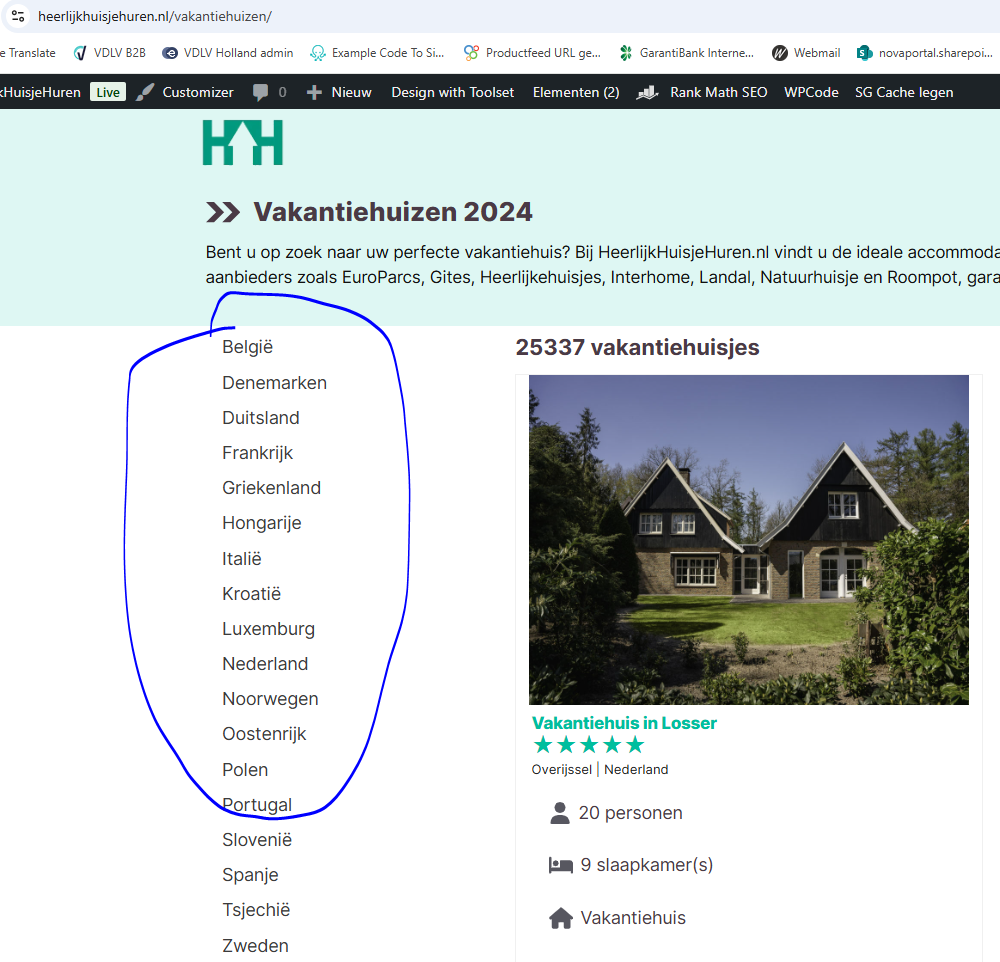
Category.PNG

Hi there,

On my site I show the categories on versteckter Link (picture attached).
I want to show the subcategories on on the underlying layer, is this possible?

So for example if you select België (versteckter Link) all subcategories of België will be shown.

Is this possible?

#2790420

Minesh
Unterstützer

Sprachen: Englisch (English )

Zeitzone: Asia/Kolkata (GMT+05:30)

Hello. Thank you for contacting the Toolset support.

As I understand, on left sidebar where currently categories are displyed, you want to have accordion so when you click on parent category it should open the accordion with subcategories associated with the clicked patent - is that correct?

If yes, I'll have to revview how exactly you are displaying the category on left panel currently.

Can you please share admin access detials.

*** Please make a FULL BACKUP of your database and website.***
I would also eventually need to request temporary access (WP-Admin and FTP) to your site. Preferably to a test site where the problem has been replicated if possible in order to be of better help and check if some configurations might need to be changed.

I have set the next reply to private which means only you and I have access to it.

#2790687

Minesh
Unterstützer

Sprachen: Englisch (English )

Zeitzone: Asia/Kolkata (GMT+05:30)

When I try to login using the admin access details shared it shows the following message when I try to login: "You are trying to login with an administrative account. Please, use the Custom Login URL instead."

Can you please tell me what is the custom URL I should use for admin login?

I have set the next reply to private which means only you and I have access to it.

#2790955

You can use:
versteckter Link

#2791015

Minesh
Unterstützer

Sprachen: Englisch (English )

Zeitzone: Asia/Kolkata (GMT+05:30)

I checked but I'm not sure how exactly you added the left sidebar widget.

Have you added the Toolset view widget or how exactly you added the left sidebar widget on the following link:
- versteckter Link

#2791070

You can find them by:
view->elements-->Left Sidebar

I would like to keep the link structure like below:
heerlijkhuisjehuren.nl/vakantiehuizen/nederland/limburg/slenaken-heijenrath/

#2791143

Minesh
Unterstützer

Sprachen: Englisch (English )

Zeitzone: Asia/Kolkata (GMT+05:30)

I see you are using the [fe_widget] shortcode and if I'm not wrong that shortcode displays the search fields on left sidebar and the shortcode belongs to "Filter Everything — WooCoomerce Product en WordPress Filter" plugin.

As this is belongs to third party plugin see the doc:
- versteckter Link

I suggest you should get in touch with "Filter Everything — WooCoomerce Product en WordPress Filter" support and check with them about your issue.

#2791356

Okay thanks.

So there is no way to do this by a toolset shortcode?

#2791398

Minesh
Unterstützer

Sprachen: Englisch (English )

Zeitzone: Asia/Kolkata (GMT+05:30)

Here is the Doc that shows information how you can build custom search using Toolset:
- https://toolset.com/course-lesson/creating-a-custom-search/

And here is the information that shows how you can display search form and search result side by side:
=> https://toolset.com/course-lesson/creating-a-custom-search/#display-the-search-box-and-search-results-side-by-side








