Navigation überspringen

[Gelöst] Show different map marker pins per category

This support ticket is created vor 1 year, 6 months. There's a good chance that you are reading advice that it now obsolete.

This is the technical support forum for Toolset - a suite of plugins for developing WordPress sites without writing PHP.

Everyone can read this forum, but only Toolset clients can post in it. Toolset support works 6 days per week, 19 hours per day.

Sun Mon Tue Wed Thu Fri Sat
- 10:00 – 13:00 10:00 – 13:00 10:00 – 13:00 10:00 – 13:00 10:00 – 13:00 -
- 14:00 – 18:00 14:00 – 18:00 14:00 – 18:00 14:00 – 18:00 14:00 – 18:00 -

Zeitzone des Unterstützers: Asia/Kolkata (GMT+05:30)

Dieses Thema enthält 0 reply, hat 1 Stimme.

Zuletzt aktualisiert von Minesh vor 1 year, 6 months.

Assistiert von: Minesh.

Author
Artikel
#2785904
Capture.PNG

Tell us what you are trying to do?

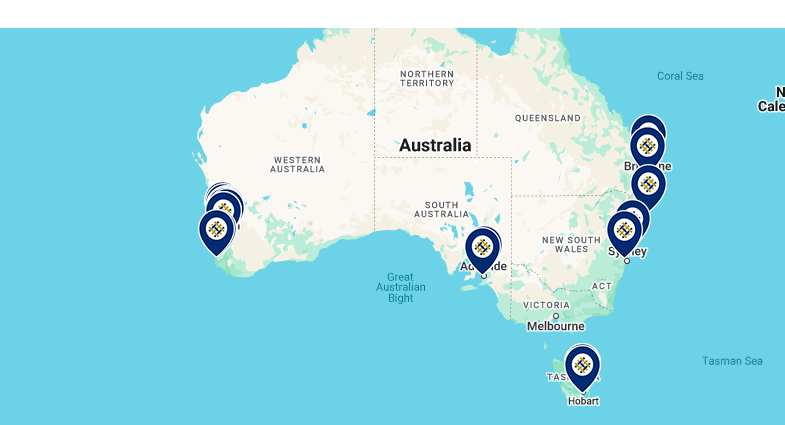
I have custom post type (Clinics) that have a two category (Medical Centres, Molescan Clinics).

-> If the the post assigned in Medical Centres category, I want to show this map maker: versteckter Link.

-> And if the the post assigned in Molescan Clinics category, I want to show this map maker: versteckter Link

What is the link to your site?

This is the page showing all locations: versteckter Link

This is my loop editor code:

[wpv-layout-start]
[wpv-items-found]
<!-- wpv-loop-start -->

<div class="container cc-wrapper">
<div class="row mb-3">
<wpv-loop>

<div class="col-lg-4 col-md-6 themed-grid-col">
<div class="location-wrap">
<div class="clinic-title">[wpv-post-link]</div>
<div class="phone"><i class="fas fa-phone"> <span>versteckter Link</span></div>
<div class="services-offered"><b>Services:</b> <span> [types field='services-offered'][/types]</span></div>
<div class="clinic-website">versteckter Link</div>
</div>
</div>

</wpv-loop>
</div>
</div>

<!-- wpv-loop-end -->
[/wpv-items-found]
[wpv-no-items-found]
[wpml-string context="wpv-views"]No items found[/wpml-string]
[/wpv-no-items-found]

[wpv-layout-end]

#2785918

Minesh
Unterstützer

Sprachen: Englisch (English )

Zeitzone: Asia/Kolkata (GMT+05:30)

Hello. Thank you for contacting the Toolset support.

What is the view that displays the map marker?

Can you please send me admin access details and once I review you settings I'll be able to guide you in the right direction.

*** Please make a FULL BACKUP of your database and website.***
I would also eventually need to request temporary access (WP-Admin and FTP) to your site. Preferably to a test site where the problem has been replicated if possible in order to be of better help and check if some configurations might need to be changed.

I have set the next reply to private which means only you and I have access to it.

#2785928

Minesh
Unterstützer

Sprachen: Englisch (English )

Zeitzone: Asia/Kolkata (GMT+05:30)

Can you please check now: versteckter Link

What I've done is from your map block that is added on the following page, I've removed the marker and I've also enable the map option for clustering of marker and minimum group for clustering is set to 4. Please check the following screenshot: versteckter Link
=> versteckter Link

Then to the view:
=> versteckter Link

I've adjusted the View Loop code as given under:

[wpv-layout-start]
	[wpv-items-found]
	<!-- wpv-loop-start -->
		
<div class="container cc-wrapper">
  <div class="row mb-3">
        <wpv-loop>
          
[wpv-conditional if="( CONTAINS(#(clinic-category),'medical-centres') )"]
         	
          		[wpv-map-marker map_id='map-3' marker_id='marker-[wpv-post-id]' marker_icon='//molescan.121group.dev/wp-content/uploads/mapmarker-fullerton.png' marker_field='wpcf-clinic-map-address']
          
          <div class='clinic-title'>[wpv-post-link]</div>
<div class='phone'><i class='fas fa-phone'></i> <span><em><u>versteckter Link</u></em></span></div>
<div class='services-offered'><b>Services:</b> <span> [types field='services-offered'][/types]</span></div>
         		[/wpv-map-marker]
          
          [/wpv-conditional]
          
          
          [wpv-conditional if="( CONTAINS(#(clinic-category),'molescan-clinics') )"]
          			[wpv-map-marker map_id='map-3' marker_id='marker-[wpv-post-id]' marker_icon='//molescan.121group.dev/wp-content/uploads/mapmarker-molescan.png' marker_field='wpcf-clinic-map-address']
          
          <div class='clinic-title'>[wpv-post-link]</div>
<div class='phone'><i class='fas fa-phone'></i> <span><em><u>versteckter Link</u></em></span></div>
<div class='services-offered'><b>Services:</b> <span> [types field='services-offered'][/types]</span></div>
          
          
          		[/wpv-map-marker]
          [/wpv-conditional]
          
          
            <div class="col-lg-4 col-md-6 themed-grid-col">
                <div class="location-wrap">
                        <div class="clinic-title">[wpv-post-link]</div>
                      	<div class="phone"><i class="fas fa-phone"></i> <span><em><u>versteckter Link</u></em></span></div>
                  		<div class="services-offered"><b>Services:</b> <span> [types field='services-offered'][/types]</span></div>
                        <div class="clinic-website"><em><u>versteckter Link</u></em></div>
                </div>
            </div>
          
          
        </wpv-loop>
   </div>
</div>


	<!-- wpv-loop-end -->
	[/wpv-items-found]
	[wpv-no-items-found]
		<strong>[wpml-string context="wpv-views"]No items found[/wpml-string]</strong>
	[/wpv-no-items-found]


[wpv-layout-end]

More info:
- https://toolset.com/documentation/legacy-features/views-plugin/displaying-taxonomies-conditionally/#specific
- https://toolset.com/documentation/programmer-reference/maps/maps-shortcodes/#wpv-map-marker

I hope solution shared above will help you to resolve your issue.

#2786033
search.PNG

Hey, Thank you for your help it works. I think much better for future toolset updates to include this set-up to easy to navigate so that all Toolset user not struggling having a code. I mean have a setting to set the conditional on the back-end rather than finding code solution.

I have another request for help. On the search bar, I want to show the closest clinic near me when I search my location address. How can I achieve that?

Like this website: versteckter Link

#2786078

Minesh
Unterstützer

Sprachen: Englisch (English )

Zeitzone: Asia/Kolkata (GMT+05:30)

Glad to know that solution I shared help you to resolve your issue.

You can raise the feature request by filling the following form:
- https://toolset.com/home/contact-us/suggest-a-new-feature-for-toolset/

Regarding your addon question, as per our support policy, we entertain only one question per ticket. This will help other users searching on the forum as well as help us to write correct problem resolution summery for the original issue reported.

May I kindly ask you to open a new ticket with every new question you may have.

Thank you for understanding.