I am trying to set up a View that will display on a page. On the initial page load, the page will show all Partners. But there will be filters on this page for two taxonomies to allow end users to filter the results by their chosen taxonomy options.
I have this working as desired here:
versteckter Link
The filtering is working. The problem I have now is I do not want the filter to be a drop-down that only allows a single option to be selected. I'd like the options to display as checkboxes that the user selects to allow multiple options to be selected before they hit the Submit button.
I'd also like these filters to appear as a left side column on the page instead of above the results output. The page we are trying to emulate is here:
versteckter Link
Note that on this page we only have one taxonomy filter for Activities. The way we are setting this up on the new site is to have two taxonomies for Activities and Amenities. Can you show me how to make the options be shown as checkboxes and how to display them in a left sidebar to the side of the results? Any assistance you can provide or steer me to here will be greatly appreciated.
Hello,
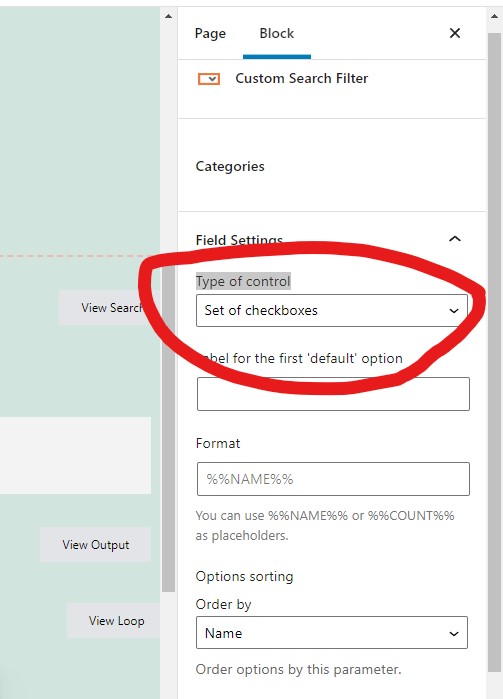
You can find and select those two taxonomy filter fields, and change the option "Type of control" to "Set of checkboxes", see my screenshot checkboxes1.JPG
How would I do it in the classic editor not the block editor?
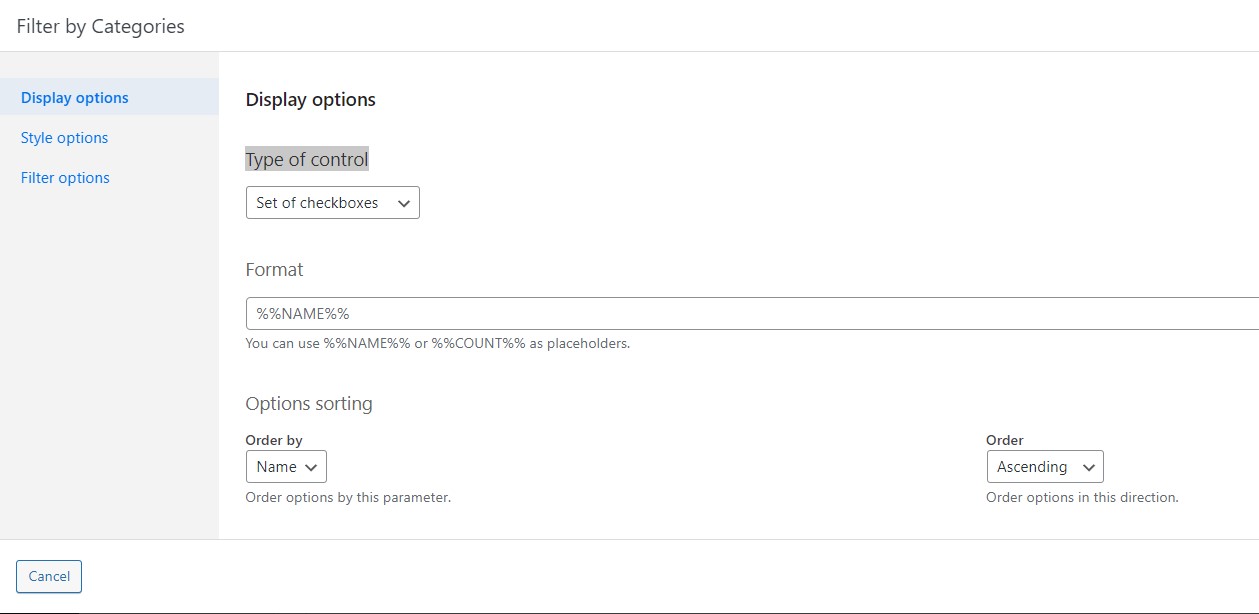
With classic editor, you can edit the post view, in section "Search and Pagination", select the taxonomy filter shortcode [wpv-control-post-taxonomy ...], click button "Edit filter", and change the option "Type of control" to: Set of checkboxes
See my screenshot checkboxes2.JPG
I highlighted the filter shortcode and clicked Edit filter and it did not take me to the screen in your screenshot. I remember that screen when I set up the filter initially though and now know I have to pick the correct option from there.
Since I couldn't get there, I tried changing the type=select to type=checkboxes and that worked. It's now displaying the options as checkboxes here:
versteckter Link
Now how do I get these options to display as a left sidebar instead of above the output?
For the new question: Now how do I get these options to display as a left sidebar instead of above the output?
You can edit the post view(ID: 9924), in section "Output Editor", customize the outputs with custom HTML + CSS codes, and try to style them as two columns.
https://toolset.com/documentation/user-guides/views-shortcodes/#wpv-filter-meta-html
https://toolset.com/documentation/user-guides/views-shortcodes/#wpv-layout-meta-html
If you are using Blocks editor to setup the post view, it will be very easy to style it with Toolset grid block, see our document:
https://toolset.com/course-lesson/responsive-columns-and-grids/
OK, that was an easy one. I didn't realize that Output Editor was the place to do this. Now that you've shown me that, obtaining the desired results was easy.
versteckter Link
Woo-hoo!
Thanks again.
My issue is resolved now. Thank you! Knocking out these issues one by one very well thanks to your awesome support.