Navigation überspringen

[Gelöst] Setting button URL to no-follow or sponsored

This support ticket is created vor 4 years, 1 month. There's a good chance that you are reading advice that it now obsolete.

This is the technical support forum for Toolset - a suite of plugins for developing WordPress sites without writing PHP.

Everyone can read this forum, but only Toolset clients can post in it. Toolset support works 6 days per week, 19 hours per day.

Sun Mon Tue Wed Thu Fri Sat
- 9:00 – 12:00 9:00 – 12:00 9:00 – 12:00 9:00 – 12:00 9:00 – 12:00 -
- 13:00 – 18:00 13:00 – 18:00 13:00 – 18:00 14:00 – 18:00 13:00 – 18:00 -

Zeitzone des Unterstützers: America/Jamaica (GMT-05:00)

Dieses Thema enthält 4 Antworten, hat 3 Stimmen.

Zuletzt aktualisiert von nadavL vor 4 years, 1 month.

Assistiert von: Shane.

Author
Artikel
#2355167

Hi,

How can I set Toolset Button block attributes to mark them as 'Sponsored'?

Thanks

#2355269

Nigel
Unterstützer

Sprachen: Englisch (English ) Spanisch (Español )

Zeitzone: Europe/London (GMT+01:00)

Screenshot 2022-05-04 at 11.53.51.png

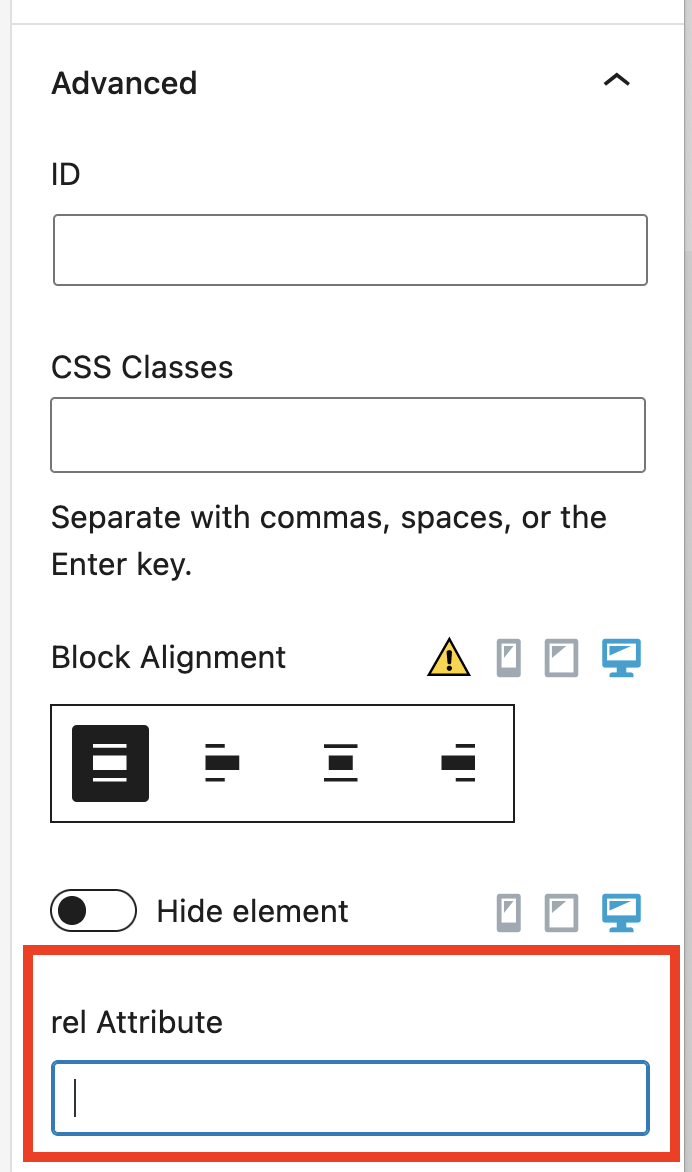
You can add a rel attribute value to a button block in the Advanced section of its settings (screenshot).

You can see valid values here: versteckter Link

#2355373
Untitled-2.jpg

That's perfect.
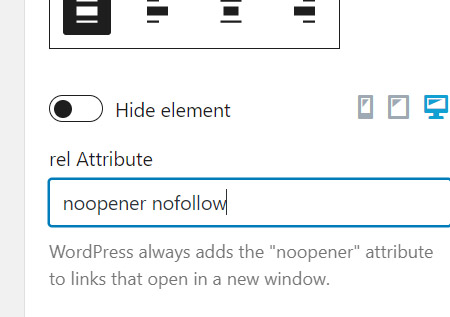
I see that WP automatically added the 'noopenner' attribute. In order to add nofollow, I simply write both (as in the image)?
Thanks

#2355443

Shane
Unterstützer

Sprachen: Englisch (English )

Zeitzone: America/Jamaica (GMT-05:00)

Hello,

Yes that is correct. How you have it in the image is the correct way to add multiple rel attributes.

Thanks,
Shane

#2355957

My issue is resolved now. Thank you!