Navigation überspringen

[Gelöst] Setting Astra page container to full width does not apply to Toolset View blocks

This support ticket is created vor 1 year, 8 months. There's a good chance that you are reading advice that it now obsolete.

This is the technical support forum for Toolset - a suite of plugins for developing WordPress sites without writing PHP.

Everyone can read this forum, but only Toolset clients can post in it. Toolset support works 6 days per week, 19 hours per day.

Sun Mon Tue Wed Thu Fri Sat
- 10:00 – 13:00 10:00 – 13:00 10:00 – 13:00 10:00 – 13:00 10:00 – 13:00 -
- 14:00 – 18:00 14:00 – 18:00 14:00 – 18:00 14:00 – 18:00 14:00 – 18:00 -

Zeitzone des Unterstützers: Asia/Kolkata (GMT+05:30)

Dieses Thema enthält 9 Antworten, hat 3 Stimmen.

Zuletzt aktualisiert von Minesh vor 1 year, 8 months.

Assistiert von: Minesh.

Author
Artikel
#2761999

Hi there,

We're using the latest version of WordPress with the Astra theme and Astra Pro add-on.

On our homepage, we've set the Container Layout to "Full Width" under the Astra settings. Paragraph blocks on the page correctly align themselves to the left edge of the page, but Toolset View blocks on the page do not. They sit centered in a 1200px-width container. Any idea what's causing this, or how to work around it? You can view the public face of the site at versteckter Link.

Thank you for your help.

Saul

#2762003

I should also add that what I'm trying to accomplish is simply adding a background color (stretching edge-to-edge) to the HTML produced by the View blocks. The 1200px content width is fine.

Is there a way to attached an ID or class to the parent '<div class="wpv-view-output" data-toolset-views-view-editor="b8f3455b4a1053d9626e12c05d44dda8">'?

#2762720

Minesh
Unterstützer

Sprachen: Englisch (English )

Zeitzone: Asia/Kolkata (GMT+05:30)

Hello. Thank you for contacting the Toolset support.

You can able to apply the CSS class to view's loop. Please check the following screenshot:
- versteckter Link

does that helps?

#2763054

Minesh,

Thanks for your response. I'm using the Classic Editor rather than the Block Editor to define my view. Is it possible to add a CSS class via the Classic Editor?

Saul

#2763354

Minesh
Unterstützer

Sprachen: Englisch (English )

Zeitzone: Asia/Kolkata (GMT+05:30)

Please check the following screenshot.
- versteckter Link

You can select the block navigation and select the view block and on right sidebar under the "Layout Customizations" you can add your desired CSS class.

#2763396
screenshot 2024-10-01 at 17.23.55.png

Hi Minesh,

Thanks for sharing the screenshot.

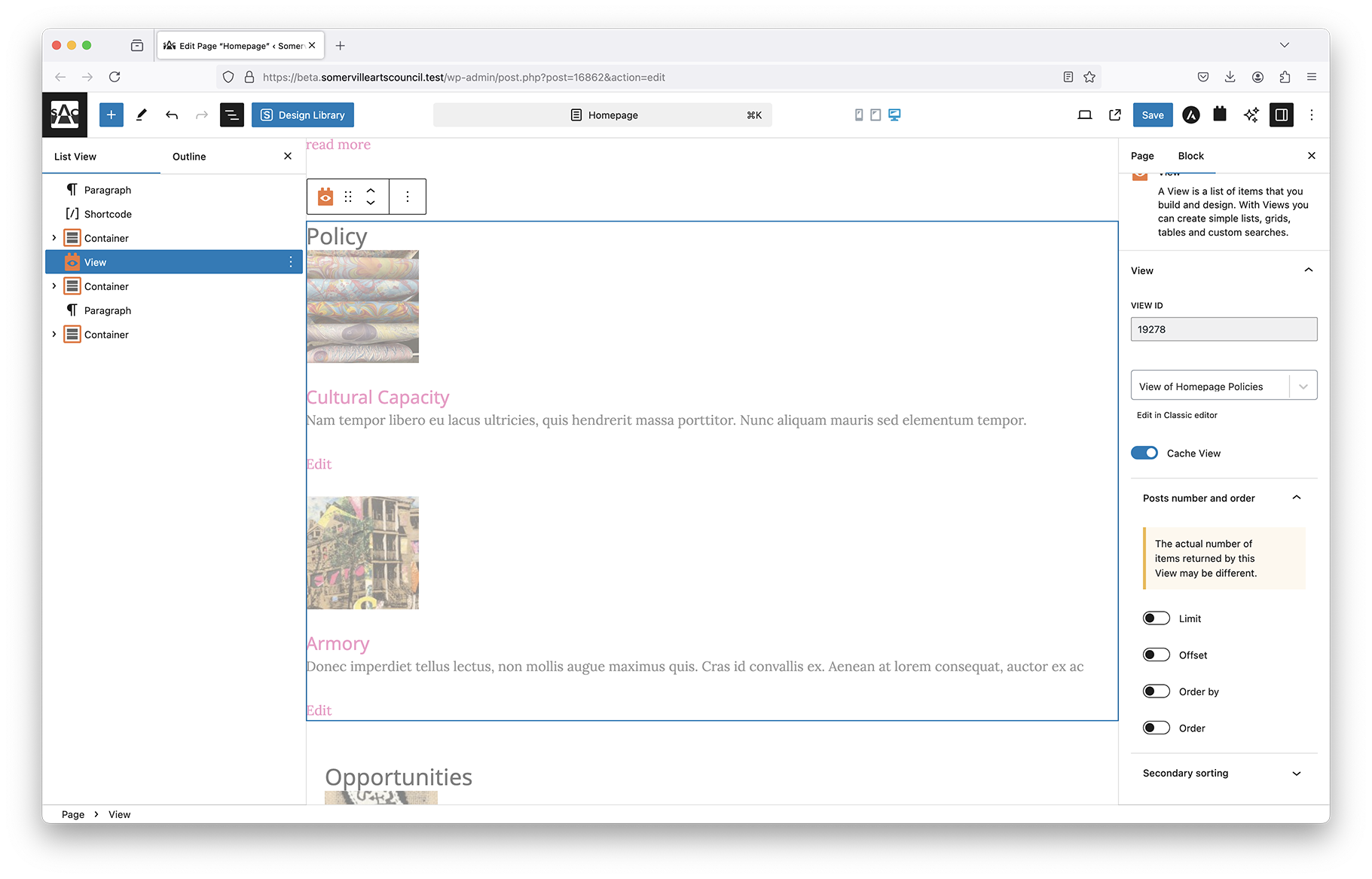
My View block doesn't have the sub-blocks that your screenshot features, nor does it have the metaboxes. I'm attaching a screenshot so you can see my screen.

In the meantime, I'm using the Container block as a means to work around this issue.

Saul

#2763491

Christopher Amirian
Unterstützer

Sprachen: Englisch (English )

Hi,

This is Christopher. I'm here to inform you that Minesh will not be available today. He will answer the question tomorrow.

Maybe in the meantime if you could provide the login information of your website it will help him to check the page in question.

Please provide the login details and the page where the issue should be checked by setting the next reply as private.

I appreciate your patience.

#2765287

Minesh
Unterstützer

Sprachen: Englisch (English )

Zeitzone: Asia/Kolkata (GMT+05:30)

Ok great - I see you must have created the view in legacy mode and then you added the legacy view using the view block.

I see as you used workaround and if that works for you then you're welcome to mark resolve this ticket or please let me know if you still require further assistance.

#2765837

Minesh
Unterstützer

Sprachen: Englisch (English )

Zeitzone: Asia/Kolkata (GMT+05:30)

Unfortunately - the admin access details you shared with us is not working at this end.

Can you please send me working admin access details.

I have set the next reply to private which means only you and I have access to it.

#2769341

Minesh
Unterstützer

Sprachen: Englisch (English )

Zeitzone: Asia/Kolkata (GMT+05:30)

As you can see with your view's "Loop Editor" section, you should add such custom HTML with CSS class that should make the view's output full width.
- versteckter Link

That will require you a bit of work where you will have to add such with with custom CSS class to make the div full-width. The current solution you chose is also fine using container.

Please check the following links that might help you:
- https://stackoverflow.com/questions/61894436/how-to-make-a-div-occupy-full-width
- https://stackoverflow.com/questions/8280716/full-screen-width-div-area
- https://stackoverflow.com/questions/76001971/how-to-make-div-full-width-of-screen

#2769745

Thanks for the links, Minesh! I appreciate it!

Saul