Navigation überspringen

[Gelöst] Remove items from sidebar in admin adding new custom post

Dieser Thread wurde gelöst. Hier ist eine Beschreibung des Problems und der Lösung.

Problem:

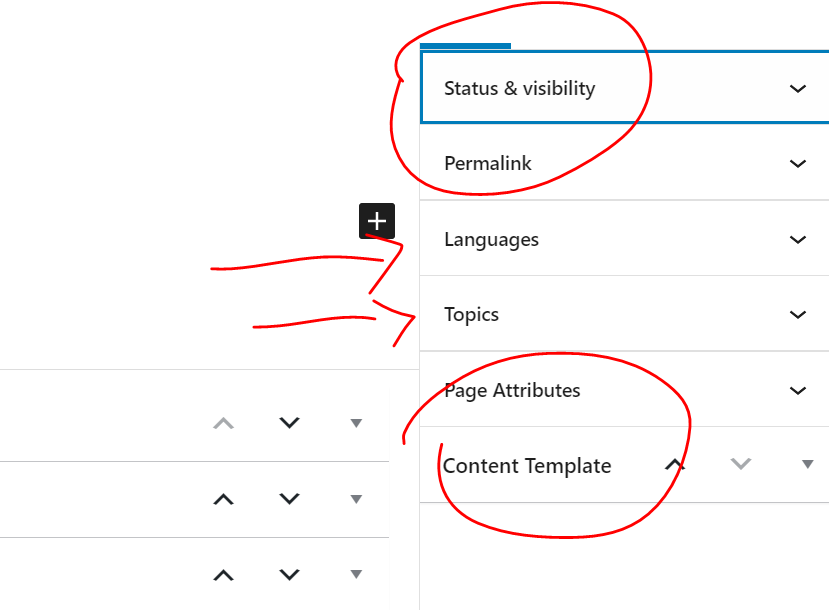
I'm wondering if it's possible to hide the options "Status & Visibility, "Permalink", "Page Attributes", and "Content Template".

Solution:

You can remove "Page Attributes" metabox by these:

Dashboard-> Toolset-> Post types, find and edit your custom post type, in section "Sections to display when editing", disable option:
"Page Attributes"

You can hide all those metaboxes for current logged-in user, by these:

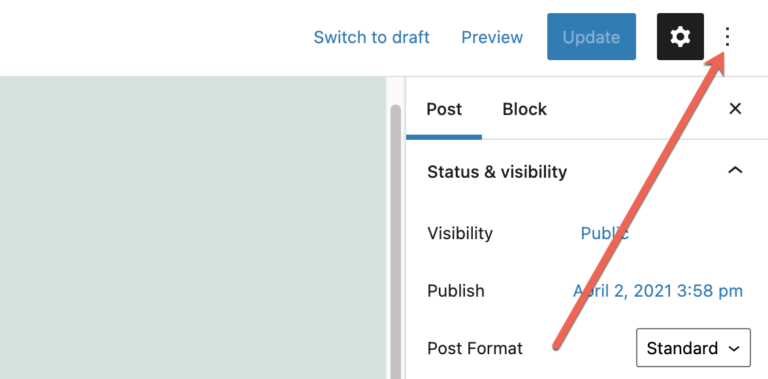
Edit/create a post, click the "Option" button, see screenshot: option.PNG, click "Preferences" link, Click the “Panels” tab, and disable those options.

Relevant Documentation:

This support ticket is created vor 4 years, 5 months. There's a good chance that you are reading advice that it now obsolete.

This is the technical support forum for Toolset - a suite of plugins for developing WordPress sites without writing PHP.

Everyone can read this forum, but only Toolset clients can post in it. Toolset support works 6 days per week, 19 hours per day.

Sun Mon Tue Wed Thu Fri Sat
- 9:00 – 13:00 9:00 – 13:00 9:00 – 13:00 9:00 – 13:00 9:00 – 13:00 -
- 14:00 – 18:00 14:00 – 18:00 14:00 – 18:00 14:00 – 18:00 14:00 – 18:00 -

Zeitzone des Unterstützers: Asia/Hong_Kong (GMT+08:00)

Dieses Thema enthält 5 Antworten, hat 2 Stimmen.

Zuletzt aktualisiert von simchaH vor 4 years, 5 months.

Assistiert von: Luo Yang.

Author
Artikel
#2240737
Capture.PNG

Hi,

I'm wondering if it's possible to hide the options "Status & Visibility, "Permalink", "Page Attributes", and "Content Template".

All I need to display when adding a new post is the taxonomies (in my case Languages & Topics).

Is there a simple way to accomplish this?

Also, now that I'm thinking about it- if there are only taxonomies on the sidebar, is there a way to push them to the center area below the custom fields and have it as a full width page with the taxonomies on bottom?

Thank You!

#2241177
option.png

Hello,

You can remove "Page Attributes" metabox by these:
Dashboard-> Toolset-> Post types, find and edit your custom post type, in section "Sections to display when editing", disable option:
"Page Attributes"

You can hide all those metaboxes for current logged-in user, by these:
Edit/create a post, click the "Option" button, see screenshot: option.PNG, click "Preferences" link, Click the “Panels” tab, and disable those options.

#2241271

Thanks Luo! That was a big help.

And is there a way to move the taxonomy terms off of the sidebar and to below the main custom field area? Or there's no simple solution for that.

Thanks so much

#2243113

Unfortunately, there isn't such kind of feature within Toolset plugins or WordPress core, you should be able to see the same result when edit any post, you can not move the taxonomy terms off of the sidebar and to below the main custom field area, there isn't simple solution for that

#2243115

Unfortunately, there isn't such kind of feature within Toolset plugins or WordPress core, you should be able to see the same result when edit any post, you can not move the taxonomy terms off of the sidebar and to below the main custom field area, there isn't simple solution for that

#2245663

My issue is resolved now - as much as possible. Thank you!