Navigation überspringen

[Gelöst] Remove development site notice on WP dashbaord

This support ticket is created vor 1 year, 5 months. There's a good chance that you are reading advice that it now obsolete.

This is the technical support forum for Toolset - a suite of plugins for developing WordPress sites without writing PHP.

Everyone can read this forum, but only Toolset clients can post in it. Toolset support works 6 days per week, 19 hours per day.

Sun Mon Tue Wed Thu Fri Sat
- 10:00 – 13:00 10:00 – 13:00 10:00 – 13:00 10:00 – 13:00 10:00 – 13:00 -
- 14:00 – 18:00 14:00 – 18:00 14:00 – 18:00 14:00 – 18:00 14:00 – 18:00 -

Zeitzone des Unterstützers: Asia/Kolkata (GMT+05:30)

Dieses Thema enthält 3 Antworten, hat 1 Stimme.

Zuletzt aktualisiert von Minesh vor 1 year, 5 months.

Assistiert von: Minesh.

Author
Artikel
#2790624
Cap.jpg

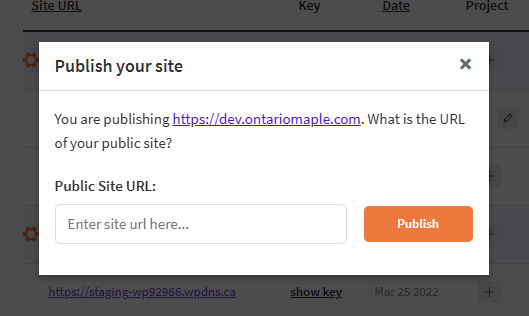
I'm having a senior's moment here. (I am one, LOL.) I created a staging version of versteckter Link at versteckter Link and registered it as a development site. I've now pushed dev to live and I'm getting the 'This site is registered on Toolset.com as a development site' message on the dashboard.

To remove that do I click Publish and then enter the production URL in the Public Site URL box?

#2790673

Minesh
Unterstützer

Sprachen: Englisch (English )

Zeitzone: Asia/Kolkata (GMT+05:30)

Hello. Thank you for contacting the Toolset support.

What if you try to enter your production URL to the "Public Site URL" box and then click on the publish button. Does that helps?

#2790873

Hi, I did that but I'm still seeing the notice. It doesn't seem to affect anything, but I would prefer to remove it.

#2791006

Minesh
Unterstützer

Sprachen: Englisch (English )

Zeitzone: Asia/Kolkata (GMT+05:30)

Ok.

Pleae navigate to "Commercial" tab:
- versteckter Link
- click on the link "Unregister Toolset from this site"
- Click on "Register Toolset" link
- Click on "Get a key for this site"
- copy the site key and past it and Register Toolset.

Does that helps?

More info:
- https://toolset.com/faq/how-to-install-and-register-toolset/#automatic-installation-once-you-have-otgs-installer-plugin-installed