Navigation überspringen

[Gelöst] Question about formatting a front-end filter

Dieser Thread wurde gelöst. Hier ist eine Beschreibung des Problems und der Lösung.

Problem:

I want to create a custom search for the "Service" posts based on the "Audience" taxonomy. The search is functional with radio buttons, but I would prefer to display clickable visual buttons for the options rather than standard radio buttons.

Solution:

Toolset doesn’t provide a PHP filter to alter the radio button HTML directly. However, you can achieve a visual button style using CSS and Javascript to replace standard radio buttons.

Relevant Documentation:

- http://stackoverflow.com/questions/3896156/how-do-i-style-radio-buttons-with-images-laughing-smiley-for-good-sad-smiley
- http://stackoverflow.com/questions/17541614/use-image-instead-of-radio-button
- http://jsfiddle.net/nuwa0me0/

- https://toolset.com/documentation/programmer-reference/views-filters/

This support ticket is created vor 1 year, 7 months. There's a good chance that you are reading advice that it now obsolete.

This is the technical support forum for Toolset - a suite of plugins for developing WordPress sites without writing PHP.

Everyone can read this forum, but only Toolset clients can post in it. Toolset support works 6 days per week, 19 hours per day.

Dieses Thema enthält 3 Antworten, hat 2 Stimmen.

Zuletzt aktualisiert von Christopher Amirian vor 1 year, 7 months.

Assistiert von: Christopher Amirian.
Author
Artikel
#2779396
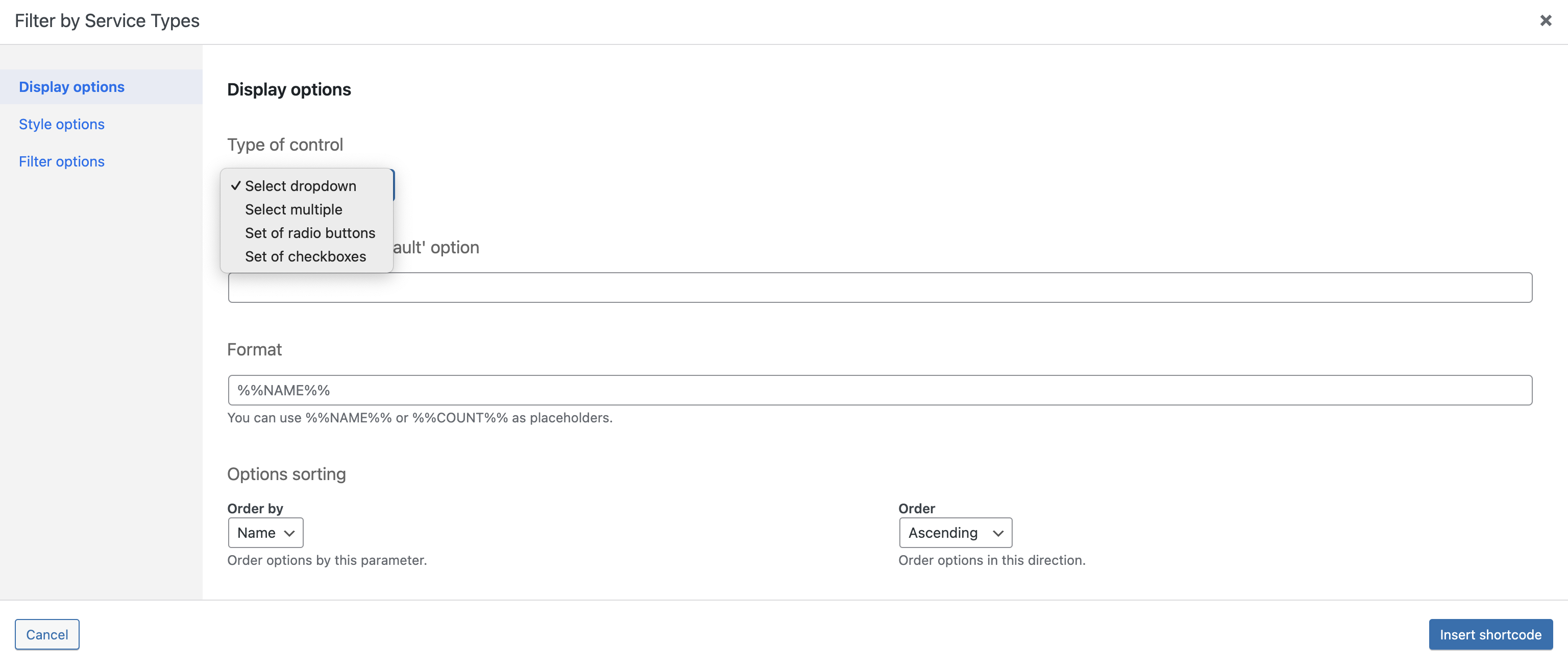
type of control.png
mockup.png

Hi there,

I have a taxonomy, Audience, connected to a custom post type, Service. Audience is either "Individuals" or "Organizations." I want to create a front-end custom search to list all Service posts, posts tagged "Individual," and posts tagged "Organizations," and let the user choose.

I've created the custom search and got the desired functionality working—with radio buttons. Here's my question: the user interface options are a pull-down menu, multi-select, radio button, or checkboxes (please see the attached "type of control.png" for reference). But I want to use the equivalent of visual buttons; please see the attached "mockup.png" for what I'm trying to accomplish.

Is that possible? If so, how?

Thanks.

Saul

#2779554

Christopher Amirian
Unterstützer

Sprachen: Englisch (English )

Hi Saul,

This needs extensive Javascript custom code to hide the original HTML radio buttons and create buttons instead and add proper events so that when the button is clicked the change is transferred to the actual radio button.

It is way outside of our support scope but you can consider hiring a developer to do that for you:

https://toolset.com/contractors/

I did a Google search which you can use as a starting point if you want to do the coding yourself:

versteckter Link

Thanks

#2779677

Hi Christopher,

Thanks for your response.

I found a great tutorial (which doesn't require any JavaScript) here: versteckter Link

What I should have asked is, is there a PHP filter that I can use to alter the output of the radio button HTML?

Saul

#2779990

Christopher Amirian
Unterstützer

Sprachen: Englisch (English )

Hi Saul,

No unfortunately that will require direct manipulation of the core Toolset code which is not recommended.

Here is the available API hooks list if you are interested: (there is no hook for the search radio button)

https://toolset.com/documentation/programmer-reference/views-filters/

I searched more and found the links below that might help you on your journey:

- http://stackoverflow.com/questions/3896156/how-do-i-style-radio-buttons-with-images-laughing-smiley-for-good-sad-smiley
- http://stackoverflow.com/questions/17541614/use-image-instead-of-radio-button
- http://stackoverflow.com/questions/5112995/how-to-replace-replace-radio-buttons-with-images
- versteckter Link

Thanks.

#2779993

Thanks for the links, Christopher! I appreciate it.

Saul