Tell us what you are trying to do?
I have two post types (Journal and People). I want to populate CRED on Journal form with data from People CPT.
Here's the wpv-loop from my custom view display-people-list. Used to display the options in the CRED form
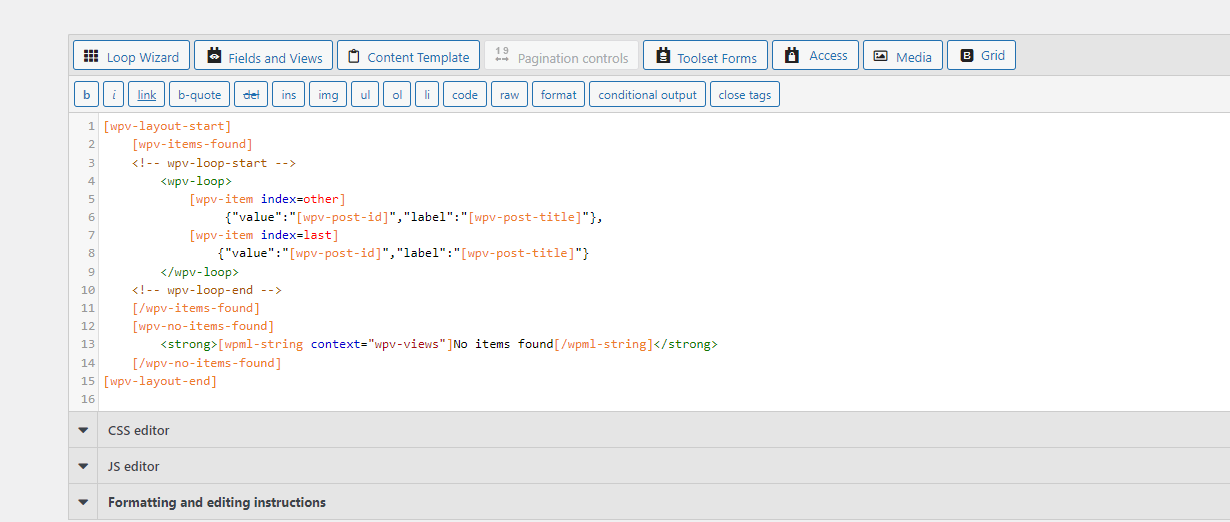
<wpv-loop>
[wpv-item index=1]
{"value":"[wpv-post-id]","label":"[wpv-post-title]"}
[wpv-item index=other] ,{"value":"[wpv-post-id]","label":"[wpv-post-title]"}
</wpv-loop>
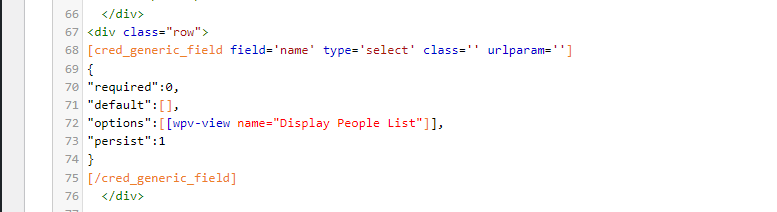
Here's the code for the multiselect field name in my CRED form:
[cred_generic_field type='multiselect' field='name']
{
"required":0,
"default":[],
"options":[[wpv-view name="display-people-list"]],
"persist":1
}
[/cred_generic_field]
It is very temperamental using a View to populate the options of a form generic field, unexpected white space can easily break the process, and I suspect that is what is happening in your case.
I just went through the steps again on my own site to confirm it should be working, which it did.
When you create the View, you must use the Loop Wizard to generate the markup for the output, choosing the List with Separators option. Choose to add any dummy field to the output (e.g. post title).
Then, when the wizard completes, edit the output section to replace the shortcode to output the dummy field with that required to produce the JSON options. In my case the result was the following:
You ran the Loop Wizard rather than copying and pasting the markup I shared?
If so, last thing to check, when you use the Form editor UI to insert the generic field where the options come from a shortcode, there are spaces between the square brackets which are missing according to your screenshot.
I'm not sure if that could be a problem, but it is one more thing to eliminate, i.e.
"options":[ [wpv-view name="Display People List"] ]