Navigation überspringen

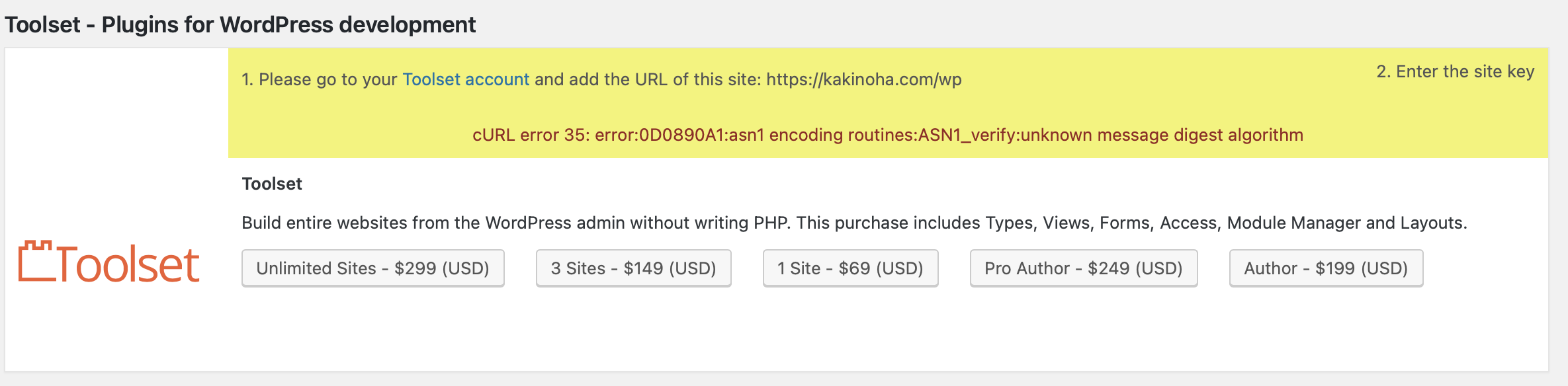
[Closed] I entered a key, but an error occurred. Why is that?

This support ticket is created vor 2 years, 6 months. There's a good chance that you are reading advice that it now obsolete.

This is the technical support forum for Toolset - a suite of plugins for developing WordPress sites without writing PHP.

Everyone can read this forum, but only Toolset clients can post in it. Toolset support works 6 days per week, 19 hours per day.

Sun Mon Tue Wed Thu Fri Sat
- 9:00 – 13:00 9:00 – 13:00 9:00 – 13:00 9:00 – 13:00 9:00 – 13:00 -
- 14:00 – 18:00 14:00 – 18:00 14:00 – 18:00 14:00 – 18:00 14:00 – 18:00 -

Zeitzone des Unterstützers: Asia/Karachi (GMT+05:00)

Dieses Thema enthält 5 Antworten, hat 3 Stimmen.

Zuletzt aktualisiert von Waqar vor 2 years, 6 months.

Assistiert von: Waqar.

Author
Artikel
#2674721
スクリーンショット 2023-12-19 21.49.54.png

I entered a key, but an error occurred. Why is that?

#2674785

Nigel
Unterstützer

Sprachen: Englisch (English ) Spanisch (Español )

Zeitzone: Europe/London (GMT+01:00)

Screenshot 2023-12-19 at 14.31.53.png

Hi there

I don't recognise that error, it is one I've not seen before.

Could you please go to the Installer support page, at yoursite.com/wp-admin/admin.php?page=otgs-installer-support

You can try the Check Now button to check the status, and see if there are errors reported in the log. Please share what you find.

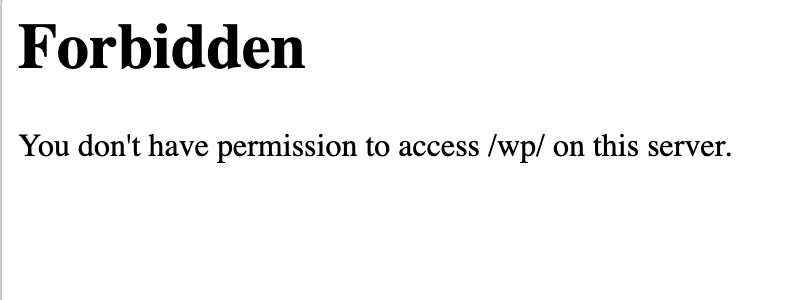
Is it related to the permissions for the URL you are trying to register?

If I try to visit versteckter Link I get the error shown in the screenshot.

Did you try to register the site with the URL versteckter Link ?

#2676454

Hello!,Mr,Nigel.
Thank you for your response!
I apologize for the delayed reply.

I couldn't find page=otgs-installer-support. Probably, as you mentioned, the registered URL might be incorrect. I am planning to change the registered URL to versteckter Link, but could you please tell me where to make this change?
Thank you.

#2676468

Hi,

Thanks for writing back.

To change the URL, please go to the Toolset's site key management page ( https://toolset.com/account/sites/ ) and delete the site key that you have for the URL versteckter Link.

After that, you'll be able to create a new site for the URL versteckter Link.

Note: While generating a new site key, make sure to use the same address that is set in the website's "Site Address" field of your website.
( at WP Admin -> Settings -> General )

Once the new site key has been created, you'll be able to register it on the website, as explained here:
https://toolset.com/faq/how-to-install-and-register-toolset/

regards,
Waqar

#2676570

Hi Mr,waqar.

Thank you so much for your reply.

I tried, but it didn't work.

The registration is at versteckter Link, but the URL displayed on the TOOLSET management page takes me to an undesired page.

versteckter Link

Could it be that the issue is related to the version of WordPress? Or is it a problem with the version of PHP?

I would appreciate it if you could let me know.

regards,
asai

#2676579

Hi Asai,

The link of the page that you shared for the redirection seems correct and expected. What do you see when you visit it? Have you tried visiting the same link in a browser window where you're also logged-in to the website's admin area?

Also, If you could share temporary admin login details of the website, I'll be in a better position to troubleshoot this and suggest the next steps.

Note: Your next reply will be private and making a complete backup copy is recommended before sharing the access details.

regards.
Waqar

The topic ‘[Closed] I entered a key, but an error occurred. Why is that?’ is closed to new replies.