Navigation überspringen

[Gelöst] I can´t clone with the new user

This support ticket is created vor 9 months. There's a good chance that you are reading advice that it now obsolete.

This is the technical support forum for Toolset - a suite of plugins for developing WordPress sites without writing PHP.

Everyone can read this forum, but only Toolset clients can post in it. Toolset support works 6 days per week, 19 hours per day.

Sun Mon Tue Wed Thu Fri Sat
- 10:00 – 13:00 10:00 – 13:00 10:00 – 13:00 10:00 – 13:00 10:00 – 13:00 -
- 14:00 – 18:00 14:00 – 18:00 14:00 – 18:00 14:00 – 18:00 14:00 – 18:00 -

Zeitzone des Unterstützers: Asia/Kolkata (GMT+05:30)

Dieses Thema enthält 7 Antworten, hat 1 Stimme.

Zuletzt aktualisiert von Minesh vor 8 months, 3 weeks.

Assistiert von: Minesh.

Author
Artikel
#2826147

Hi, I have encountered another issue in addition to the previous ticket I opened. I have already created the user for the sections I want (I don't know how to remove wpml and profile, but it's not a big deal).

The problem I have is that in Events (the first taxonomy, the other events that appear below will be deleted), it won't let me duplicate an event that I want to use as a template, and I can't see where to give access in the Access options.

I think the problem comes from the fact that we have the Duplicator plugin, and the clone button may come from there.

If you can help me, I would appreciate it.

#2826214

Minesh
Unterstützer

Sprachen: Englisch (English )

Zeitzone: Asia/Kolkata (GMT+05:30)

Hello. Thank you for contacting the Toolset support.

The duplicate post plugin should be from Yoast. You can use the "dp_duplicate_post" hook from the "Yoast Duplicate Post" plugin:
=> versteckter Link

If you want to duplicate repeating field group items when you duplicate the post:

function my_custom_dp_duplicate_post( $new_post_id, $post ) {
    $parent_post = 'book';
    $rfg_post = 'book-rfg';
    if ( get_post_type( $new_post_id ) == $parent_post ) {
        $rfg_ids = toolset_get_related_posts($post->ID, $rfg_post,'parent',999,0,array(),'post_id','child');
            if(count($rfg_ids) > 0 ) {
                foreach($rfg_ids as $k=>$v):
                    // Copy post metadata
                    $data = get_post_custom($v);
                    $my_post = array(
                        'post_title'    => get_the_title($v),
                        'post_content'  => '',
                        'post_status'   => 'publish',
                        'post_author'   => $post->post_author,
                        'post_type'     => $rfg_post
                    );
                    // Insert the post into the database
                    $insert_post_id = wp_insert_post( $my_post );
                    // connecting RFG item to newly cloned $post_id
                    toolset_connect_posts($rfg_post, $new_post_id, $insert_post_id );
                    foreach ( $data as $key => $values) {
                        foreach ($values as $value) {
                            add_post_meta( $insert_post_id, $key, $value );
                    }
                }
                endforeach;
            }
    }
}
 
add_action( 'dp_duplicate_post', 'my_custom_dp_duplicate_post', 50, 2 );

+
Please change "book" and "book-rfg" with your parent and child/repeating field group post type slugs, respectively.

Note: The custom code examples from our forum are shared to get you started in the right direction.

I hope you can use above example and that will help you to start and explore.

Here are few related tickets that may help you:
- https://toolset.com/forums/topic/duplicate-post-with-relationships/#post-1850911
- https://toolset.com/forums/topic/im-unable-to-duplicate-post-with-its-repeating-field-content-2/#post-1817785
- https://toolset.com/de/forums/topic/wpml-language-duplicate-not-being-created-correctly-100-of-the-time/?paged=2#post-2677721

#2826266
Screenshot 2025-09-23 151432.png

Thanks, now we use the funcionality of Yoast to clone pages.

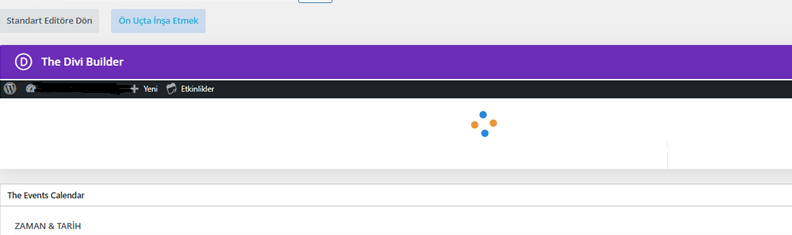
We have implemented your recommendation and it is now working. The issue is that Divi doesn' t load with the custom user we created (it keeps loading), however, it does load with another user with administrator permissions. It gets stuck loading in an infinite loop. Since the Divi blocks are not loading, nothing can be edited.

Thanks

#2826400

Minesh
Unterstützer

Sprachen: Englisch (English )

Zeitzone: Asia/Kolkata (GMT+05:30)

Have you checked with default editor - do you see default editro working?

I'm not sure what should be cloned in order to make divi builder work. You may need to contact the Divi support.

#2826402

The native editor works.

Divi also works with an administrator user, but with the created user (Tr_user) it gets stuck in a loop when trying to load Divi.

#2826406

Minesh
Unterstützer

Sprachen: Englisch (English )

Zeitzone: Asia/Kolkata (GMT+05:30)

Pleae check (Tr_user) role has capability to load divi. I'm not sure - you need to check with Divi support.

#2826422

Okay, I'll discuss it with Divi.

Apart from that, we've noticed an error. When we clone an event, it clones in all languages, not just the language we're in (which is what we need).

Neue Threads, die von Minesh erstellt wurden und mit diesem verbunden sind, sind unten aufgeführt:

https://toolset.com/de/forums/topic/split-i-cant-clone-with-the-new-user-clone-or-duplicate-in-specific-desired-language/

#2826575

Minesh
Unterstützer

Sprachen: Englisch (English )

Zeitzone: Asia/Kolkata (GMT+05:30)

As per our support policy, we entertain only one question per ticket. This will help other users searching on the forum as well as help us to write correct problem resolution summery for the original issue reported with this ticket.

I'll split the ticket this time but please kindly open a new ticket with every new quetion you may have. Thank you for understanding.

Here is a split ticket and we will continue there:
- https://toolset.com/forums/topic/split-i-cant-clone-with-the-new-user-clone-or-duplicate-in-specific-desired-language/

Thank you for your understanding. You're welcome to mark resolve this ticket.