Hi,
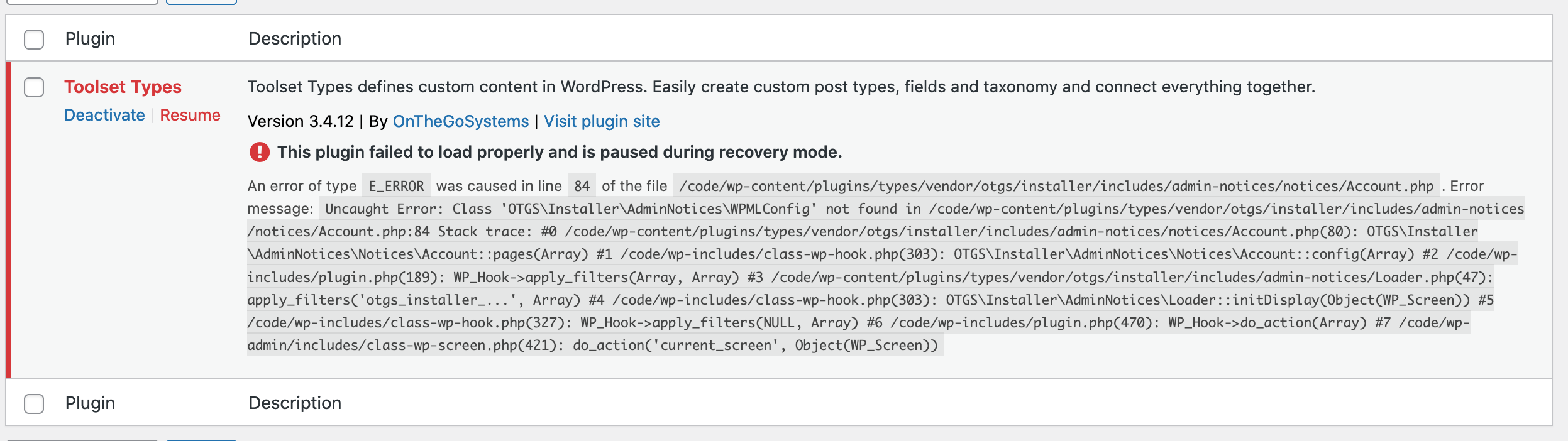
We received a notice from our site this morning that Toolset Types is causing a fatal error on our admin pages. I'm including the error from the email below & a screenshot from the plugin dashboard using recovery mode. I'm unable to access the debug info because the plugin is paused by recovery mode.
WordPress version 5.8.1
Current theme: wwad (version 1.0.4)
Current plugin: Toolset Types (version 3.4.12)
PHP version 7.4.24
Error Details
=============
An error of type E_ERROR was caused in line 84 of the file
/code/wp-content/plugins/types/vendor/otgs/installer/includes/admin-notices/notices/Account.php.
Error message: Uncaught Error: Class
'OTGS\Installer\AdminNotices\WPMLConfig' not found in
/code/wp-content/plugins/types/vendor/otgs/installer/includes/admin-notices/notices/Account.php:84
Stack trace:
#0 /code/wp-content/plugins/types/vendor/otgs/installer/includes/admin-notices/notices/Account.php(80):
OTGS\Installer\AdminNotices\Notices\Account::pages(Array)
#1 /code/wp-includes/class-wp-hook.php(303):
OTGS\Installer\AdminNotices\Notices\Account::config(Array)
#2 /code/wp-includes/plugin.php(189): WP_Hook->apply_filters(Array, Array)
#3 /code/wp-content/plugins/types/vendor/otgs/installer/includes/admin-notices/Loader.php(47):
apply_filters('otgs_installer_...', Array)
#4 /code/wp-includes/class-wp-hook.php(303):
OTGS\Installer\AdminNotices\Loader::initDisplay(Object(WP_Screen))
#5 /code/wp-includes/class-wp-hook.php(327): WP_Hook->apply_filters(NULL, Array)
#6 /code/wp-includes/plugin.php(470): WP_Hook->do_action(Array)
#7 /code/wp-admin/includes/class-wp-screen.php(421):
do_action('current_screen', Object(WP_Screen))
Hi Rachael,
Thank you for getting in touch.
I see that your types plugin is actually outdated. Can you go to Plugins -> Add New and then click the commercial tab and update your Types plugin from this screen.
Once you've done this please let me know if the issue still remains.
Thanks,
Shane
Hi, thanks, but we're still getting the error with 3.4.14.
Hi Rachael,
Would you mind allowing me to have admin access to the website to check on this issue further for you ?
I've enabled the private fields for your next response.
Thanks,
Shane
Hi Rachael,
Whenever I try to log into the site and access the dashboard i'm getting a fatal error.
Can you check on this for me so that I can have a look at the issue with the plugin.
Thanks,
Shane
Hi Shane,
Yes, that's the whole problem! The Toolset plugin is causing the fatal error on the admin dashboard.
If you can give me another private field, I'll give you another admin account to try with.
Hi Rachael,
I will need FTP access as well.
If you can provide this please do as well.
Thanks,
Shane
Hi Rachael,
This limits the amount of debugging that I can do.
Are you able to provide me with a copy of the site ?
https://toolset.com/faq/provide-supporters-copy-site/
This way I can test to see if the issue occurs when the site is moved to a different server environment.
Thanks,
Shane