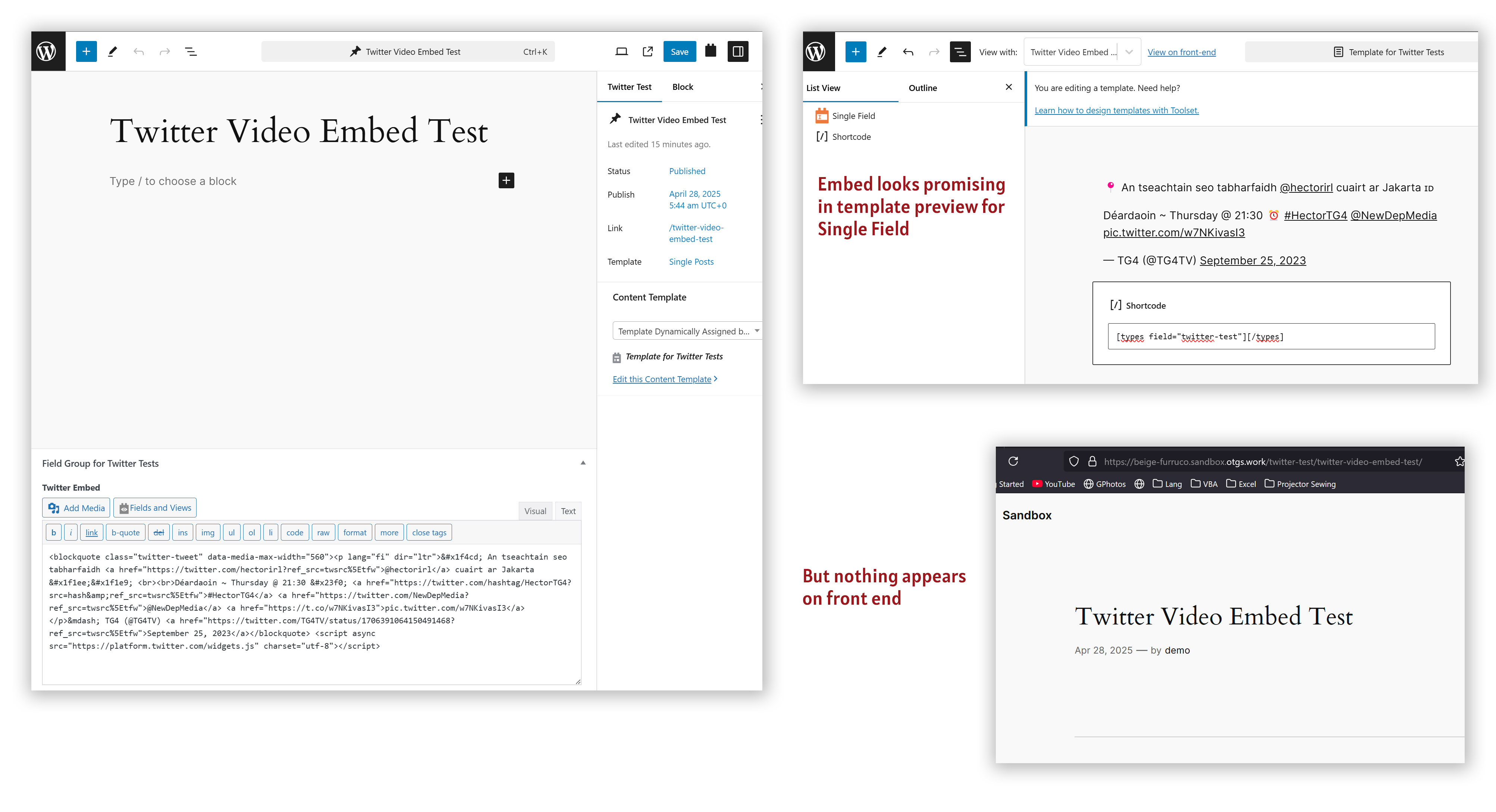
Tell us what you are trying to do?
As in the example below, I've created a WYSIWIG field, then entered embed code in said field on a post. The embed code is for a Twitter/X video and oddly, everytime I paste the code in the field, then update the post, the field reverts to its content prior to the update.
Is there any documentation that you are following?
https://toolset.com/forums/topic/whatt-the-correct-way-to-add-a-snippet-of-code-entered-via-a-toolset-field/#post-2053763
Is there a similar example that we can see?
As a test, I've embedded the X video on regular WP page, without any issue.
versteckter Link
And in the WYSIWIG field of the CPT page where I'm trying to embed the Twitter video, I can embed a YouTube iframe with no trouble. Test result is the second video here:
versteckter Link
Happy to provide login details privately.
Many thanks in advance!
Hi,
Welcome to Toolset support. Would you please use the link below to enter the dashboard of a clean installation of WordPress and Toolset:
versteckter Link
Would you please replicate the issue there so I can report?
Thanks.
Thanks for your speedy reply 🙂
I got farther in the sandbox than I do on my site, but I still get a blank output on the front end.
On my site, I get a failure on the post page, when the embed snippet disappears from the WYSIWIG widget upon update.
In the sandbox, entering text in the WYSIWIG block works fine, and on a content template, a Single Field block previews the proper text from Twitter. (I see the same text I see on my vanilla WP test page before the video loads.) But, alas, that preview doesn't make it to the frontend (even after vigorous cache dumps).
Sandbox Test: versteckter Link
Working example on WP page: versteckter Link
Note I've removed the WYSIWIG field from my site for now, so the link to see a YouTube embed I made in that field has expired.
Hi,
Thank you for your reply. I created a video to show how I fixed the problem:
versteckter Link
The PHP code that I used in the video is:
function enqueue_twitter_widget_script_in_head() {
    wp_enqueue_script(
        'twitter-widgets',
        '<em><u>versteckter Link</u></em>',
        array(),
        null,
        false // 'false' loads it in the <head>, not in the footer
    );
}
add_action('wp_head', 'enqueue_twitter_widget_script_in_head');
You can check how I did that int he Sandbox installation:
versteckter Link
Thank you very much.
Thank you for such a clear and speedy reply Christian!
It's working! versteckter Link
I wondered about that script tag...
Again, many, many thanks!!