Navigation überspringen

[Gelöst] Create a gridview

This support ticket is created vor 3 years, 3 months. There's a good chance that you are reading advice that it now obsolete.

This is the technical support forum for Toolset - a suite of plugins for developing WordPress sites without writing PHP.

Everyone can read this forum, but only Toolset clients can post in it. Toolset support works 6 days per week, 19 hours per day.

Sun Mon Tue Wed Thu Fri Sat
- 9:00 – 13:00 9:00 – 13:00 9:00 – 13:00 9:00 – 13:00 9:00 – 13:00 -
- 14:00 – 18:00 14:00 – 18:00 14:00 – 18:00 14:00 – 18:00 14:00 – 18:00 -

Zeitzone des Unterstützers: Asia/Hong_Kong (GMT+08:00)

Dieses Thema enthält 2 Antworten, hat 2 Stimmen.

Zuletzt aktualisiert von irynaL vor 3 years, 3 months.

Assistiert von: Luo Yang.

Author
Artikel
#2559689
ExcelCalculations.jpg

Dear Sirs,

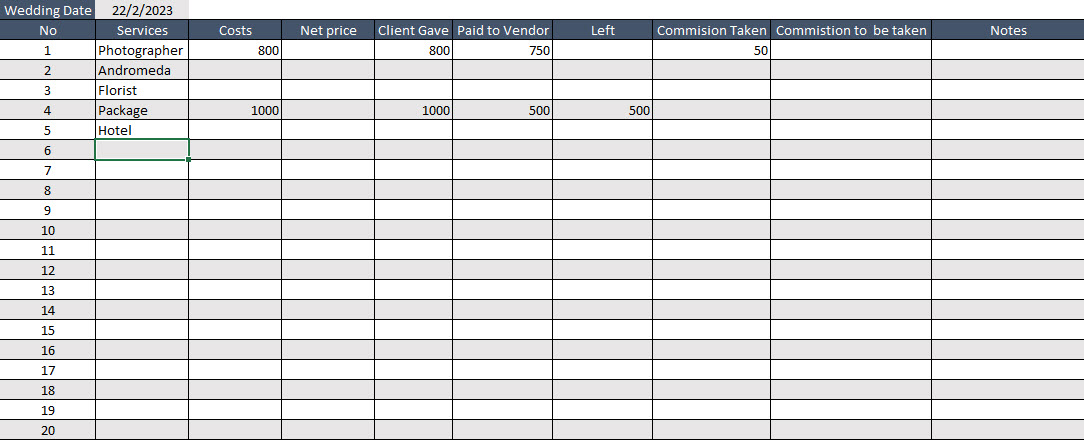
I would like to create a custom post and view that will have the attached screenshot layout.

Please let me know what steps to follow. I have already created some other posts but they weren't like a gridview as this one.
Ideally will be to have a button to add extra lines too.

Thank you so much

#2560573

Hello,

It is possible with table layout. For example, see below test site:
Login URL: versteckter Link

1) Dashboard->Toolset-> Settings-> General:
versteckter Link
in section "Editing experience", enable option: Show both the legacy and Blocks interface and let me choose which to use for each item I build

2) Dashboard-> Toolset-> Views, create a post view:
versteckter Link
- Query your custom posts
- In section "Loop Editor", display view's loop, like this:

...
		<wpv-loop>
          [wpv-item index=odd]
			<tr>
				[wpv-post-body view_template="loop-item-in-create-a-gridview"]
			</tr>
          [wpv-item index=even]
			<tr style="background: gray;">
				[wpv-post-body view_template="loop-item-in-create-a-gridview"]
			</tr>
		</wpv-loop>
...

See the result page:
versteckter Link

#2562133

My issue is resolved now. Thank you!