Navigation überspringen

[Gelöst] Change "no file chosen" text

This support ticket is created vor 1 year, 10 months. There's a good chance that you are reading advice that it now obsolete.

This is the technical support forum for Toolset - a suite of plugins for developing WordPress sites without writing PHP.

Everyone can read this forum, but only Toolset clients can post in it. Toolset support works 6 days per week, 19 hours per day.

Sun Mon Tue Wed Thu Fri Sat
- 10:00 – 13:00 10:00 – 13:00 10:00 – 13:00 10:00 – 13:00 10:00 – 13:00 -
- 14:00 – 18:00 14:00 – 18:00 14:00 – 18:00 14:00 – 18:00 14:00 – 18:00 -

Zeitzone des Unterstützers: Asia/Kolkata (GMT+05:30)

Dieses Thema enthält 1 reply, hat 2 Stimmen.

Zuletzt aktualisiert von Minesh vor 1 year, 10 months.

Assistiert von: Minesh.

Author
Artikel
#2705655
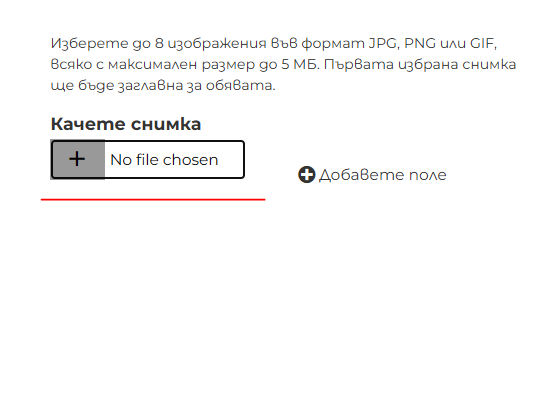
1.PNG

Hi,
I've made a custom form and added image field upload.
I need to change the text of the field, that is currently showing "No file chosen".

Not using WordPress Media Library manager. I've tried placeholder and description, but no luck. I've also tried Translate Press, but it's not locating it as a translatable text.
Link to view - versteckter Link

#2705668

Minesh
Unterstützer

Sprachen: Englisch (English )

Zeitzone: Asia/Kolkata (GMT+05:30)

Hello. Thank you for contacting the Toolset support.

Actually - the input type file captions are managed by the browser you are using.

Each browser has it's own rendition of the control and as such you can't change either the text or the orientation of the control.

Please check the following article:
- versteckter Link
- https://stackoverflow.com/a/16001704
- https://stackoverflow.com/questions/5138719/change-default-text-in-input-type-file

#2705739

I see, so it was not something easy.
When I do that, the repeating field disappears too, so I'll just have to drop that idea off.
Thank you!