I am trying to: We have just updated the PHP version from 7.4 to 8 but after the update, we are not able to access the WordPress dashboard as well as the website. We have checked in the 7.4 PHP version and it is working perfectly but in 8.0 it is not working.
Link to a page where the issue can be seen: versteckter Link
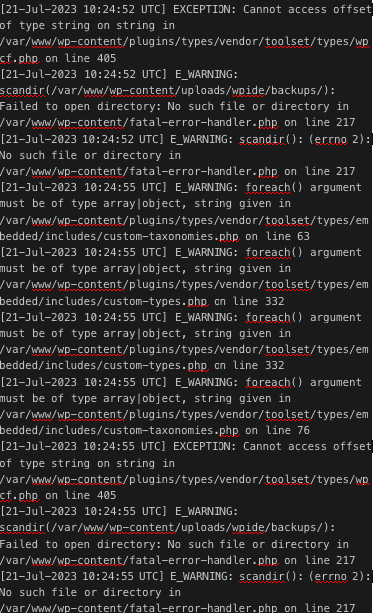
Here I have attached the log file for your reference.
Please check and let me know if you have any questions.
We have set the PHP 8.0 at the movement but still, we are not able to access the admin area.
we are still facing the same issue which I have shared.
====================================================
[25-Jul-2023 06:55:22 UTC] E_WARNING: foreach() argument must be of type array|object, string given in /var/www/html/wp-content/plugins/types/vendor/toolset/types/embedded/includes/custom-taxonomies.php on line 63
[25-Jul-2023 06:55:22 UTC] E_WARNING: foreach() argument must be of type array|object, string given in /var/www/html/wp-content/plugins/types/vendor/toolset/types/embedded/includes/custom-types.php on line 332
[25-Jul-2023 06:55:22 UTC] E_WARNING: foreach() argument must be of type array|object, string given in /var/www/html/wp-content/plugins/types/vendor/toolset/types/embedded/includes/custom-types.php on line 332
[25-Jul-2023 06:55:22 UTC] E_WARNING: foreach() argument must be of type array|object, string given in /var/www/html/wp-content/plugins/types/vendor/toolset/types/embedded/includes/custom-taxonomies.php on line 76
[25-Jul-2023 06:55:22 UTC] EXCEPTION: Cannot access offset of type string on string in /var/www/html/wp-content/plugins/types/vendor/toolset/types/wpcf.php on line 405
[25-Jul-2023 06:55:22 UTC] E_WARNING: scandir(/var/www/html/wp-content/uploads/wpide/backups/): Failed to open directory: No such file or directory in /var/www/html/wp-content/fatal-error-handler.php on line 216
[25-Jul-2023 06:55:22 UTC] E_WARNING: scandir(): (errno 2): No such file or directory in /var/www/html/wp-content/fatal-error-handler.php on line 216
===============================================
May I know what details you want to resolve this issue?
Hello. Thank you for contacting the Toolset support.
Based on information shared by you its still not clear what is the cause of the issue. Can you please make sure the Toolset server requirements are matched:
- https://toolset.com/toolset-requirements/
If server requirements is up-to-date, then I will require admin access details with FTP to check whats going wrong with your setup.
*** Please make a FULL BACKUP of your database and website.***
I would also eventually need to request temporary access (WP-Admin and FTP) to your site. Preferably to a test site where the problem has been replicated if possible in order to be of better help and check if some configurations might need to be changed.
I have set the next reply to private which means only you and I have access to it.
I cant able to load the wp-admin page maybe as you already acknowledge that the site is not loading due to plugin error.
Then I try to use the FTP/SFTP access details you shared but unfortunately its not working at this end. I get the error "Could not connect to server" when I try to login to FTP/SFTP. Do I need to use any specific port to login to FTP/SFTP?
I have set the next reply to private which means only you and I have access to it.
Ok - you are right. When I change the plugin "types-old" to "111-types-old" then I'm able to access the site.
May I ask permission to take your site copy using "Duplicator" plugin that will help me to host your site on local server for further debugging or you can send me the copy of your site:
- https://toolset.com/faq/provide-supporters-copy-site/
I have set the next reply to private which means only you and I have access to it.
Can you please check now I see your site is running now.
The issue was there was malfunction entry with your database for the option key "wpcf-custom-taxonomies" with "options" table.
Please check the following screenshot:
- versteckter Link
I've adjusted the value of that with default taxonomy "Categories" and "Tags". If you have any other custom taxonomy you should add it and it should work now.
Then open the "options" table and search for the option key "wpcf-custom-taxonomies" and update the following given value for this option key:
a:2:{s:8:"category";a:34:{s:4:"name";s:8:"category";s:5:"label";s:10:"Categories";s:6:"labels";a:30:{s:4:"name";s:10:"Categories";s:13:"singular_name";s:8:"Category";s:12:"search_items";s:17:"Search Categories";s:13:"popular_items";N;s:9:"all_items";s:14:"All Categories";s:11:"parent_item";s:15:"Parent Category";s:17:"parent_item_colon";s:16:"Parent Category:";s:22:"name_field_description";s:40:"The name is how it appears on your site.";s:22:"slug_field_description";s:140:"The “slug” is the URL-friendly version of the name. It is usually all lowercase and contains only letters, numbers, and hyphens.";s:24:"parent_field_description";s:114:"Assign a parent term to create a hierarchy. The term Jazz, for example, would be the parent of Bebop and Big Band.";s:22:"desc_field_description";s:78:"The description is not prominent by default; however, some themes may show it.";s:9:"edit_item";s:13:"Edit Category";s:9:"view_item";s:13:"View Category";s:11:"update_item";s:15:"Update Category";s:12:"add_new_item";s:16:"Add New Category";s:13:"new_item_name";s:17:"New Category Name";s:26:"separate_items_with_commas";N;s:19:"add_or_remove_items";N;s:21:"choose_from_most_used";N;s:9:"not_found";s:20:"No categories found.";s:8:"no_terms";s:13:"No categories";s:14:"filter_by_item";s:18:"Filter by category";s:21:"items_list_navigation";s:26:"Categories list navigation";s:10:"items_list";s:15:"Categories list";s:9:"most_used";s:9:"Most Used";s:13:"back_to_items";s:23:"← Go to Categories";s:9:"item_link";s:13:"Category Link";s:21:"item_link_description";s:21:"A link to a category.";s:9:"menu_name";s:10:"Categories";s:14:"name_admin_bar";s:8:"category";}s:11:"description";s:0:"";s:6:"public";b:1;s:18:"publicly_queryable";b:1;s:12:"hierarchical";b:1;s:7:"show_ui";b:1;s:12:"show_in_menu";b:1;s:17:"show_in_nav_menus";b:1;s:13:"show_tagcloud";b:1;s:18:"show_in_quick_edit";b:1;s:17:"show_admin_column";b:1;s:11:"meta_box_cb";s:24:"post_categories_meta_box";s:20:"meta_box_sanitize_cb";s:40:"taxonomy_meta_box_sanitize_cb_checkboxes";s:11:"object_type";a:1:{i:0;s:4:"post";}s:3:"cap";a:4:{s:12:"manage_terms";s:17:"manage_categories";s:10:"edit_terms";s:15:"edit_categories";s:12:"delete_terms";s:17:"delete_categories";s:12:"assign_terms";s:17:"assign_categories";}s:7:"rewrite";a:4:{s:10:"with_front";b:1;s:12:"hierarchical";b:1;s:7:"ep_mask";i:512;s:4:"slug";s:8:"category";}s:9:"query_var";s:13:"category_name";s:21:"update_count_callback";s:0:"";s:12:"show_in_rest";b:1;s:9:"rest_base";s:10:"categories";s:14:"rest_namespace";s:5:"wp/v2";s:21:"rest_controller_class";s:24:"WP_REST_Terms_Controller";s:15:"rest_controller";N;s:12:"default_term";N;s:4:"sort";N;s:4:"args";N;s:8:"_builtin";b:1;s:18:"__accessIsCapValid";b:1;s:19:"__accessIsNameValid";b:1;s:15:"__accessNewCaps";a:4:{s:12:"manage_terms";s:15:"manage_category";s:10:"edit_terms";s:13:"edit_category";s:12:"delete_terms";s:15:"delete_category";s:12:"assign_terms";s:15:"assign_category";}s:4:"slug";s:8:"category";s:8:"supports";a:1:{s:4:"post";i:1;}}s:8:"post_tag";a:34:{s:4:"name";s:8:"post_tag";s:5:"label";s:4:"Tags";s:6:"labels";a:30:{s:4:"name";s:4:"Tags";s:13:"singular_name";s:3:"Tag";s:12:"search_items";s:11:"Search Tags";s:13:"popular_items";s:12:"Popular Tags";s:9:"all_items";s:8:"All Tags";s:11:"parent_item";N;s:17:"parent_item_colon";N;s:22:"name_field_description";s:40:"The name is how it appears on your site.";s:22:"slug_field_description";s:140:"The “slug” is the URL-friendly version of the name. It is usually all lowercase and contains only letters, numbers, and hyphens.";s:24:"parent_field_description";N;s:22:"desc_field_description";s:78:"The description is not prominent by default; however, some themes may show it.";s:9:"edit_item";s:8:"Edit Tag";s:9:"view_item";s:8:"View Tag";s:11:"update_item";s:10:"Update Tag";s:12:"add_new_item";s:11:"Add New Tag";s:13:"new_item_name";s:12:"New Tag Name";s:26:"separate_items_with_commas";s:25:"Separate tags with commas";s:19:"add_or_remove_items";s:18:"Add or remove tags";s:21:"choose_from_most_used";s:30:"Choose from the most used tags";s:9:"not_found";s:14:"No tags found.";s:8:"no_terms";s:7:"No tags";s:14:"filter_by_item";N;s:21:"items_list_navigation";s:20:"Tags list navigation";s:10:"items_list";s:9:"Tags list";s:9:"most_used";s:9:"Most Used";s:13:"back_to_items";s:17:"← Go to Tags";s:9:"item_link";s:8:"Tag Link";s:21:"item_link_description";s:16:"A link to a tag.";s:9:"menu_name";s:4:"Tags";s:14:"name_admin_bar";s:8:"post_tag";}s:11:"description";s:0:"";s:6:"public";b:1;s:18:"publicly_queryable";b:1;s:12:"hierarchical";b:0;s:7:"show_ui";b:1;s:12:"show_in_menu";b:1;s:17:"show_in_nav_menus";b:1;s:13:"show_tagcloud";b:1;s:18:"show_in_quick_edit";b:1;s:17:"show_admin_column";b:1;s:11:"meta_box_cb";s:18:"post_tags_meta_box";s:20:"meta_box_sanitize_cb";s:35:"taxonomy_meta_box_sanitize_cb_input";s:11:"object_type";a:1:{i:0;s:4:"post";}s:3:"cap";a:4:{s:12:"manage_terms";s:16:"manage_post_tags";s:10:"edit_terms";s:14:"edit_post_tags";s:12:"delete_terms";s:16:"delete_post_tags";s:12:"assign_terms";s:16:"assign_post_tags";}s:7:"rewrite";a:4:{s:10:"with_front";b:1;s:12:"hierarchical";b:0;s:7:"ep_mask";i:1024;s:4:"slug";s:3:"tag";}s:9:"query_var";s:3:"tag";s:21:"update_count_callback";s:0:"";s:12:"show_in_rest";b:1;s:9:"rest_base";s:4:"tags";s:14:"rest_namespace";s:5:"wp/v2";s:21:"rest_controller_class";s:24:"WP_REST_Terms_Controller";s:15:"rest_controller";N;s:12:"default_term";N;s:4:"sort";N;s:4:"args";N;s:8:"_builtin";b:1;s:18:"__accessIsCapValid";b:1;s:19:"__accessIsNameValid";b:1;s:15:"__accessNewCaps";a:4:{s:12:"manage_terms";s:15:"manage_post_tag";s:10:"edit_terms";s:13:"edit_post_tag";s:12:"delete_terms";s:15:"delete_post_tag";s:12:"assign_terms";s:15:"assign_post_tag";}s:4:"slug";s:8:"post_tag";s:8:"supports";a:1:{s:4:"post";i:1;}}}
I hope the above information should help you to fix the issue.