michelL
Fils de soutien créés au cours des 30 derniers jours : 0
Sujets de forum favoris
This user has no favorite topics.
Sujets de forum créés
| Status | Topic | Supporter | Voix | Publications | Nouveauté |
|---|---|---|---|---|---|
|
switch the View to Classic Mode
Commencé par : michelL in: Toolset Professional Support |
|
1 | 2 | Il y a 4 months, 1 week | |
|
toolset: Unable to register: Site key not matching
Commencé par : michelL in: Toolset Professional Support |
|
1 | 3 | Il y a 1 year, 2 months | |
|
Show sub category in search bar widget
Commencé par : michelL in: Toolset Professional Support |
|
1 | 10 | Il y a 1 year, 4 months | |
|
toolset: Unable to register: Site key not matching
Commencé par : michelL in: Toolset Professional Support |
|
2 | 6 | Il y a 1 year, 10 months | |
|
displaying-search-results-on-a-different-page
Commencé par : michelL in: Toolset Professional Support |
|
3 | 8 | Il y a 1 year, 11 months | |
|
Combine JavaScript files and defer JavaScript rendering blocking
Commencé par : michelL in: Toolset Professional Support |
|
2 | 3 | Il y a 2 years | |
|
displaying-search-results-on-a-different-page
Commencé par : michelL in: Toolset Professional Support |
|
2 | 8 | Il y a 2 years | |
|
Image elements do not have explicit width and height
Commencé par : michelL in: Toolset Professional Support |
|
2 | 9 | Il y a 2 years | |
|
Full width button
Commencé par : michelL
in: Toolset Professional Support
Problem:
.tb-button__link{
width: 100%;
}
Option 2:
.tb-button[data-toolset-blocks-button="ff923b00a782de616999d8bee8398d8a"] .tb-button__link, .tb-button[data-toolset-blocks-button="c43a52d063fa7692dec80f6313473a50"] .tb-button__link{
width: 100%;
}
Relevant Documentation: |
|
2 | 3 | Il y a 2 years | |
|
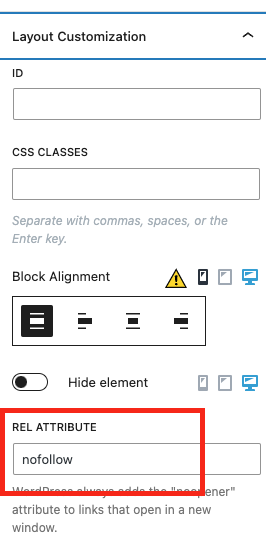
Set button link to a no follow link.
Commencé par : michelL
in: Toolset Professional Support
Problem: I want to set a dynamic link to a "nofollow" link using the Toolset button block. Solution: Go to the WordPress Archive, click on the button you want to modify, and open the "Layout Customization" panel from the right side sidebar. Scroll down to find the option to add a REL attribute, and enter "nofollow" there. This will apply the "nofollow" attribute to the button's link on the front end. |
|
2 | 9 | Il y a 2 years | |
|
Post Type without singlephp and archivephp
Commencé par : michelL in: Toolset Professional Support |
2 | 3 | Il y a 2 years, 1 month | ||
|
Button full width
Commencé par : michelL in: Toolset Professional Support |
|
2 | 2 | Il y a 2 years, 1 month | |
|
Button full width
Commencé par : michelL
in: Toolset Professional Support
Problem: I want to have full-width buttons in the WordPress archive loop, but the buttons' width is not extending on all devices. Solution: Add the following CSS code to your theme: .post-type-archive-product .wp-block-toolset-views-view-template-block .tb-button .tb-button__link {
width: 100%;
}
|
|
2 | 5 | Il y a 2 years, 1 month | |
|
Show product category and sub category
Commencé par : michelL in: Toolset Professional Support |
|
3 | 6 | Il y a 2 years, 2 months | |
|
Button with dynamic URL not working
Commencé par : michelL in: Toolset Professional Support |
|
2 | 7 | Il y a 2 years, 2 months |