Hello,
I've found the following issues
1) Home page do not shows product images enlace oculto enlace oculto but are designed to show them enlace oculto. But they are shown at product page enlace oculto enlace oculto with same design enlace oculto
2) Product title is shown in different lines enlace oculto for two products because categories take two lines at one of them enlace oculto. Do you have a solution like a block that cover the categories field and always keep the block at same size?
3) The way of developing product archive it seems have been changed and I do not find tutorials for this
I built this "WordPress Archive" Template enlace oculto in a temporal site and when I try to create a new Template archive I get this enlace oculto instead. Very hard to design because blocks does not work in the template associated, only a block "Classic" with short code with non-design data enlace oculto
Do you have a way to go back to the previous way?
Anyway also find issues in this new way
- It adds a line enlace oculto at each product cell, I can't see a way to hide it
- When I change page it does not show the first products images enlace oculto, if I refresh the page it shows it enlace oculto
- I don't know how to apply to this page enlace oculto
- I don't know how to design the blocks (add to cart…). I can add them here, but are not shown at frontend enlace oculto
Could you please help?
Thank you
Hello,
I have checked the URLs you mentioned above, all I can see are 403 Forbidden errors.
And the problem you mentioned above is abnormal, please check these:
1) Make sure you have installed below plugins in your website:
- Toolset WooCommerce Blocks
- Toolset Types
- Toolset Blocks
You can download them here:
https://toolset.com/account/downloads/
2) Deactivate other plugins, switch to wordpress default theme 2022, and test again
3) Follow our document to design your Woocommerce shop page:
https://toolset.com/course-lesson/building-a-custom-woocommerce-shop-page/
Design the single product post:
https://toolset.com/course-chapter/templates-for-single-product-pages/
If you need more assistance for it, you can provide a test site, fill below private message box with the test site credentials, I can setup a demo for you.
Your website is using 30 + plugins, I need your permission to deactivate plugins/theme, please backup your website first.
Thank you for note that. I already backup the site
Thanks for the details, I can login into your website, will update here if find anything
Thank you, how could I solve the issues?
Q1) Home page do not shows product images enlace oculto
I have tried these in your website:
1) Deactivate other plugins, switch to wordpress default theme 2022,
2) Test home page again, I can see all images correctly:
enlace oculto
Can you confirm it?
So it should be a conflict of your website, and you can activate other plugins/theme one by one, try to locate the problem plugin/theme
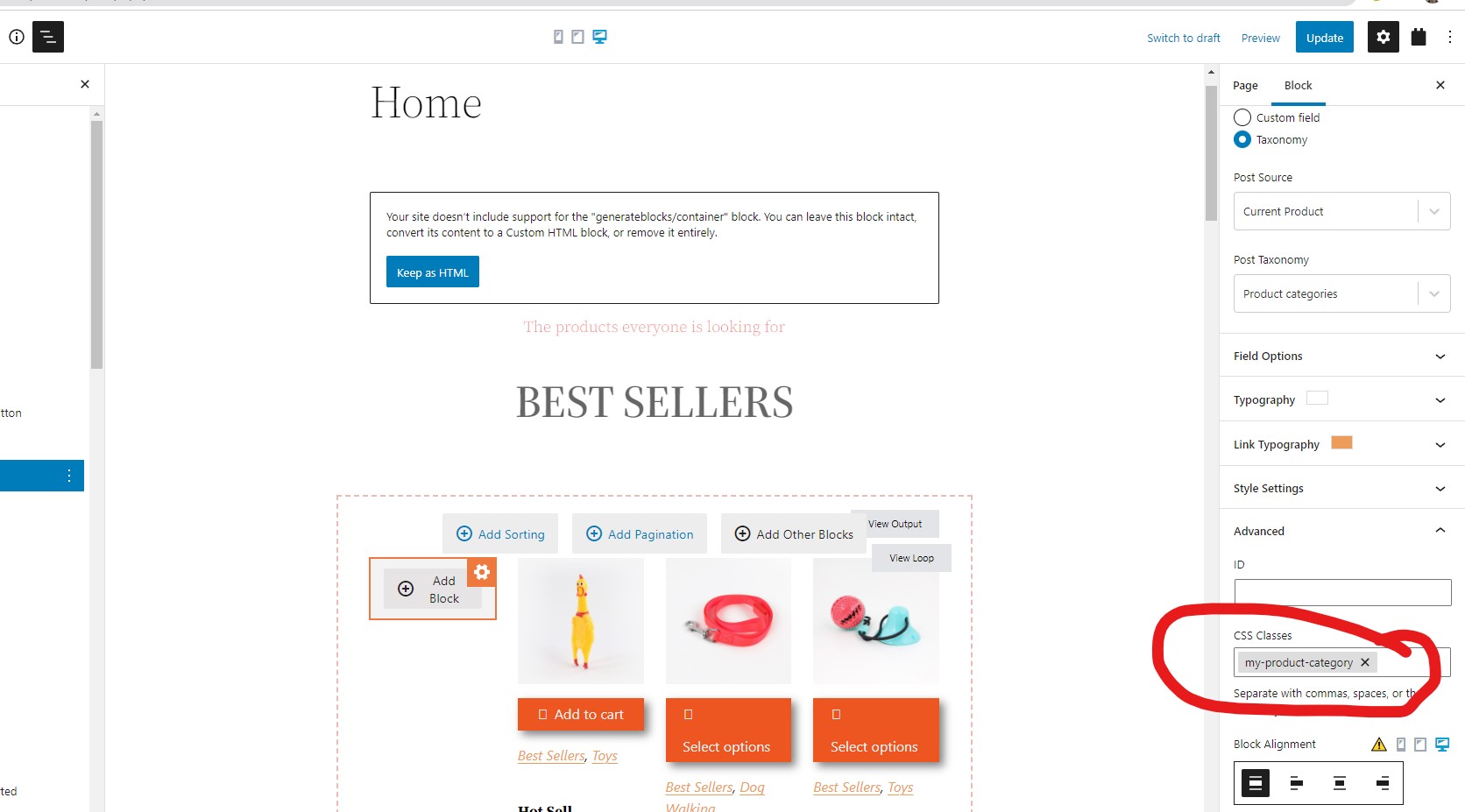
Q2) You can setup CSS codes to style the single field block, for example, find and select the Toolset single field block for "Product category" taxonomy, add a CSS class name "my-product-category", see my screenshot my-product-category.JPG
Then use CSS codes to style it as what you want
More help:
https://toolset.com/course-lesson/adding-custom-css-to-templates-archives-and-views/
Q3) You can follow our document to enable legacy editor:
https://toolset.com/course-lesson/enabling-legacy-version-of-toolset-views/
For example:
1) Dashboard-> Toolset-> Settings-> General:
in section "Editing experience", enable option "Show both the legacy and Blocks interface and let me choose which to use for each item I build"
in section "Editor to use for WordPress Archives", choose option: Classic Editor
2) Then setup the Toolset WordPress again
Hello,
Q1) Thank you, I fixed. I tried deactivating all before but It seems that CDN didn't show me changes so when I deactivated all plugins it shows the issue but it wasn't there. I deactivated CDN so I could find the issue
Q3) the problem is that editing experience is set to Show only the Blocks interface enlace oculto, but archive is created and shown as legacy experience
Could you please help on Q3?
Thanks
Hello,
Thank you
About Q2. I fixed using Heading block inside Toolset Container block with Inner Content-Min-Height set to 50px for two lines and 70 for 3 lines
About Q3, I've deleted the Product archive and created a new one and now it works property. It seems that last fix also fixed this issue. But now the search filters shows uncategorized category at enlace oculto, how could I hide that? enlace oculto
Thank you
Hello,
I also have this question
How could I achieve "search by price: low to high" and "search by price: high to low" like your example? enlace oculto
On my site I can't add price a second time (after adding one time enlace oculto, I do not see price in new option enlace oculto
Thanks
Hello,
It seems that Q2 appears again and it was not fixed
I disabled all plugins enlace oculto and activate default theme enlace oculto
I access home page with no cache enlace oculto and I get un-styled items enlace oculto (No cache plugins, access with incognito chrome and no CDN cache)
But If I access to shop page it applies the styles enlace oculto
Could you please help?
Thanks
I have tried the website credentials you provided above, but can only see below error message:
This has been disabled.
Please check it, make sure your website is ready for test and debug, thanks
Hi, sorry for that, the site is ready again for support, thank you
There are lots of questions in this thread, one can handle them one by one.
Q2) Edit home page
1) find and select "Product category" single field block, add a CSS class name "my-product-category" in it
2) Find and select view block, in panel "Custom JS and CSS", add below CSS codes:
.my-product-category{
min-height: 51px;
}
Test it in frontend:
enlace oculto
it works fine, can you confirm it?
More help:
enlace oculto
Thank you for, that, sure, one by one.
The answer is about min-height but I already answered that this part was fixed with your own block. I provided the following answered
"About Q2. I fixed using Heading block inside Toolset Container block with Inner Content-Min-Height set to 50px for two lines and 70 for 3 lines"
Could you please help in the following question?
Home page do not show styles, should be like product page in orange background while editing enlace oculto or like product page enlace oculto but it shows no styles enlace oculto
I disabled all plugins enlace oculto and activate default theme enlace oculto
I access home page with no cache enlace oculto and I get un-styled items enlace oculto (No cache plugins, access with incognito chrome and no CDN cache)
But If I access to shop page it applies the styles enlace oculto
Could you please help?