Saltar navegación

[Resuelto] WYSIWYG content missing on all pages using content template

This support ticket is created 4 years, 8 months ago. There's a good chance that you are reading advice that it now obsolete.

This is the technical support forum for Toolset - a suite of plugins for developing WordPress sites without writing PHP.

Everyone can read this forum, but only Toolset clients can post in it. Toolset support works 6 days per week, 19 hours per day.

Sun Mon Tue Wed Thu Fri Sat
- 9:00 – 13:00 9:00 – 13:00 9:00 – 13:00 9:00 – 13:00 9:00 – 13:00 -
- 14:00 – 18:00 14:00 – 18:00 14:00 – 18:00 14:00 – 18:00 14:00 – 18:00 -

Zona horaria del colaborador: Asia/Hong_Kong (GMT+08:00)

Este tema contiene 2 respuestas, tiene 2 mensajes.

Última actualización por jonP-4 4 years, 8 months ago.

Asistido por: Luo Yang.

Autor
Mensajes
#2182445

I am trying to: display text content from a WYSIWYG custom field in a content template using Kadence Blocks

Link to a page where the issue can be seen: enlace oculto

I expected to see: text content displayed in the description field

Instead, I got: no text content displayed

Loom video of issue: enlace oculto

#2182587
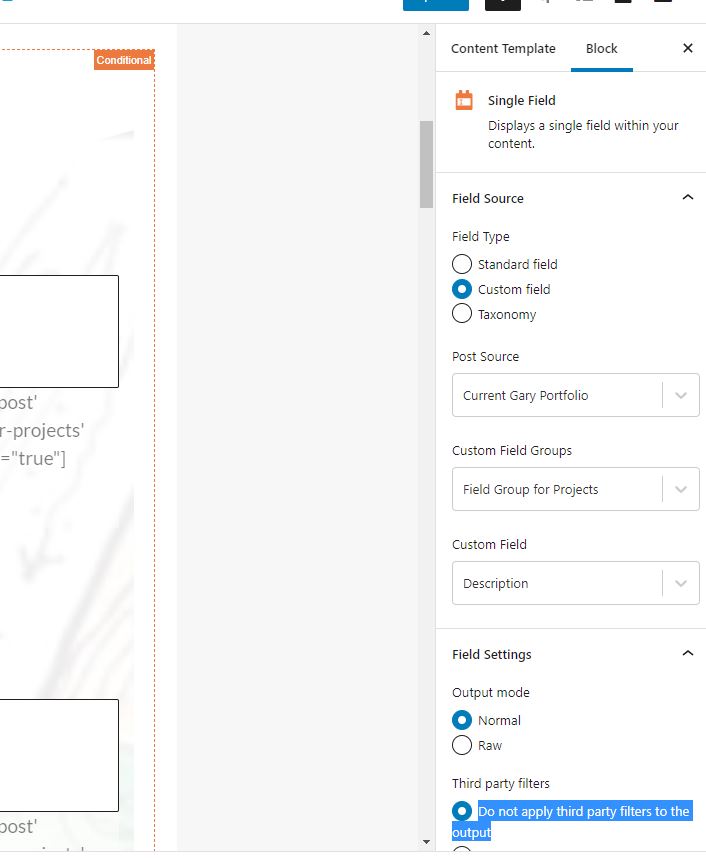
third-party-filters.JPG

Hello,

I have tried these in your website:
1) Edit the content template "Template for Portfolio Single":
enlace oculto
Just below "Story", add a Toolset Single field block, choose the Custom field "Description", enable option "Do not apply third party filters to the output", see my screenshot third-party-filters.JPG

2) Clear the "WP Rocket" caches, test it in frontend:
enlace oculto
I can see it works fine, please check it if it is fixed, thanks

More help:
https://toolset.com/documentation/customizing-sites-using-php/functions/#wysiwyg

suppress_filters:
'true' | 'false' (default)
If suppress_filters=’true’, all third party (non WordPress) filters hooked into the_content filter will be removed, when retrieving the WYSIWYG content.

#2185519

My issue is resolved now. Thank you!